Why Small Tweaks in Selenium Python Lead to Big Gains
Every tester wants scripts that run fast, break less, and deliver accurate results. Yet many automation teams fail because they rely on basic commands without optimizing how they write and manage their tests. This is where the right Selenium Python Tips can transform your entire workflow.
Python is already known for clean code and fast development. When you combine Python with Selenium, you get one of the most powerful automation stacks used by global companies today. A report by Gartner noted that over 65% of QA teams now automate web testing, and Python remains a favorite for its simplicity and readability.
If you want to grow in automation, master real-world practices, and build job-ready skills, you should explore advanced strategies. You can learn these skills through a Selenium certification course or a structured Selenium course online. This blog covers the most practical, industry-relevant tips you will need to write efficient Selenium Python scripts.
Understanding the Power of Python in Selenium Automation
Python plays a key role in modern QA teams because it saves time and reduces coding effort. Selenium supports many languages, but many testers choose Python because it is simple and expressive. The combination allows testers to:

- Write cleaner automation code
- Reduce script development time
- Manage test data easily
- Handle dynamic elements
- Integrate with CI/CD tools
Most companies look for testers who know both Selenium and Python. This makes Selenium Python Tips essential for anyone who wants to speed up automation workflows.
Tip 1: Use WebDriver Waits Instead of Sleep
Many beginners make the mistake of using time.sleep(). This makes test execution slow and unstable. The best practice is to use explicit waits and implicit waits.
Why This Matters
Modern web applications load content in parts, and this creates timing issues for automation. If your script tries to interact with an element before it appears, your test will fail. One of the most important Selenium Python Tips is to avoid fixed delays and use smart waits instead. WebDriverWait solves this problem by checking elements dynamically, making your tests faster and more reliable. When you follow these Selenium Python Tips, you prevent flaky behavior and create stronger, more stable automation scripts.
Code Example: Explicit Wait
from selenium.webdriver.common.by import By
from selenium.webdriver.support.ui import WebDriverWait
from selenium.webdriver.support import expected_conditions as EC

wait = WebDriverWait(driver, 10)
element = wait.until(EC.visibility_of_element_located((By.ID, "username")))
element.send_keys("admin")
Selenium Python Tips Applied
This tip helps you avoid flaky tests, improve speed, and reduce failures.
Tip 2: Optimize Your Locators for Better Performance
Good locators make tests run faster. Poor locators cause failures. Testers should avoid unstable attributes like:
- Dynamic IDs
- Auto-generated class names
- Long XPaths
Best Practices Based on Selenium Python Tips
- Prefer ID over other selectors.
- Use CSS selectors for clean locator structure.
- Use XPath only when needed.
- Avoid indexing in XPath.
Example of a Clean CSS Selector
button = driver.find_element(By.CSS_SELECTOR, "button.login-btn")
button.click()
Clean locators help you write scripts that can survive UI changes.
Tip 3: Use Page Object Model (POM) for Scalable Automation
Page Object Model is one of the most important frameworks in test automation. It helps large teams automate tests in an organized way.
Why POM Makes a Difference
According to QA Touch research, teams who use POM reduce script maintenance time by 40%.
Basic POM Structure
project/
│
├── pages/
│    ├── login_page.py
│    └── dashboard_page.py
│
├── tests/
│    └── test_login.py
│
└── utilities/
Example: login_page.py
class LoginPage:
    def __init__(self, driver):
        self.driver = driver
        self.username_id = "username"
        self.password_id = "password"
        self.login_btn = "loginBtn"

    def login(self, username, password):
        self.driver.find_element(By.ID, self.username_id).send_keys(username)
        self.driver.find_element(By.ID, self.password_id).send_keys(password)
        self.driver.find_element(By.ID, self.login_btn).click()
This structure supports scalability and clarity. A good Selenium certification course will teach you how to design advanced POM frameworks.
Tip 4: Use Python’s Built-In Logging Instead of Print Statements
Print statements look unprofessional and are not useful for debugging. Logging gives you clear status messages in every test run.
Example
import logging

logging.basicConfig(level=logging.INFO)
logging.info("Test execution started...")
Logs help teams spot issues during CI/CD runs and improve reporting accuracy.
Tip 5: Use Fixtures with pytest for Clean Test Setup
Most testers use pytest because it is simple and powerful. Fixtures help you manage browser setup and teardown.

Example: conftest.py
import pytest
from selenium import webdriver

@pytest.fixture()
def driver():
    driver = webdriver.Chrome()
    driver.maximize_window()
    yield driver
    driver.quit()
Example Test
def test_title(driver):
    driver.get("https://h2kinfosys.com")
    assert "H2K" in driver.title
This reduces duplicate code and improves test structure. These are essential Selenium Python Tips for efficient automation.
Tip 6: Use Headless Browsers to Speed Up Execution
Headless mode allows tests to run without opening the UI. This saves time on local machines and CI pipelines.
Example
from selenium.webdriver.chrome.options import Options

options = Options()
options.headless = True
driver = webdriver.Chrome(options=options)
Teams that use headless mode report faster pipelines and better test coverage.
Tip 7: Use Virtual Environments for Dependency Control
Each project should have its own environment. This prevents module conflicts.
Steps
python -m venv venv
source venv/bin/activate
pip install selenium
This keeps your automation workspace clean.
Tip 8: Use Data-Driven Testing for Realistic Automation
Real applications require multiple test inputs. Use data files like:
- CSV
- Excel
- JSON
- SQL databases
Example: Reading CSV Data
import csv

with open("data.csv", "r") as file:
    reader = csv.reader(file)
    for row in reader:
        print(row)
This makes your tests more powerful and flexible.
Tip 9: Use Advanced Python Features to Simplify Scripts
Python has powerful features that many testers overlook, even though these features reduce code and make scripts easier to read. When you apply the right Selenium Python Tips, you can simplify logic, speed up your workflow, and write cleaner automation. Tools like list comprehensions, lambda functions, and dictionary unpacking help you handle data and UI actions with less code.
These abilities become even stronger when combined with practical Selenium Python Tips, allowing you to create scripts that run faster, stay stable, and fit well into any modern automation framework.
Useful Concepts
- List comprehensions
- Lambda functions
- Dictionary unpacking
- Try-except handling
- Enum for locator types
Example: Simple Try-Except Block
try:
    driver.find_element(By.ID, "submit").click()
except:
    print("Submit button not found")
These small improvements make your tests clean and reliable.
Tip 10: Capture Screenshots Automatically on Test Failure
This is important for debugging. Screenshots help you see the state of the application when the test fails.
Example
def capture_screenshot(driver, name):
    driver.save_screenshot(f"{name}.png")
Most companies require this in test reporting.
Tip 11: Use Browser DevTools for Better Debugging
Modern Selenium supports Chrome DevTools Protocol (CDP). CDP helps you:
- Capture network logs
- Monitor performance
- Block requests
- Simulate geolocation
Example: Capture Network Logs
driver.execute_cdp_cmd("Network.enable", {})
These features help you test real-world user flows.
Tip 12: Combine Selenium with CI/CD Pipelines
Teams prefer continuous testing. Selenium integrates well with tools like:
- Jenkins
- GitHub Actions
- Azure DevOps
- GitLab CI
CI/CD improves automation maturity. A strong Selenium course online teaches you this integration.
Tip 13: Use Parallel Execution to Speed Up Large Suites
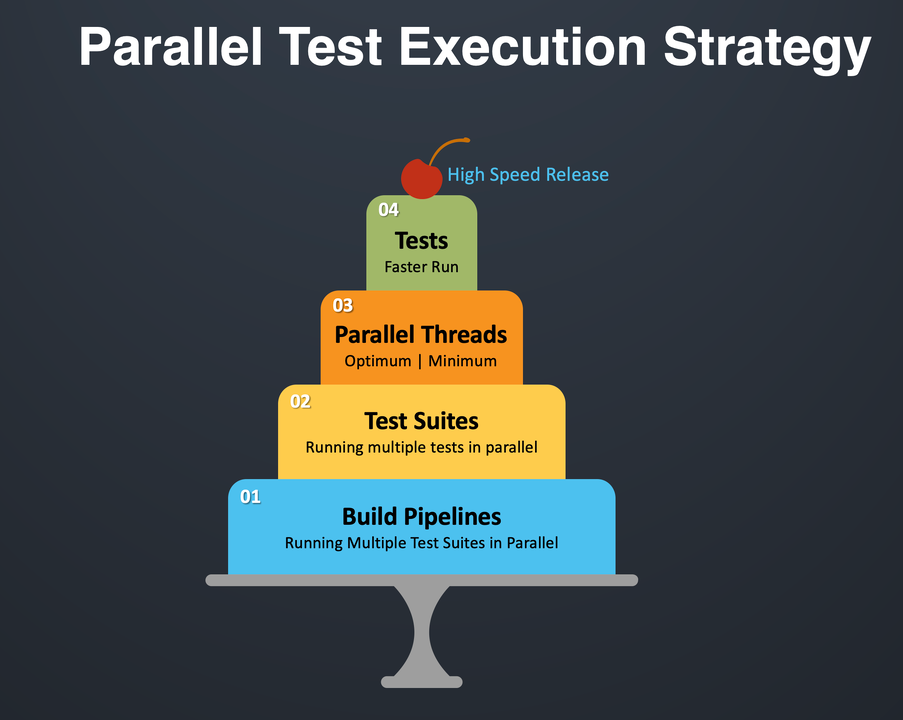
Large test suites take time. Parallel execution cuts this time drastically.
pytest Example
pytest -n 4
This runs tests across multiple threads.
Tip 14: Add Smart Assertions for More Reliable Tests
Assertions help you check application behavior. Avoid using only equal checks.
Examples
- Check text
- Check element state
- Check URL
- Check visibility
assert driver.current_url == "https://example.com/home"
Tip 15: Maintain a Clean Project Folder Structure
Teams often struggle because their project folder is messy. Use a clean structure:
project/
│
├── tests/
├── pages/
├── reports/
├── utils/
└── config/
A clean structure helps you scale your framework and collaborate with others.
Conclusion
These Selenium Python Tips help you write faster, more stable, and more effective automation scripts. Use them to enhance your skills and grow in your QA career.
Upgrade your career today. Enroll in H2K Infosys’ Selenium certification course or join a Selenium course online for real hands-on training and expert guidance.