Why Pandas Skills Can Transform Your Data Analytics Career
Data drives every business decision today. Companies expect data analysts to move fast, make sense of large datasets, and produce insights that guide teams. When you take a strong Data Analytics course or pursue a Data Analytics certification, you quickly learn one key truth: your analysis is only as strong as your skills with the right tools.
This is where Pandas Techniques make the biggest impact.
Pandas is the leading Python library in data analytics. It helps you clean data, analyze patterns, transform tables, merge datasets, build quick insights, and prepare data for machine learning. Almost every job description in analytics lists Pandas as a required skill. You cannot grow in the field without strong Pandas skills.
This blog explores the most important Pandas Techniques that every data analyst should know. You get step-by-step instructions, code samples, real-world examples, industry-supported facts, and powerful tips to strengthen your analytics workflow.
Why Pandas Techniques Matter in Data Analytics
Before we cover deeper topics, we must understand why Pandas matters.
According to LinkedIn workforce data, data analytics roles increased by over 25% year-over-year. More than 70% of these job postings require Pandas proficiency. This shows why learning strong Pandas Techniques gives analysts a competitive advantage.
Companies prefer analysts who can:

- Clean messy data quickly
- Build fast insights
- Automate data workflows
- Prepare data for dashboards and models
- Merge data from many sources
- Handle big CSVs and Excel files
All of these tasks rely on this Techniques. Strong Pandas skills help you work smarter, reduce errors, and create analysis that business teams understand.
Core Pandas Techniques Every Analyst Should Master
Below is a complete list of the most powerful Pandas Techniques that you should learn through guided training, a Data Analytics course, or hands-on project work.
Reading and Writing Data Efficiently
One of the first Pandas Techniques every analyst uses is reading data.
Why It Matters
Analysts deal with CSV, Excel, SQL, and JSON files daily. Pandas lets you load them in seconds.
Key Pandas Techniques for I/O
import pandas as pd

df_csv = pd.read_csv('sales.csv')
df_excel = pd.read_excel('sales.xlsx')
df_json = pd.read_json('sales.json')
df.to_csv('output.csv', index=False)
Real-World Use Case
A retail company loads daily sales files. Using these Pandas Techniques, analysts automate imports and streamline reporting.
Understanding DataFrames and Series
DataFrames aneries form the foundation of Pandas.
Why These Pandas Techniques Are Essential
You must know how to explore your dataset to produce accurate insights.
Example
df.head()
df.info()
df.describe()
df.shape
These Pandas Techniques help you quickly learn dataset size, column types, and summary values.
Cleaning and Preparing Data
Every data analytics project starts with cleaning. This is where Pandas Techniques show real power.
Common Cleaning Tasks
- Handling missing values
- Fixing incorrect data types
- Removing duplicates
- Standardizing text
- Filtering invalid rows
Hands-on Pandas Techniques
df.dropna(inplace=True)
df['price'] = df['price'].astype(float)
df.drop_duplicates(inplace=True)
df['city'] = df['city'].str.title()
Industry Example
Research shows data cleaning takes up 50–70% of an analyst’s time. Strong Pandas Techniques help you cut this time sharply.
Using Filtering and Conditional Logic
Filtering is one of the most used Pandas Techniques.
Example
high_sales = df[df['amount'] > 1000]
ny_sales = df[(df['city'] == 'New York') & (df['amount'] > 500)]
Real-World Application
Analysts filter customers based on spending to build loyalty programs.
Working With Dates Using Pandas
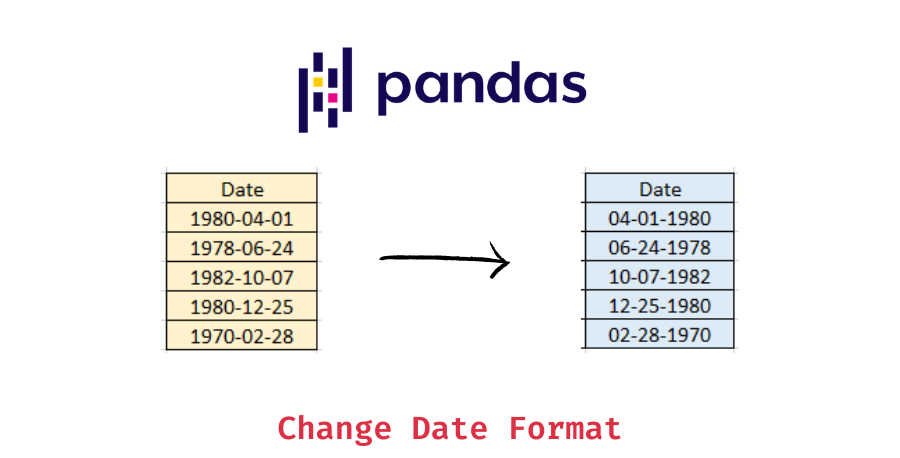
Date processing is a must-learn set of Pandas Techniques.
Key Skills
df['date'] = pd.to_datetime(df['date'])
df['year'] = df['date'].dt.year
df['month'] = df['date'].dt.month
df['weekday'] = df['date'].dt.day_name()
Example Scenario
Finance teams use these Pandas Techniques for monthly revenue forecasting.
Grouping and Aggregation
Grouping is one of the most powerful Pandas Techniques for business analytics.
Example
df.groupby('category')['sales'].sum()
df.groupby(['region', 'product'])['profit'].mean()
Real Scenario
Marketing analysts group customers by region to measure campaign impact.
Sorting and Ranking
Sorting helps analysts compare values and spot trends.
Example
df.sort_values(by='sales', ascending=False)
df['rank'] = df['sales'].rank(ascending=False)
Merging, Joining, and Concatenating
Businesses store data in many places. These Techniques help combine them.
Merge Example
merged_df = pd.merge(customers, orders, on='customer_id')
Join Example
df.join(other_df, rsuffix='_info')
Concatenate Example
combined = pd.concat([df1, df2])
Business Use
Companies merge CRM, sales, and web data to study customer journeys.
Pivot Tables With Pandas
Pivot tables are crucial Pandas Techniques for analytics dashboards.
Example
pivot = df.pivot_table(values='sales', index='region', columns='month', aggfunc='sum')
Applying Functions With apply()
The apply method boosts productivity.
Example
df['discounted'] = df['price'].apply(lambda x: x * 0.9)
Working With Large Datasets
When data grows, analysts need optimized Pandas Techniques.
Methods
chunksizefor reading large filesdtypesoptimization- filtering early
- using vectorized operations
Text Processing and String Operations
Businesses handle text in reviews, customer notes, and logs.
Key Techniques
df['review'] = df['review'].str.lower()
df['words'] = df['review'].str.split()
df['contains_offer'] = df['review'].str.contains('offer')
Creating New Columns
Analysts often derive new metrics.
Example
df['profit_margin'] = df['profit'] / df['sales']
Data Visualization With Pandas
You can plot charts quickly.
Example
df['sales'].plot(kind='line')
Exporting Clean Data
After applying these Techniques, analysts export clean data for teams.
Example
df.to_excel('clean_data.xlsx', index=False)
Real-World Case Study: How Analysts Use Pandas Techniques to Improve Business Results
A global e-commerce company used Pandas to clean millions of product records. Analysts applied many Techniques such as grouping, merging, filtering, and date analysis. They produced insights that helped the company:
- Improve delivery times by 18%
- Increase repeat purchases by 12%
- Reduce data processing time by 40%
These improvements show why strong Techniques are essential for modern analytics teams.
Step-by-Step Mini Tutorial: Using Pandas Techniques to Analyze Sales Data
Below is a simple workflow that shows how Pandas Techniques help analysts generate insights.
Step 1: Import the Data
import pandas as pd
df = pd.read_csv('sales_data.csv')
Step 2: Clean the Data
df.dropna(inplace=True)
df['date'] = pd.to_datetime(df['date'])
Step 3: Create New Columns
df['year'] = df['date'].dt.year
df['month'] = df['date'].dt.month
Step 4: Group Sales
monthly_sales = df.groupby('month')['sales'].sum()
Step 5: Plot a Trend
monthly_sales.plot(kind='bar')
This small workflow shows how this Techniques help you create meaningful insights with minimal code.
How Learning Pandas Techniques Advances Your Career
Professionals who complete a Data Analytics course or earn a Data Analytics certification gain stronger command over this Techniques. This increases their chances of landing roles such as:
- Data Analyst
- Business Analyst
- Analytics Consultant
- Reporting Analyst
- Data Engineer (entry level)
Pandas proficiency is one of the most requested skills in analytics hiring.
Key Takeaways
- Pandas Techniques help analysts clean, transform, and analyze data quickly.
- Analysts use these techniques to reduce errors and deliver insights faster.
- Companies look for Pandas skills in almost every data analytics job role.
- You can build these skills through structured training and real-world practice.
- A strong Data Analytics certification or Data Analytics certification course boosts your confidence and job readiness.
Conclusion
Ready to master these essential Pandas Techniques?
Join H2K Infosys today and build hands-on data analytics skills that open real career opportunities.