Distributed execution plays a major role in modern automated testing because teams need reliable ways to run large suites at scale without slowing down their own machines. Tricentis Tosca Distributed Execution allows you to execute automated tests across multiple machines, monitor results centrally, and improve testing speed and stability. This guide explains how to configure the server, create repositories, set up the workspace, launch agents, and monitor execution. Every step aligns with concepts taught in TOSCA Certification, TOSCA Training, and the TOSCA Automation Course to help learners build hands-on confidence.
Before starting, review the official notes and documentation links below, especially because the legacy Tosca DEX component is approaching end-of-life.
NOTE: Tosca DEX to end of life
https://support-hub.tricentis.com/open?number=NEW0001523&id=post

https://documentation.tricentis.com/tosca/2420/en/content/distributed_execution/distributed_execution_overview.htm
https://documentation.tricentis.com/tosca/2320/en/content/distributed_execution/setup_with_aos_https.htm
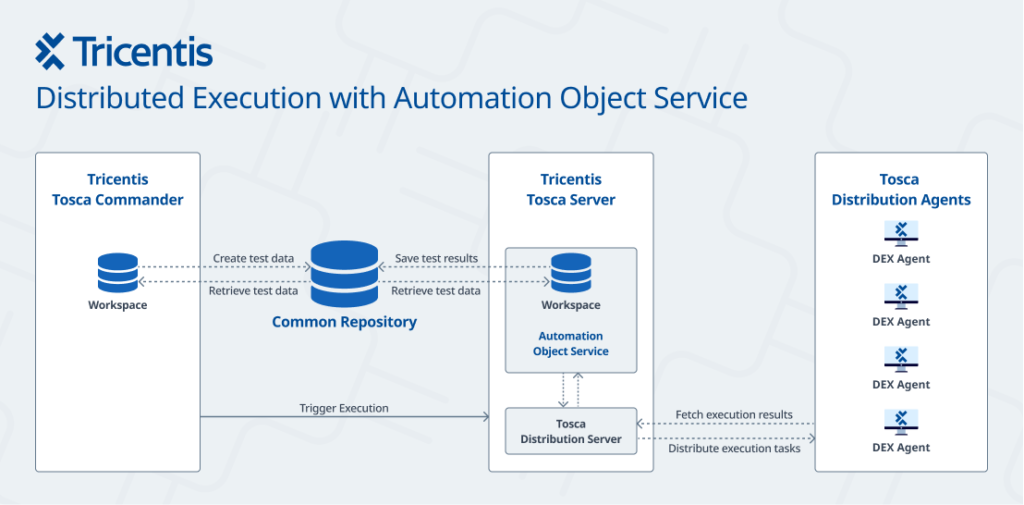
Understanding Distributed Execution in Tosca
Tricentis Tosca Distributed Execution helps testing teams run automated tests on multiple machines at the same time. This improves efficiency and reduces the load on individual user machines. Tests run on remote agents while you continue working without interruptions. The system uses a server that organizes execution requests and reports results back into the shared repository. This model allows teams to scale execution based on available hardware.
What Distributed Execution Does
- Runs automated tests on remote machines
- Uses distributed agents to complete tasks in parallel
- Reduces delays during execution
- Sends results back to a shared workspace
The overall process becomes much smoother when collaborating across teams and large test suites.
Why This Matters for Modern Test Automation
Modern software applications need constant testing across browsers, platforms, and user flows. Tricentis Tosca Distributed Execution allows you to schedule and run multiple tests concurrently so that regression cycles complete faster. When the workload spreads across machines, you save time and reduce bottlenecks.
This system is especially beneficial for training programs focused on TOSCA Certification, TOSCA Training, and the TOSCA Automation Course because learners must understand how enterprise teams execute tests at scale.
Who Uses Distributed Execution
Distributed execution works only in multi-user workspaces. All project members connect to a common repository where test artifacts and execution results are stored. The execution results are accessible to all users, and this centralization supports large QA teams.
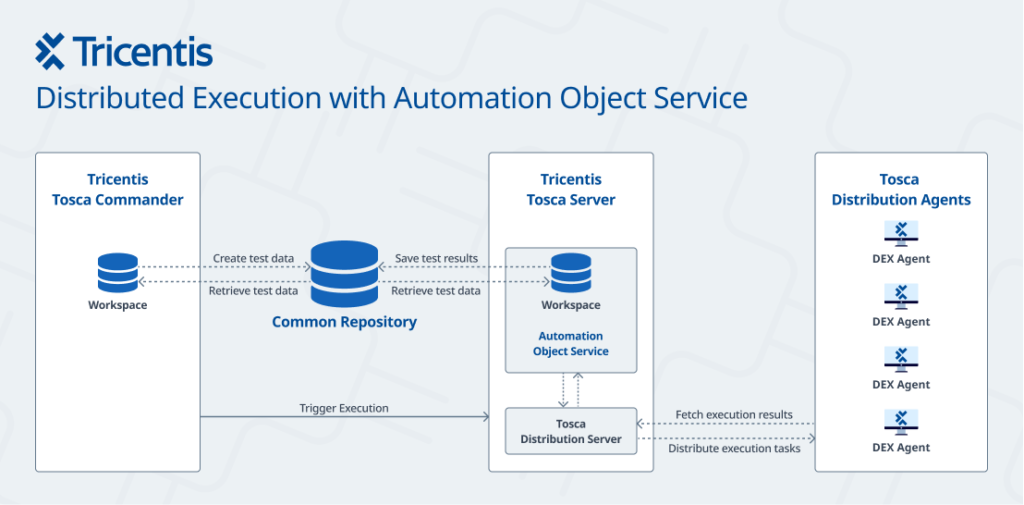
Core Components of Tricentis Tosca Distributed Execution
1. User Machine
This is the machine where you create test cases in Tosca Commander. You manage execution lists and trigger runs from this interface.
2. Tosca Distribution Server
The Distribution Server operates through the Automation Object Service (AOS).
It:
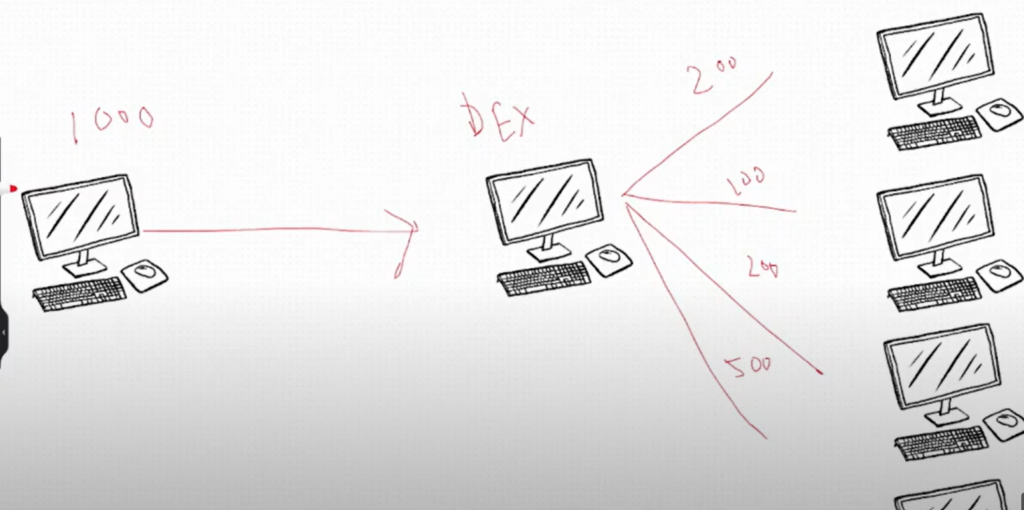
- Manages distribution of execution tasks
- Connects to the common repository
- Stores a local workspace
- Delivers execution tasks to agents
This server plays a central role in Tricentis Tosca Distributed Execution and must run the same version as Tosca Commander.
3. Agent Machines
Agent machines run the actual test cases. They do not require their own workspaces. Instead, they pull instructions from the Distribution Server and return results via AOS.
How the Distributed Execution Flow Works
- You create test cases in Tosca Commander and place them in an execution list.
- You trigger execution from the TestEvents area.
- The Distribution Server collects the request.
- The server sends tasks to the available agents.
- Agents run the tests.
- Agents send results back to the server.
- The server saves results in the common repository.
This reliable cycle keeps all team members aligned during test execution.
Benefits Recap
- Faster execution
- Efficient resource usage
- Delegates heavy processing to remote machines
- Keeps the user’s system responsive
- Supports collaboration
These strengths highlight why Tricentis Tosca Distributed Execution is important for testers working toward TOSCA Certification and roles that require enterprise automation skills.
Prerequisites Before Setup
- Tosca Server and Tosca Commander must be the same version.
- The user machine, DEX server, and agent machines must communicate over the network.
- For practice, all components can run on a single local machine.
You need three logical layers:
User Machine → DEX Server → Agent Machines
Step-by-Step Setup for Tricentis Tosca Distributed Execution
Below is the complete setup process, which you can replicate for your learning or practice environment.
Step 1: Install Tosca Commander and Tosca Server
Install the same version of both tools. The agent program installs automatically with Tosca Commander. This version alignment ensures proper communication.
Step 2: Create a New Repository and Workspace
In Tosca Commander:
- Create a new repository
Example: MayJune2025 - Create a workspace and login using
Username: Admin
Password: Admin - Example workspace: H2kInfosysValidation
This serves as your multi-user environment.
Step 3: Configure Automation Object Service in Tosca Server
Open http://localhost/
Login with Admin / Admin
Go to Automation Object Service
Add:
- Repository Root Name: MayJune2025
- Workspace Name: H2kInfosysValidation
- Username: Admin
- Password: Admin
Save and allow services to restart.
Step 4: Start the Tosca Distribution Agent
Navigate to:
C:\Program Files (x86)\TRICENTIS\Tosca Testsuite\DistributedExecution
Run ToscaDistributionAgent.exe as Administrator.
A green monitor icon appears in the system tray.
This indicates that the agent is active and ready to receive tasks.
Step 5: Update Settings in Tosca Commander
In Tosca Commander:
- Open Settings
- Go to Commander → Distributed Execution
Set:
Monitor URL: http://localhost/Monitor/
Server Endpoint: http://localhost/DistributionServerService/ManagerService.svc
At the bottom of the settings list:
Tricentis Services: http://localhost/
Step 6: Open Repository and Prepare for Execution
In the shared repository:
- Go to the Execution section
- Right-click Configurations
- Select Refresh Agents
Your agent count should update to 1 if the local agent is running.
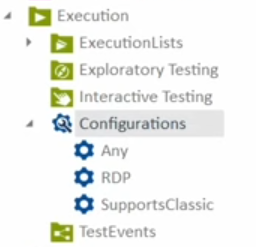
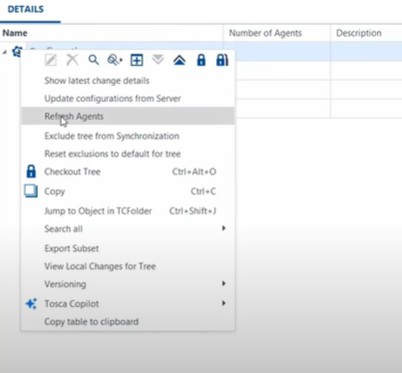
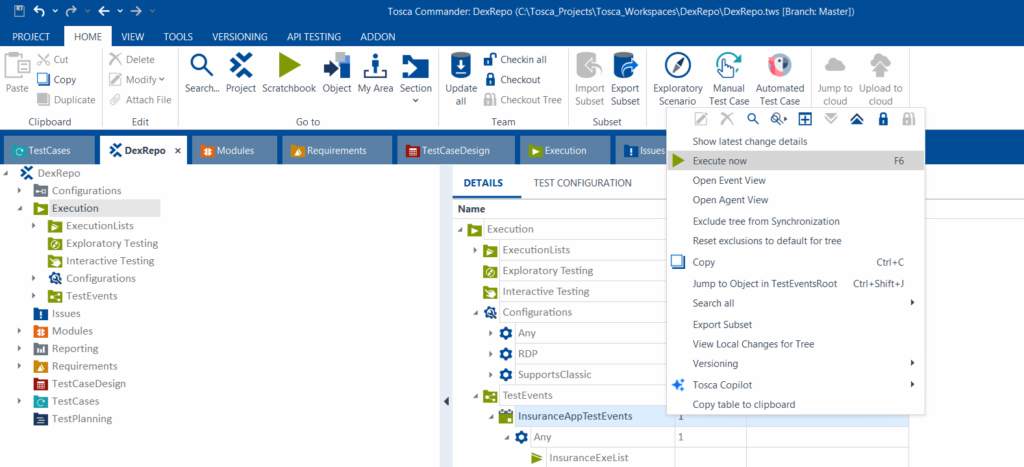
Step 7: Create TestEvents for Execution
To run the execution:
- Create a folder in TestEvents
- Drag Any from Configurations into your TestEvents folder
- Drag the execution list from ExecutionLists into the TestEvents folder
Create a folder under Test Events
Drag and drop Any from configuration folder to the Test Events folder.
Drag and drop the execution list folder under the Any in Test Events folder
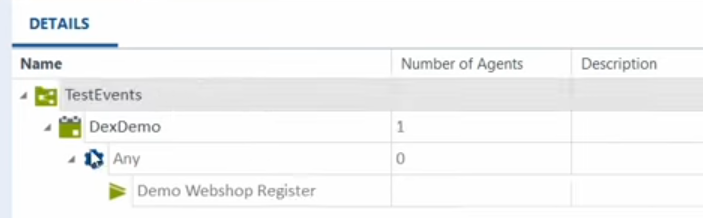
Step 8: Execute Tests Through the Server
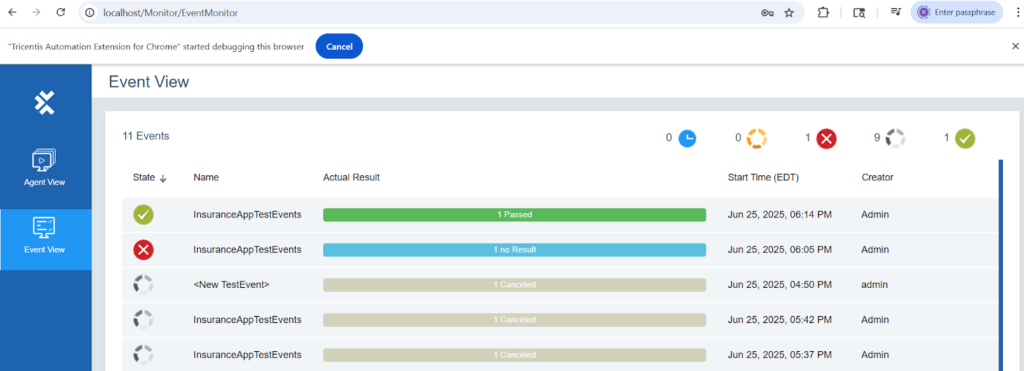
Step 8: Open the Tosca Server : dashboard, click on Distributed Execution , and monitor the test execution status. Agent View for status of Agents, Execution View for status of test case execution.
Viewing Agent Activity and Event Progress
You can track:
- Active agents
- Running executions
- Passed or failed tests
Open the Tosca Server URL again:
Open the Tosca Server URL : localhost:80 localhost
Click on Dex Distributed Execution
View the Agent view and Event view
From Tosca Commander, Under Test Events, Right click on the folder that we created and Execute Now
Step 9: Monitor Final Execution Status
Refresh the browser on Tosca Server , for Distributed Execution screen ,
Click on Events View for the test execution status.
Troubleshooting Common Issues
One common issue occurs when the Tosca Server services fail to start after AOS configuration.
If the server dashboard does not load:
After restarting services, Tosca server might be down , The Follow below steps and make sure
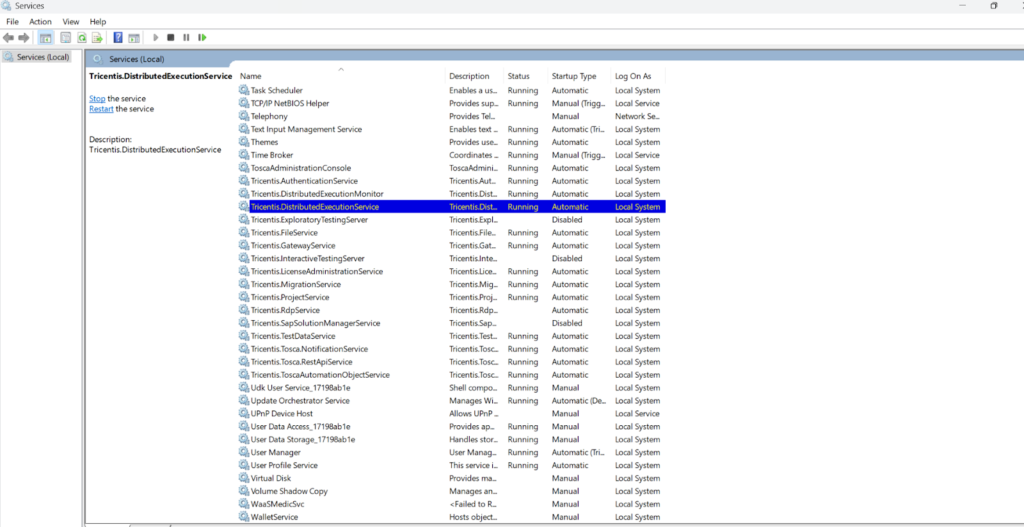
From Windows Services:
Open Services from the Windows Start menu.
Find Consul.Service in the list.
Right-click on the service name and select Restart.

Restarting the Consul service allows the server to recover so Distributed Execution can respond to agent requests.
Understanding the Execution Flow Again
Tricentis Tosca Distributed Execution behaves like a communication loop:
- Tosca Commander sends the trigger
- Distribution Server reads the request
- Agents receive tasks
- Agents run the automation
- Results return to the server
- Results sync into the repository
This architecture improves test coverage and time efficiency, which is a major focus of TOSCA Training and the TOSCA Automation Course.
Summary of Key Concepts
- Tricentis Tosca Distributed Execution helps teams execute tests faster using shared infrastructure.
- A multi-user repository connects the user machine, the server, and agent machines.
- AOS ensures smooth data exchange.
- Agents run tests without requiring a Tosca workspace.
- Test results remain centralized.
This approach is essential for teams handling large regression sets or end-to-end automation workflows.
Conclusion:
You now understand how to install, configure, and operate Tricentis Tosca Distributed Execution for automated testing. Follow these steps to practice distributed execution, monitor real-time execution status, and strengthen your automation expertise.
Take the next step today and explore advanced execution models.
Apply your new skills to automate tests at scale.