Business Intelligence Tools are software platforms used by data analysts to collect, process, analyze, and visualize data to support business decision-making. The best Tools for data analysts are those that integrate reliably with enterprise data sources, support scalable analytics workflows, and provide clear, interactive reporting for stakeholders. Commonly used tools include Power BI, Tableau, Looker, Qlik Sense, and enterprise BI platforms embedded within cloud ecosystems.
What Are Business Intelligence Tools?
These Tools are technologies designed to transform raw data into structured, meaningful insights through reporting, dashboards, and analytical models. These tools typically sit between data storage systems (such as databases or data warehouses) and business users who need actionable information.
From a data analytics perspective, Business Intelligence Tools enable analysts to:
- Query structured and semi-structured datasets
- Apply transformations and calculations
- Visualize trends, patterns, and anomalies
- Share standardized reports across teams
In enterprise environments, these tools are not standalone applications. They are part of a broader analytics stack that includes data engineering pipelines, governance frameworks, and security controls.
How Do Business Intelligence Tools Work in Real-World Data Analytics Projects?
In practical data analytics workflows, These Tools operate as the final layer of the analytics lifecycle. Analysts rarely work with these tools in isolation.
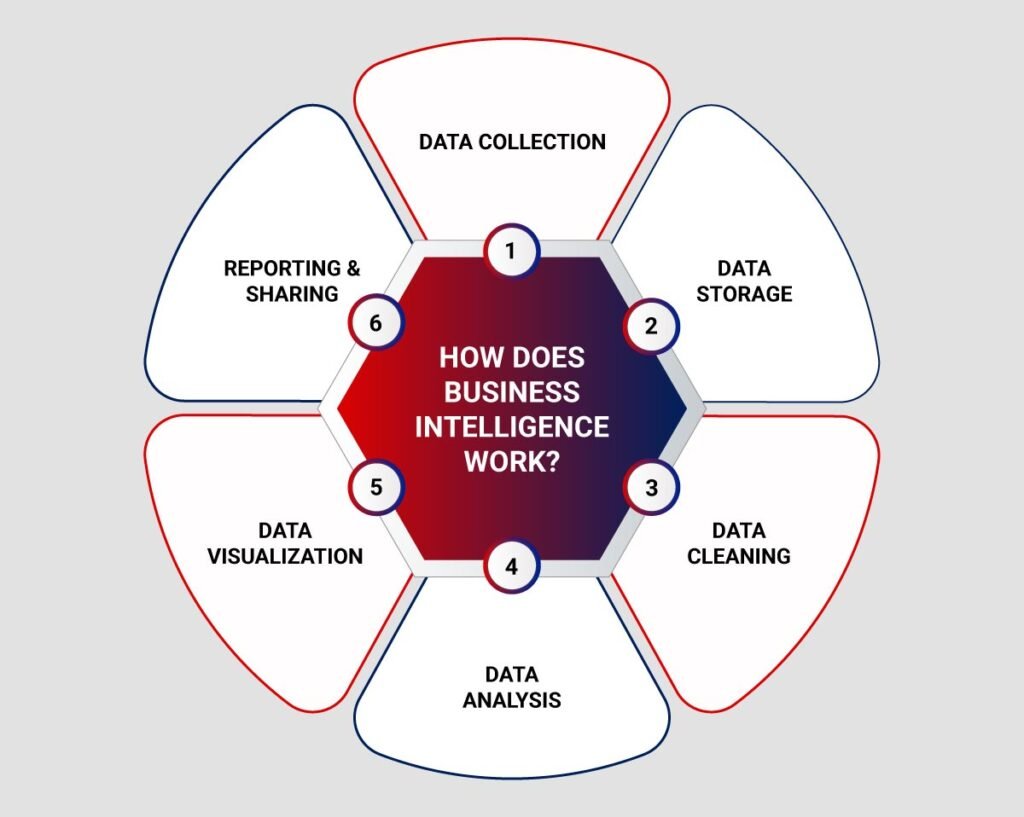
A typical enterprise workflow looks like this:
- Data ingestion from operational systems (ERP, CRM, transactional databases)
- Data storage in data warehouses or cloud platforms
- Data modeling using semantic layers or star schemas
- Analysis and visualization using Business Intelligence Tools
- Distribution of dashboards and reports to business stakeholders
Business Intelligence Tools connect to curated datasets rather than raw data. This ensures performance, consistency, and compliance with enterprise data standards.
Why Are Business Intelligence Tools Important for Data Analysts?
Business Intelligence Tools are critical because they bridge the gap between technical data systems and business decision-makers. Data analysts rely on these tools to convert analytical outputs into understandable insights.
Key reasons these tools are important include:
- Standardized reporting: Ensures consistent metrics across departments
- Self-service analytics: Enables business users to explore data safely
- Decision support: Provides real-time or near-real-time visibility
- Scalability: Handles growing datasets without manual effort
For working professionals attending Data analyst online classes, understanding these Tools is essential because these tools are embedded in daily job responsibilities rather than theoretical exercises.
Core Capabilities of Modern Business Intelligence Tools
Most widely adopted Business Intelligence Tools share a common set of capabilities, regardless of vendor.
Data Connectivity
Business Intelligence Tools connect to:
- Relational databases (MySQL, PostgreSQL, SQL Server)
- Cloud data warehouses
- Spreadsheet-based data sources
- APIs and SaaS platforms
Data Modeling
Analysts create logical models that define:
- Relationships between tables
- Calculated measures
- Business-friendly field names
Visualization and Reporting
Common visual elements include:
- Bar and line charts
- KPI scorecards
- Tables and pivot views
- Interactive filters and drill-downs
Governance and Security
Enterprise Business Intelligence Tools enforce:
- Role-based access control
- Data masking
- Audit logging
- Version control for reports
Which Business Intelligence Tools Are Commonly Used by Data Analysts?
The selection of Business Intelligence Tools depends on organizational scale, data maturity, and technology stack. Below are tools commonly encountered in enterprise data analytics roles.
Power BI
Power BI is widely used in organizations operating within Microsoft ecosystems.
Common use cases include:
- Operational dashboards
- Financial reporting
- Ad-hoc business analysis
Power BI emphasizes tight integration with Excel, Azure data services, and SQL-based systems.
Tableau
Tableau is known for advanced visualization capabilities and exploratory analytics.
It is commonly used when:
- Analysts need high-interactivity dashboards
- Visual storytelling is a priority
- Multiple data sources must be blended
Tableau is often introduced after analysts develop strong data preparation skills.
Looker

Looker focuses on centralized data modeling and governed analytics.
Typical environments include:
- Cloud-native data stacks
- SQL-driven analytics teams
- Organizations emphasizing metric consistency
Looker uses a semantic modeling layer to ensure business logic remains consistent across reports.
Qlik Sense
Qlik Sense emphasizes associative data exploration.
It is useful when:
- Analysts need flexible slicing across dimensions
- Data relationships are complex
- Exploratory analysis is required beyond predefined paths
Comparison of Common Business Intelligence Tools
| Tool Name | Primary Strength | Typical Environment | Skill Focus |
|---|---|---|---|
| Power BI | Enterprise reporting | Microsoft-centric | DAX, SQL |
| Tableau | Visual analytics | Cross-platform | Visualization design |
| Looker | Governed analytics | Cloud warehouses | SQL, data modeling |
| Qlik Sense | Associative analysis | Mixed data sources | Data exploration |
How Are Business Intelligence Tools Used in Enterprise Environments?
In enterprise settings, these are governed systems rather than personal analytics software. Analysts must work within structured processes.
Enterprise Usage Patterns
- Dashboards reviewed in executive meetings
- Automated refresh schedules
- Certified datasets for official metrics
- Change management for report updates
Common Challenges
Data analysts frequently encounter:
- Performance bottlenecks due to poor modeling
- Conflicting definitions of metrics
- Over-customized dashboards that reduce clarity
- Access control complexity
Best practices include maintaining documentation, validating metrics with stakeholders, and aligning reports with business objectives.
What Skills Are Required to Learn Business Intelligence Tools?
Learning Business Intelligence Tools requires a combination of technical and analytical skills.
Foundational Skills
- SQL querying
- Data cleaning concepts
- Basic statistics
- Understanding of business metrics
Tool-Specific Skills
- Data modeling techniques
- Visualization best practices
- Calculated fields and measures
- Dashboard usability principles
Many structured data analyst online classes integrate these skills progressively rather than teaching tools in isolation.
How Do Business Intelligence Tools Fit into Data Analytics Learning Paths?
These Tools are usually introduced after learners understand data fundamentals.
Typical Learning Progression
- Data fundamentals and databases
- SQL and querying techniques
- Data preparation and transformation
- Business Intelligence Tools
- Reporting and stakeholder communication
Professional programs and certifications, including the Google data analytics certification, follow similar staged learning approaches that emphasize real-world workflows.
What Job Roles Use Business Intelligence Tools Daily?
Business Intelligence Tools are not limited to a single role.
Common roles include:
- Data Analyst
- Business Analyst
- Reporting Analyst
- Operations Analyst
- Product Analyst
In these roles, These Tools are used to monitor KPIs, identify trends, and support operational decisions.
How Data Analysts Apply Business Intelligence Tools in Real Projects
In real projects, analysts do not simply create dashboards. They follow structured processes.
Example Workflow
- Understand business questions
- Identify relevant datasets
- Validate data quality
- Build analytical models
- Design dashboards aligned to decisions
- Review outputs with stakeholders
This workflow highlights why Business Intelligence Tools are considered applied analytics platforms rather than visualization software alone.
Best Practices for Using Business Intelligence Tools Effectively
Experienced analysts follow established practices:
- Limit the number of KPIs per dashboard
- Use consistent color and scale conventions
- Optimize data models for performance
- Document metric definitions
- Test dashboards with end users
These practices reduce misinterpretation and improve adoption.
FAQ: Business Intelligence Tools for Data Analysts
What are Business Intelligence Tools used for?
These are used to analyze structured data, generate reports, and support business decision-making through dashboards and visual insights.
Are Business Intelligence Tools suitable for beginners?
Yes, when combined with foundational analytics training. Many tools offer beginner-friendly interfaces, but understanding data concepts is essential.
Do data analysts need coding skills to use Business Intelligence Tools?
Basic SQL is typically required. Advanced programming is not mandatory but can enhance automation and integration.
How do Business Intelligence Tools differ from data science tools?
These Tools focus on reporting and descriptive analytics, while data science tools emphasise predictive modeling and experimentation.
Are Business Intelligence Tools used in cloud environments?
Yes. Most modern These Tools integrate with cloud data platforms and support scalable analytics.
Key Takeaways
- These are essential for translating data into business insights
- Analysts use these tools within structured enterprise analytics workflows
- Tool selection depends on data architecture and organizational needs
- Strong foundations in data concepts improve BI effectiveness
- Practical experience is critical for professional competency
Explore hands-on learning paths and structured data analytics training with H2K Infosys to build real-world Business Intelligence skills.
Advance your career by applying analytics concepts through guided, industry-aligned projects.