Important SQL Joins are SQL operations that combine rows from two or more tables using related columns (keys) so analysts can create complete, usable datasets. In data analytics, joins are used to connect facts (transactions, events, measurements) with dimensions (customers, products, time, geography). The most important joins for analytics are INNER JOIN, LEFT JOIN, RIGHT JOIN, FULL OUTER JOIN, and SELF JOIN, with CROSS JOIN used carefully for specific scenarios.
What Are Important SQL Joins in SQL?
SQL joins are clauses used to merge data across tables based on a condition, usually a relationship between keys.
Why joins matter in analytics datasets
Most enterprise systems store data in normalized structures:
- Sales data in one table
- Customer profile in another
- Product catalog in another
- Region/store data in another
Analytics tools like Power BI and Tableau require a connected dataset, so SQL joins become the foundation of:
- KPI reporting (Revenue, Profit, Retention)
- Funnel analysis (Lead → Opportunity → Deal)
- Operational metrics (SLA, resolution times, inventory movement)
- Cohort and trend reporting
How Do SQL Joins Work in Real-World Data Analytics Projects?

In real projects, SQL joins help you transform raw, normalized data into structured reporting models, a core skill developed through hands-on practice in Data analyst online classes and real-world analytics training.
Common join workflow in enterprise environments
- Identify a primary dataset (often the fact table)
- Example:
orders,transactions,click_events
- Example:
- Identify the lookup tables
- Example:
customers,products,stores,calendar
- Example:
- Match them using keys
- Example:
customer_id,product_id,store_id
- Example:
- Validate results:
- row counts before vs after join
- duplicates created by many-to-many relationships
- missing values introduced by unmatched keys
Why Are Important SQL Joins Critical for Working Professionals?
Joins directly impact data correctness, which impacts decisions.
Joins influence three high-impact outcomes
- Accuracy: Wrong join type can remove valid rows or create duplicates.
- Performance: Poor joins can slow down dashboards and pipelines.
- Trust: Business users lose confidence if numbers change unexpectedly.
In day-to-day analytics roles, joins appear in:
- building datasets for BI reports
- preparing extracts for stakeholder analysis
- validating ETL results
- supporting QA for reporting logic
Which Important SQL Joins Should Every Data Analyst Learn First?
Below are the Important SQL Joins most used in analytics work.
1) What Is an INNER JOIN and When Should You Use It?
INNER JOIN returns only the rows that match in both tables.
Use cases
- Revenue by customer (only customers who placed orders)
- Order details with product mapping (only valid product IDs)
Example
SELECT
  o.order_id,
  o.order_date,
  c.customer_name
FROM orders o
INNER JOIN customers c
  ON o.customer_id = c.customer_id;
Analytics interpretation
You are asking:
“Show only orders where a valid customer exists.”
Common mistake
If your customer table is incomplete, INNER JOIN can drop orders, making revenue look smaller.
2) What Is a LEFT JOIN and Why Is It One of the Most Important SQL Joins?
LEFT JOIN returns all rows from the left table, plus matching rows from the right table.
If there is no match, right-side columns become NULL.
Typical analytics use cases
- Keep all transactions even if reference data is missing
- Identify missing dimension values (data quality checks)
- Create complete customer lists for retention and churn reporting
Example
SELECT
  o.order_id,
  o.order_date,
  c.customer_name
FROM orders o
LEFT JOIN customers c
  ON o.customer_id = c.customer_id;
Practical meaning
“Keep every order, even if customer data is missing.”
Data quality pattern: find missing mappings
SELECT
  o.customer_id,
  COUNT(*) AS order_count
FROM orders o
LEFT JOIN customers c
  ON o.customer_id = c.customer_id
WHERE c.customer_id IS NULL
GROUP BY o.customer_id;
3) What Is a RIGHT JOIN and When Is It Useful?
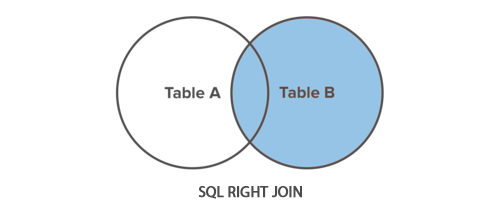
RIGHT JOIN keeps all rows from the right table and matches from the left table.
In analytics work, RIGHT JOIN is less common because the same logic can be written using LEFT JOIN by swapping table order.
Example
SELECT
  c.customer_id,
  c.customer_name,
  o.order_id
FROM orders o
RIGHT JOIN customers c
  ON o.customer_id = c.customer_id;
When it helps
- You want all dimension entries, even if no transactions exist
- Example: all products listed, even if never sold
4) What Is a FULL OUTER JOIN and What Problems Does It Solve?
FULL OUTER JOIN returns all rows from both tables.
Matches are combined; non-matching rows from either side appear with NULLs.
Analytics use cases
- Reconciliation between two systems
Example: CRM orders vs Billing orders - Comparing old pipeline vs new pipeline output
- Detecting missing records in either dataset
Example
SELECT
  a.order_id AS systemA_order_id,
  b.order_id AS systemB_order_id
FROM systemA_orders a
FULL OUTER JOIN systemB_orders b
  ON a.order_id = b.order_id;
Interpretation
Find:
- orders in both systems
- orders missing from System A
- orders missing from System B
5) What Is a SELF JOIN and Why Is It Useful in Analytics?
A SELF JOIN joins a table to itself, often used for hierarchical or relationship-based data.
Use cases
- employee reporting structure (manager → employee)
- product bundles (parent SKU → child SKU)
- customer referral analysis
Example: employee manager mapping
SELECT
  e.employee_id,
  e.employee_name,
  m.employee_name AS manager_name
FROM employees e
LEFT JOIN employees m
  ON e.manager_id = m.employee_id;
6) What Is a CROSS JOIN and Why Must Analysts Use It Carefully?
CROSS JOIN produces a Cartesian product (every row with every row).
Useful analytics cases
- building a complete date series for each store/product
- generating scenario combinations (forecast versions)
- filling missing time periods for BI visuals
Example: create store-date combinations
SELECT
  s.store_id,
  d.date
FROM stores s
CROSS JOIN calendar d;
Warning for real projects
If stores = 500 and dates = 3650 (10 years), output = 1,825,000 rows.
That can be fine or can overload your BI model depending on usage.
How Do Important SQL Joins Support BI Tools Like Power BI and Tableau?
SQL joins vs BI model relationships
In analytics workflows, joins happen in two common places:
Option A: Join in SQL (database layer)
Used when:
- you want reusable datasets for many dashboards
- performance needs to be consistent
- governance requires controlled transformations
Option B: Relationships in BI tools (semantic layer)
Used when:
- business needs change frequently
- you want flexibility without changing source SQL
- star schema modeling is used
Practical recommendation
For enterprise reporting:
- Use SQL joins to build clean base tables
- Use Power BI/Tableau relationships to build metrics and business logic
What Are the Most Common SQL Join Challenges in Real Analytics Projects?
1) Many-to-many joins causing duplicate totals
Example problem:
- A customer has multiple addresses
- An order joins to multiple address rows
Result: Revenue is duplicated.
Fix: deduplicate or choose the right grain before joining.
2) Wrong join type removing important records
- INNER JOIN drops non-matching rows
- Analysts accidentally hide missing data problems
Fix: use LEFT JOIN during exploration and validation.
3) Null handling issues
LEFT JOIN may introduce NULL values, impacting:
- counts
- averages
- conversion rates
Fix: apply COALESCE() or handle NULLs in calculations:
SELECT COALESCE(region, 'Unknown') AS region_name
FROM customers;
4) Joining on non-unique keys
If the join key isn’t unique in the dimension table, duplicates occur.
Fix: enforce uniqueness or aggregate before join.
How Do You Choose the Right Join Type for a Business Question?
Quick decision guide
- INNER JOIN → “I only want records that exist in both.”
- LEFT JOIN → “Keep all main records, enrich when possible.”
- RIGHT JOIN → “Keep all secondary records (rare).”
- FULL OUTER JOIN → “Show everything from both and compare.”
- SELF JOIN → “Relate rows within the same table.”
- CROSS JOIN → “Generate all combinations (use carefully).”
Real Data Analytics Use Cases for Important SQL Joins
Use Case 1: Sales dashboard dataset (Power BI)
Goal: Order metrics by product and customer
ordersLEFT JOINcustomersordersINNER JOINproducts(if product catalog is reliable)- Join
calendarfor time intelligence
Use Case 2: Customer churn analysis
Goal: Keep all customers, show last purchase date
customersLEFT JOINorders- group by customer to compute last order date
Use Case 3: Support ticket SLA reporting
Goal: Tickets with priority and agent details
ticketsLEFT JOINagentsticketsLEFT JOINpriority_lookup
Use Case 4: Data reconciliation across systems
Goal: Compare invoicing vs fulfillment
- FULL OUTER JOIN between datasets on document ID
What Skills Are Required to Learn SQL for Data Analytics Certification?

To apply joins confidently, working professionals typically need:
SQL fundamentals
- SELECT, WHERE, GROUP BY, HAVING
- Aggregations: COUNT, SUM, AVG
- Filtering and sorting
Join-related skills
- identifying primary and foreign keys
- understanding data grain (row-level meaning)
- debugging duplicates and missing records
- using aliases clearly (
orders o,customers c)
BI integration basics
- creating a reporting dataset for Power BI/Tableau
- measures vs calculated columns (Power BI)
- extracts vs live connections (Tableau)
These skills commonly align with a Data Analytics certification roadmap and are often included in structured learning paths.
How Is SQL Used in Enterprise Analytics Environments?
In most organizations, SQL is used in multiple layers:
Data sources
- ERP databases
- CRM systems
- web/app event logs
- marketing platforms
Processing environments
- data warehouses (cloud or on-prem)
- analytics marts for reporting
- scheduled transformations
Business consumption
- dashboards (Power BI/Tableau)
- KPI scorecards
- exports for finance and operations
Joins are applied throughout: ingestion validation, transformation logic, and final reporting datasets.
What Job Roles Use Important SQL Joins Daily?
Roles where joins are used frequently
- Data Analyst
- BI Analyst
- Reporting Analyst
- Product Analyst
- Data QA Analyst
- Analytics Engineer (often deeper join optimization)
Professionals targeting a Data analyst course with placement often focus heavily on joins because real interview tasks commonly include:
- combining orders + customers + products
- matching events to user sessions
- building monthly KPI outputs
Role vs Skill Mapping (SQL Join Focus)
| Role | Join Skills Used | Typical Output |
|---|---|---|
| Data Analyst | INNER, LEFT, aggregates | Monthly KPIs, dashboards |
| BI Analyst | LEFT joins, star schema mapping | Semantic models, reports |
| Product Analyst | joins + event logic | funnels, retention |
| Analytics Engineer | join optimization + validation | curated datasets |
| Data QA Analyst | FULL OUTER for reconciliation | mismatch reports |
Best Practices for Writing Joins in Analytics SQL
Write joins that are readable and testable
- Use clear aliases:
o,c,p - Join on explicit keys only
- Keep join conditions separate from filters
Validate join outputs
Check:
- row counts before and after joins
- duplicates introduced after joining
- unexpected NULLs in lookup fields
Prefer consistent join patterns
For most analytics datasets:
- Start with fact table
- Add dimension tables using LEFT JOIN (safe default)
- Switch to INNER JOIN only when reference data is trustworthy
FAQ: Important SQL Joins for Data Analytics
Q1) Which join is most used in data analytics?
LEFT JOIN is commonly used because it preserves the main dataset while enriching it with lookup data.
Q2) Is INNER JOIN good for dashboards?
Yes, but only when you are sure both tables contain complete and valid matches. Otherwise it may drop data silently.
Q3) What join helps compare two datasets for missing records?
FULL OUTER JOIN is the best option for reconciliation and mismatch checks.
Q4) Why do joins create duplicate revenue totals sometimes?
Duplicates usually occur due to many-to-many relationships or joining on non-unique keys.
Q5) Should I join data in SQL or Power BI/Tableau?
For stable and reusable datasets, join in SQL. For flexible reporting, use BI relationships. Many teams do both.
Q6) What is the easiest way to choose the correct join?
Start with LEFT JOIN during exploration, validate row counts and NULLs, then refine join type based on business requirements.
Q7) Are SQL joins required for Data Analytics certification?
Yes. Joins are a core skill in most Data Analytics certification learning paths because they appear in projects and interviews.
Conclusion
- Important SQL Joins connect tables so analytics teams can build complete reporting datasets.
- INNER JOIN keeps only matching rows; LEFT JOIN preserves the main table and is safest for analytics.
- FULL OUTER JOIN supports reconciliation and mismatch analysis across systems.
- SELF JOIN is practical for hierarchies like managers or product structures.
- Join mistakes often show up as missing rows or duplicated totals, so validation is part of professional SQL work.
To build hands-on confidence with joins, datasets, and BI reporting projects, explore H2K Infosys learning tracks.
A structured Data Analytics certification path can help you apply SQL joins in real Power BI/Tableau workflows.