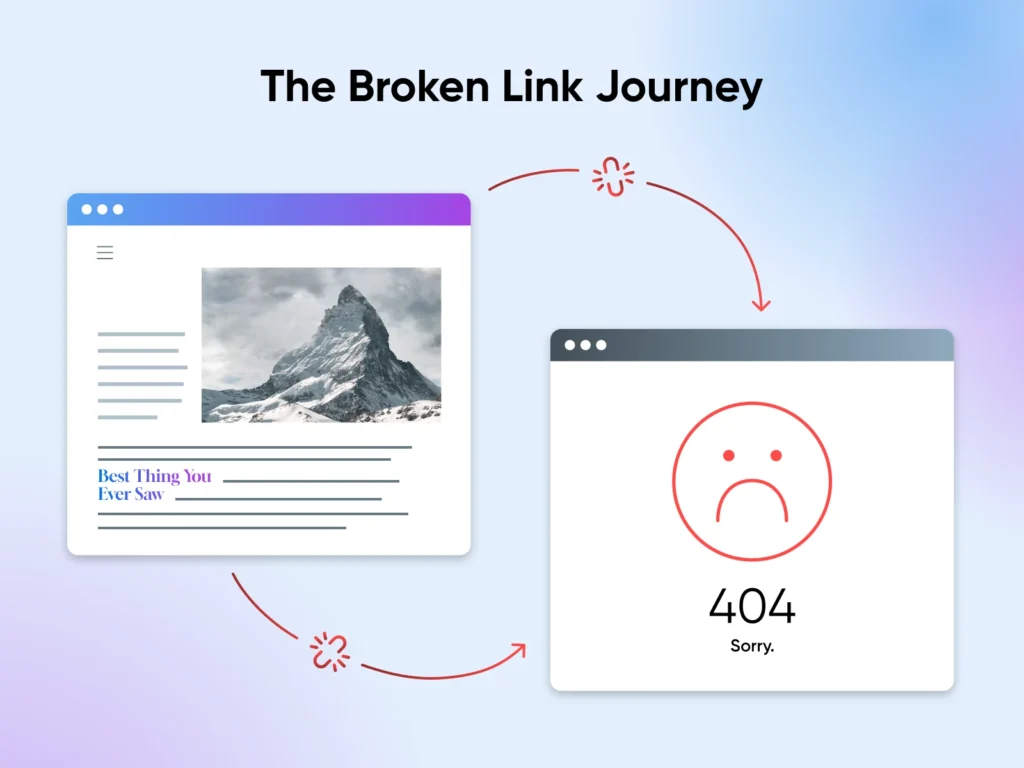
A broken link disrupts the user journey, blocks conversions, reduces trust, and lowers search engine rankings. Companies lose up to 20% of customer trust when users land on dead pages, according to recent UX studies. QA teams must detect these issues before release.
This is where Selenium testing helps teams quickly scan websites, identify broken URLs, and maintain a smooth navigation experience. If you are taking a Selenium certification course or learning through a Selenium course online, mastering broken-link detection becomes an important job skill because almost every modern web application has hundreds of links.
This blog explains everything about Broken links, how to find them with Selenium, why companies take them seriously, and how you can implement step-by-step automation to detect them.
What Are Broken Links?
A broken link is a hyperlink that no longer leads to the correct destination. The link may show a 404 page, a timeout error, or redirect users to an unexpected location. It is happen for many reasons:
- The target page was deleted
- The URL was updated without proper redirection
- There is a typo in the link
- The server is down
- The domain expired
- Network issues disrupted the request
No matter the cause, a broken link affects both users and search engines.
Why Broken Links Matter in Selenium Testing
Many testers ignore these links because they seem too basic. But companies treat them as high-impact usability defects. Here’s why:
Broken Links Hurt User Experience
Users expect smooth, predictable navigation. When a link fails, users leave the site.
Broken Links Damage SEO
Search engines see this as a sign of poor maintenance. Multiple links can lower rankings.
Broken Links Reduce Conversion Rates
If product pages, sign-up pages, or payment links break, companies lose revenue.
Broken Links Hurt Website Credibility
Users trust brands that maintain professional websites.
Broken Links Slow Down Release Cycles
Manual link checking takes hours. Selenium automation speeds up validation.
This is why QA teams use Selenium to automate broken-link detection across large websites with thousands of URLs.
How Selenium Helps Detect Broken Links
Selenium WebDriver does not detect this directly. It helps testers extract all links from the webpage. Then testers use Java, Python, or another language to send HTTP requests and verify the response code.
The automation logic follows a simple structure:
- Open the web page
- Collect all
<a>tags - Extract the
hrefattribute - Send an HTTP request
- Check the response code
- Report URLs with errors
A link is broken if the server returns:
- 404 – Not Found
- 400 – Bad Request
- 500 – Internal Server Error
- 403 – Forbidden
- 408 – Request Timeout
Types of Broken Links Testers Commonly Find
Internal Broken Links
Links that break within the same domain.
Example:https://site.com/products/shoes→ returns 404.
External Broken Links
Links to third-party pages that fail due to server issues, outdated URLs, or expired resources.
Redirection Issues
Links redirect multiple times or redirect to incorrect pages.
Soft 404 Errors
A page loads normally but displays “Page Not Found.” Search engines detect it as broken.
Broken Image Links
Image URLs fail to load. Selenium can detect them using similar logic.
How to Find Broken Links Using Selenium (Step-By-Step Guide)
Below is a clear and simple step-by-step tutorial that you can practice in your Selenium certification course or Selenium course online.
Step 1: Set Up Your Selenium Project (Java Example)
Install:
- Java
- Maven
- TestNG (optional)
- Selenium WebDriver
- An IDE like IntelliJ or Eclipse
Add Selenium and Apache HttpClient dependencies in your pom.xml:
<dependency>
    <groupId>org.seleniumhq.selenium</groupId>
    <artifactId>selenium-java</artifactId>
    <version>4.14.0</version>
</dependency>

<dependency>
    <groupId>org.apache.httpcomponents</groupId>
    <artifactId>httpclient</artifactId>
    <version>4.5.13</version>
</dependency>
Step 2: Write Code to Fetch All Links
List<WebElement> links = driver.findElements(By.tagName("a"));
System.out.println("Total links: " + links.size());
Step 3: Extract Link URLs
for (WebElement link : links) {
    String url = link.getAttribute("href");
    System.out.println(url);
}
Ignore null or empty URLs to avoid false reports.
Step 4: Validate Each URL
Send an HTTP GET request and check the status code:
public static void verifyLink(String url) {
    try {
        HttpURLConnection connection = (HttpURLConnection) new URL(url).openConnection();
        connection.setRequestMethod("GET");
        connection.connect();

        int responseCode = connection.getResponseCode();

        if (responseCode >= 400) {
            System.out.println(url + " - Broken link");
        } else {
            System.out.println(url + " - Valid link");
        }
    } catch (Exception e) {
        System.out.println(url + " - Invalid link");
    }
}
Step 5: Run the Entire Script
for (WebElement link : links) {
    String url = link.getAttribute("href");
    if (url != null && !url.isEmpty()) {
        verifyLink(url);
    }
}
This script scans every link on the page and reports broken URLs.
Real-World Example: Detecting Broken Product Links
Imagine an ecommerce site with 3,000 product pages. A tester must ensure:
- All product categories open
- Every product page loads
- All images display
- All checkout links work
Without automation, checking these links manually would take days. Selenium can do it in minutes.
Many companies use this to ensure:
- No broken pages during flash sales
- No 404 errors after website redesigns
- No broken images during migrations
- No dead links that reduce customer trust
Top companies depend on testers trained in Selenium to solve these issues. This is why training programs like a Selenium certification course emphasize broken-link automation.
Advanced Ways to Detect Broken Links in Selenium
Multi-Threading for Faster Execution
You can execute link checks in parallel using Java Executors.
Filtering Only Active Links
Skip:
- mailto links
- javascript:void(0)
- telephone links
- anchor links (#section)
Headless Browsers
Use Chrome Headless for faster scanning.
Detecting Broken Images
Replace <a> with <img> tags and validate the src attribute.
Generating HTML Reports
Use Extent Reports or Allure to generate detailed summaries of valid and invalid links.
Common Mistakes Testers Make While Checking Broken Links
Not Handling Redirects
Some links return 301/302, but they are valid.
Not Checking HTTPS Issues
SSL certificate errors may block pages.
Not Validating External URLs
External links matter for user trust.
Ignoring Null Links
Empty hrefs skew results.
Scanning Pages Too Frequently
Frequent scans may overload the server.
Broken Links and Their Impact on SEO
Google and other search engines penalize websites with it. Here’s why:
- Crawlers cannot index the site correctly
- This links increase bounce rate
- The signal poor maintenance
- They limit backlink value
Many SEO teams now ask QA teams to add automated broken-link checks to the regression suite.
Case Study: How Automation Saved a Retail Brand
A large retail company noticed a drop in sales during a seasonal sale. After running Selenium scripts, the QA team found:
- 71 internal links
- 32 broken product images
- 18 broken payment links
Fixing these errors restored conversion rates by 12% in the next two days. Automation provided the fastest fix.
Broken Links Monitoring: What Companies Expect from Testers
Companies want testers who can:
- Scan thousands of URLs quickly
- Create reusable frameworks
- Provide clear reports
- Maintain scripts with CI/CD integration
- Ensure good user experience
This is why many learners join a Selenium certification course or choose a Selenium course online to gain automation skills.
Best Practices for Broken-Link Automation
- Always use a stable network
- Use headless mode for large scans
- Validate both images and hyperlinks
- Use API calls for performance
- Add retry logic for flaky links
- Schedule daily runs through Jenkins
- Maintain a dashboard for reports
Key Takeaways
- Selenium helps testers scan thousands of links automatically.
- Companies treat broken-link detection as a core QA responsibility.
- Testers must know how to extract URLs, send HTTP requests, and report failures.
- Training through a Selenium certification course or a Selenium course online builds these essential skills.
FAQ’s
What is a broken link in Selenium?
A broken link is a URL that returns an error, such as 404 or 500.
Can Selenium directly detect broken links?
No. Selenium collects URLs, while HTTP requests are used to verify their status.
How do you get all links using Selenium?
Use findElements(By.tagName("a")) and extract each link’s href.
Which HTTP status codes indicate broken links?
Usually, status codes 400 and above indicate an error or broken link.
Why check broken links with Selenium WebDriver?
It helps improve website usability, SEO, and overall testing quality.
Conclusion
A strong testing strategy must include regular checks for non-working or outdated links. These issues may look small, but they impact user trust, search visibility, and business growth in a big way. Automated validation with Selenium helps teams save time, avoid release delays, and deliver a smooth browsing experience for every user.
If you want to gain real-world automation skills and learn how to build reliable validation scripts, enroll in H2K Infosys today. Our hands-on Selenium training will help you grow your career with confidence and practical knowledge.