
Introduction
Software development teams release features faster than ever. Agile and DevOps practices push updates weekly or even daily. Manual testing alone cannot support this pace. This is why automation has become essential in modern quality assurance.
Many organizations expect testers to create Automated Test Scripts to validate core workflows, reduce regression time, and support continuous integration. However, automation is not as easy as it appears. Testers often face failures, maintenance issues, and unstable results.
This blog explains the real challenges of creating Automated Test Scripts and provides clear, practical ways to overcome them. It is designed for learners exploring QA tester training, QA testing courses, and QA online training who want real-world clarity instead of theory alone.
Why Automation Is Critical in Modern QA
Automation supports speed, accuracy, and consistency. It allows teams to test more features in less time. According to industry studies, over 70 percent of software teams now rely on automation to support release cycles.
Automation helps teams:
- Reduce repetitive manual effort
- Improve test coverage
- Detect defects earlier
- Support CI/CD pipelines
Despite these benefits, many teams struggle to maintain stable Automated Test Scripts due to technical and process challenges.
Core Challenges of Creating Automated Test Scripts
1. Frequent Application Changes
Modern applications evolve constantly. Developers update user interfaces, workflows, and backend logic. Even a small UI change can break Automated Test Scripts.
Example:
A button ID changes after a UI redesign. Every script using that locator fails, even though the application works correctly.
This leads to increased maintenance effort and reduced trust in automation results.
2. Poor Automation Planning
Many beginners automate without strategy. They try to automate every test case. This creates unstable Automated Test Scripts that fail often.
Common planning mistakes include:
- Automating unstable features
- Ignoring business priorities
- Writing long scripts without structure
Successful automation starts with careful selection of test cases.
3. Tool and Framework Learning Curve
Automation tools require setup and configuration. Selenium, Cypress, Playwright, and TestNG each have their own learning curve. New testers struggle to understand frameworks while writing Automated Test Scripts.
Challenges include:
- Environment setup errors
- Dependency conflicts
- Weak programming basics
This is why structured QA testing courses are important for beginners.
4. Test Data Issues
Automation depends heavily on data. Poor data handling causes Automated Test Scripts to fail unexpectedly.
Common data problems include:
- Duplicate records
- Invalid inputs
- Shared data across tests
Reliable data strategies are essential for stable automation.
5. Skill Gaps in QA Teams
Automation requires both testing knowledge and logical thinking. Without proper Quality assurance tester training, teams struggle to scale automation.
Skill gaps often include:
- Weak understanding of test design
- Limited coding exposure
- No real project experience
This explains the growing demand for Software testing and quality assurance course programs.
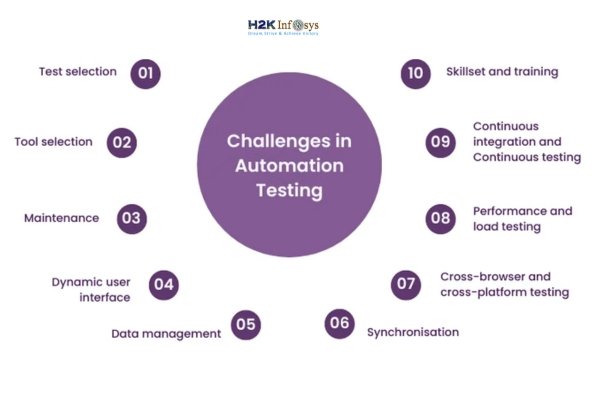
Practical Ways to Overcome Automation Challenges
Step 1: Select the Right Test Cases
Not every test should be automated. Focus on stable, repeatable, and high-value scenarios. This improves the reliability of Automated Test Scripts.
Best candidates include:
- Smoke tests
- Regression tests
- Business-critical workflows
Exploratory tests should remain manual.
Step 2: Use Stable Locators and Design Patterns
Locator strategy determines script stability. Avoid fragile XPath expressions. Use IDs and names when possible. Apply the page object model to structure Automated Test Scripts clearly.
Benefits include:
- Easier maintenance
- Better readability
- Reusable components
Most QA online training programs teach this as a core concept.
Step 3: Write Modular and Reusable Code
Reusable methods reduce duplication. Break large scripts into small functions. This makes Automated Test Scripts easier to maintain.
Example:
def login(user, password):
    enter_username(user)
    enter_password(password)
    click_login()
This approach improves clarity and scalability.
Step 4: Manage Test Data Effectively
Use separate data sources for automation. Reset data before execution. This prevents false failures in Automated Test Scripts.
Effective strategies include:
- External data files
- Mock services
- Environment-specific datasets
Quality assurance software testing courses often include hands-on data labs.
Step 5: Integrate Automation with CI/CD
Automation delivers maximum value when integrated with pipelines. Running Automated Test Scripts automatically after each build improves feedback speed.
Benefits include:
- Faster defect detection
- Reduced manual checks
- Better collaboration
This skill is highly valued in modern QA roles.
Strong QA Fundamentals Are Essential

Automation builds on testing basics. Without fundamentals, Automated Test Scripts lack meaningful validation.
Core skills every tester needs:
- Requirement analysis
- Boundary testing
- Negative testing
- Defect lifecycle knowledge
QA tester training programs focus on these foundations first.
Handling Dynamic Web Applications
Modern web apps load content dynamically. Elements appear late. IDs change at runtime. This creates instability in Automated Test Scripts.
Solutions include:
- Relative locators
- Explicit waits
- Stable attributes
- Proper synchronization
QA online training often includes labs focused on dynamic elements.
Reducing Flaky Tests
Flaky tests fail without real defects. They damage confidence in automation.
Common causes:
- Hard-coded waits
- Environment instability
- Shared data
To improve stability:
- Use condition-based waits
- Isolate test data
- Review failures regularly
Stable Automated Test Scripts build trust across teams.
Automation Beyond UI Testing
Automation is not limited to UI. Mature teams automate APIs and services. UI automation is slower and more fragile.
Balanced automation strategy includes:
- API testing
- Integration testing
- End-to-end flows
Many Quality assurance software testing courses now include API automation modules.
Collaboration Between QA and Development
Automation succeeds when teams collaborate. When QA works alone, Automated Test Scripts become reactive.
Collaboration helps with:
- Early defect prevention
- Testable design
- Faster fixes
Shift-left testing improves automation success.
Version Control for Automation Code
Automation code is software code. It requires version control.
Best practices include:
- Git repositories
- Branching strategies
- Code reviews
A Software testing and quality assurance course that teaches Git gives learners a strong advantage.
Measuring Automation Success
Automation success is not about script count. It is about value.
Better metrics include:
- Defect detection rate
- Execution time reduction
- Stability of runs
Well-designed Automated Test Scripts support faster releases.
Learning Automation Through Real Projects
Theory alone is not enough. Real projects expose testers to real challenges.
Hands-on Quality assurance tester training helps learners:
- Debug failures
- Handle environments
- Follow real workflows
This experience builds confidence.
Career Growth Through Automation Skills
Automation skills unlock advanced roles. Testers with strong Automated Test Scripts experience move faster into senior positions.
Common roles include:
- QA Automation Engineer
- SDET
- QA Lead
QA testing courses aligned with industry tools support long-term growth.
Long-Term Maintenance Strategy
Automation requires maintenance. Without planning, scripts become outdated.
Sustainable practices include:
- Periodic reviews
- Removing obsolete tests
- Refactoring code
Well-maintained Automated Test Scripts deliver lasting value.
Key Takeaways
- Automation needs planning and discipline
- Strong fundamentals improve script quality
- Dynamic apps require smarter handling
- Collaboration improves outcomes
- Training with real projects builds confidence
Conclusion
Automation challenges are real, but they are solvable with the right skills and structure.
Enroll in H2KInfosys QA tester training to gain hands-on automation experience, real projects, and job-ready quality assurance skills.