Cloud teams want strong protection, fast delivery, and full visibility. Many organizations now depend on AWS Security Hub DevSecOps to merge security, development, and operations into a single workflow that supports continuous delivery. Threats evolve fast. Cloud environments grow large and complex. Security teams must move at the same speed as development. AWS Security Hub DevSecOps helps them reach that speed with automation, policy enforcement, and centralized intelligence.
This detailed guide explains why AWS Security Hub DevSecOps is important, how it strengthens cloud environments, and how engineers can apply it in real-world settings. You will also learn how related paths like DevSecOps Training Online, AWS DevSecOps Certification, and aws devops certification align with the skills needed to work in secure AWS environments. The goal is to give readers practical information, simple explanations, and actionable steps that fit modern cloud needs.
Introduction:
Cloud adoption rises every year. Reports show that more than 80% of companies run their applications on public cloud platforms. This growth gives teams flexibility and speed, but it also opens new security risks. Common issues include:
- Misconfigured storage buckets
- Weak IAM policies
- Poor network segmentation
- Missing encryption
- Unpatched workloads
Most of these issues happen due to human error or fast deployments without security checks. Development teams push updates daily. Security teams cannot review each change manually. Attackers look for these weaknesses.
This is where AWS Security Hub DevSecOps becomes a powerful approach. It aligns security with development and integrates continuous checks into the delivery pipeline. It also centralizes findings, automates responses, and ensures compliance. Instead of security working as a separate team, it becomes an active part of delivery.
What Is AWS Security Hub?
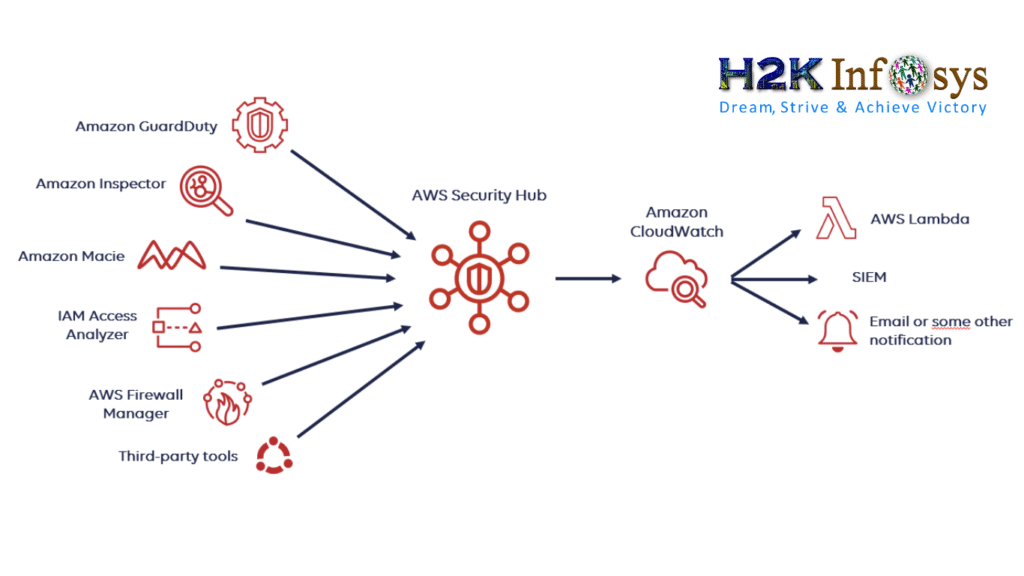
AWS Security Hub is a service that gathers alerts and security findings from different AWS services and partner tools. It gives a full view of the cloud security posture. It checks compliance rules, lists misconfigurations, and groups similar alerts. Teams do not need to switch between tools because Security Hub brings everything together on a single dashboard.
Security Hub alone gives information, but when you combine it with automation, CI/CD pipelines, scanning tools, and Infrastructure as Code, you create a full AWS Security Hub DevSecOps workflow. This combination provides continuous protection without slowing development.
Why AWS Security Hub DevSecOps Is Necessary
Modern cloud workloads change often. New resources spin up and shut down automatically. Manual checks are not enough. AWS Security Hub DevSecOps helps organizations solve these challenges with automation and integration.
Many companies now use AWS Security Hub DevSecOps because it:
- Catches risks early in development
- Removes weak configurations instantly
- Reduces time spent on manual security tasks
- Ensures continuous compliance
- Provides reliable visibility into large environments
Speed, consistency, and visibility are the key values of this approach.
Key Benefits of AWS Security Hub DevSecOps
Centralized Visibility
Companies often manage multiple AWS accounts. Each account may have dozens or hundreds of resources. Security teams need a simple way to monitor all of them in one view.
AWS Security Hub DevSecOps provides that unified view. Teams can compare accounts, identify trends, and focus on the highest-risk areas.
Continuous Scanning
Security must be active at all times, not only during audits. AWS Security Hub DevSecOps performs continuous scanning across the environment. It checks resource configurations, identity controls, encryption status, and compliance rules.
It detects common issues such as:
- Public S3 buckets
- Public SSH access
- Disabled encryption
- Insecure IAM roles
- Open security groups
These findings help teams correct issues before they lead to breaches.
Automated Remediation
Automation reduces response time and human error. With AWS Security Hub DevSecOps, your environment can fix problems automatically. For example:
- If a database is not encrypted, trigger a fix.
- If a security group exposes a port, remove that rule.
- If an IAM policy is risky, update it.
These automated responses work through Lambda functions, EventBridge rules, and IaC workflows.
Faster Incident Response
Security Hub integrates with tools that help teams act fast. When it finds a critical issue, it sends alerts to the right team or triggers automated responses. Engineers no longer search logs manually.
This approach improves the speed of DevSecOps workflows.
Continuous Compliance
Many companies must follow frameworks such as CIS, HIPAA, PCI DSS, or NIST. AWS Security Hub DevSecOps checks compliance requirements continuously. It creates reports and visual summaries that simplify audits.
How AWS Security Hub DevSecOps Works
Step 1: Collecting Security Data
Security Hub collects findings from many AWS services, such as:
- GuardDuty
- Inspector
- Firewall Manager
- IAM Access Analyzer
- Config
It also connects with third-party scanners. This creates a single database of security findings.
Step 2: Normalizing Findings
Findings arrive from different tools in different formats. Security Hub standardizes them. It ranks risks by severity so teams know what to fix first.
Step 3: Automating Responses
Teams integrate EventBridge and Lambda to build automatic remediation actions. This supports the core idea of AWS Security Hub DevSecOps.
Step 4: Integration with CI/CD
Security integrates with the deployment pipeline. When teams push new code or infrastructure templates, automated scans run. Pipelines block deployments when risks are found.
This ensures safer releases.
Hands-On Remediation Example
Below is a code snippet that removes public SSH access automatically when Security Hub reports a violation:
import boto3

ec2 = boto3.client('ec2')

def lambda_handler(event, context):
    group_id = event['detail']['resource']['id']
    ec2.revoke_security_group_ingress(
        GroupId=group_id,
        IpProtocol='tcp',
        FromPort=22,
        ToPort=22,
        CidrIp='0.0.0.0/0'
    )
    print("Removed Public SSH Access")
This is a simple but effective approach used in AWS Security Hub DevSecOps workflows.
Real-World Use Cases for AWS Security Hub DevSecOps
Financial Institutions
Banks must secure customer financial data. They use AWS Security Hub DevSecOps to enforce encryption and prevent misconfigurations.
Healthcare Organizations
Hospitals manage sensitive patient data. They use continuous checks to meet HIPAA requirements.
Online Stores and eCommerce
Retail businesses protect payment information. AWS Security Hub DevSecOps helps track security risks and secure APIs.
Startups and SaaS Platforms
Startups deploy features quickly. This workflow helps them move fast while staying secure.
Integrating AWS Security Hub DevSecOps into DevOps Pipelines
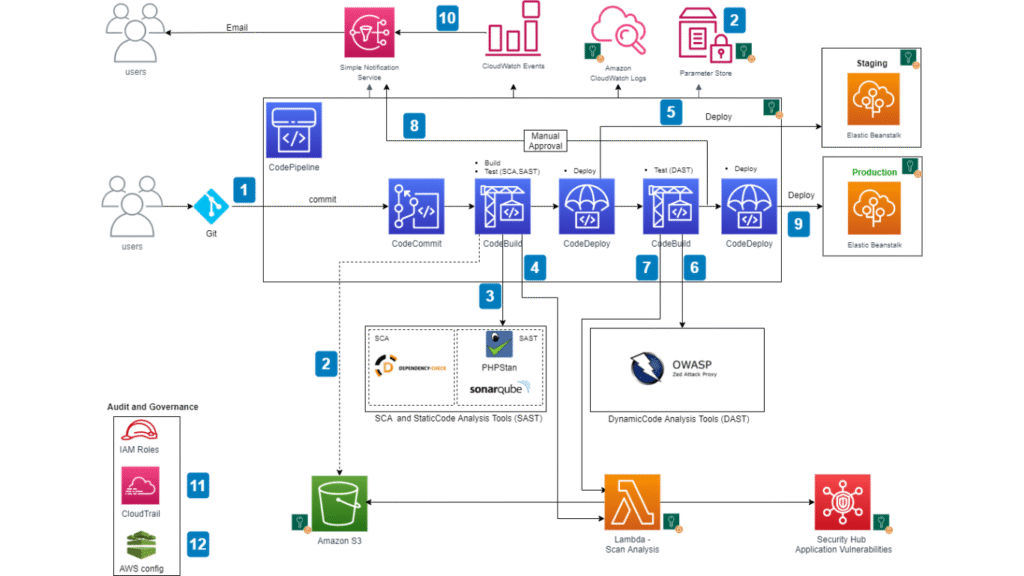
Build Stage
Security checks validate Infrastructure as Code templates. Teams block deployments when templates fail mandatory rules.
Deploy Stage
Security Hub monitors new resources as they deploy. Alerts appear instantly if rules break.
Operate Stage
Automation handles issues in real time. Teams monitor dashboards to track trends and compliance.
Skills Needed to Work with AWS Security Hub DevSecOps
Engineers who want to work with this approach usually learn:
- Cloud security fundamentals
- IAM and identity controls
- CI/CD pipelines
- Network security
- Infrastructure as Code
- Incident response
- Threat detection
These skills align with career paths connected to DevSecOps Training Online, AWS DevSecOps Certification, and aws devops certification.
Building a DevSecOps Workflow Using AWS Security Hub
Step 1: Enable Security Hub
Begin by turning on the service across all AWS accounts. This allows centralized monitoring.
Step 2: Connect Security Services
Integrate GuardDuty, Inspector, IAM Access Analyzer, and other tools.
Step 3: Create Automated Rules
Use EventBridge to route findings to Lambda or ticketing systems.
Step 4: Automate Fixes
Automate common remediations that support the goals of AWS Security Hub DevSecOps.
Step 5: Monitor Dashboards
Review dashboards daily to monitor open findings and compliance status.
Industry Research Supporting AWS Security Hub DevSecOps
Here are some industry numbers that explain why teams adopt this approach:
- Misconfigured cloud resources cause more than 70% of cloud breaches.
- Automated responses reduce incident recovery time by up to 90%.
- DevSecOps practices can improve release speed by nearly 50%.
- Continual scanning reduces misconfiguration rates by up to 80%.
These figures confirm the value of AWS Security Hub DevSecOps in large cloud environments.
Common Challenges Solved by AWS Security Hub DevSecOps
Too Many Alerts
Security Hub groups similar alerts.
Slow Manual Fixes
Automation handles fixes instantly.
Poor Visibility
One dashboard provides a full view.
Difficult Audits
Compliance reports simplify audits.
Best Practices for Implementing AWS Security Hub DevSecOps
- Use Infrastructure as Code to enforce predictable deployments.
- Integrate security scans into every CI/CD pipeline.
- Automate responses to common risks.
- Review findings often.
- Use organization-level configurations.
These practices strengthen cloud protection.
Future of AWS Security Hub DevSecOps
Cloud adoption will continue to rise. Attackers use automation, and defenders must match that speed. More teams will adopt AWS Security Hub DevSecOps to stay ahead of risks. Future enhancements may add more AI-driven detection and faster remediation.
Key Takeaways
- Cloud security needs continuous action and automation.
- AWS Security Hub DevSecOps unifies development and security in one workflow.
- It improves visibility, reduces response time, and enforces compliance.
- It supports skills used in DevSecOps Training Online, AWS DevSecOps Certification, and aws devops certification.
- Teams can build secure pipelines that protect applications and data.
Conclusion
Secure cloud operations require automation, intelligence, and teamwork. AWS Security Hub DevSecOps gives engineers a powerful way to achieve reliable protection without slowing innovation. Build your skills, follow best practices, and apply these concepts to strengthen your cloud security.
Start learning, stay consistent, and take your cloud career forward.