

Introduction
In today’s digital era, accessibility is not a luxury; it’s a necessity. As technology continues to shape every aspect of human life, making websites and applications accessible to all users, including those with disabilities, is both a moral and legal obligation. Accessibility Testing ensures that digital products are usable by people with visual, auditory, cognitive, and motor impairments.
For professionals pursuing QA software testing mastering accessibility testing has become a vital skill. Beyond functional testing, accessibility testing ensures inclusivity, compliance with global standards, and a positive user experience for everyone.
What Is Accessibility Testing?
Accessibility testing is a subset of usability testing aimed at verifying that an application or website is usable by individuals with disabilities. It ensures compliance with standards such as the Web Content Accessibility Guidelines (WCAG) and Section 508 (in the U.S.).
This testing helps identify barriers that prevent people with disabilities from effectively navigating or interacting with an application. It also verifies that assistive technologies, such as screen readers, voice recognition software, and keyboard navigation, function correctly within the digital environment.
Why Accessibility Testing Matters
1. Ethical Responsibility
Accessibility testing promotes digital inclusivity. Ensuring equal access reflects a brand’s values, showing empathy and respect toward all users.
2. Legal Compliance
Countries around the world have implemented accessibility laws like the Americans with Disabilities Act (ADA) and the Equality Act (UK). Failing to meet accessibility standards can result in legal consequences.
3. Business Benefits
An accessible product broadens your user base. When applications cater to all users, organizations can reach a larger audience and enhance customer satisfaction.
4. Improved SEO and Usability
Accessibility features, such as proper labeling and alternative text, improve website readability and SEO ranking. Thus, accessibility indirectly supports digital marketing efforts.
Key Principles of Accessibility Testing
The WCAG defines four core principles summarized by the acronym POUR:
- Perceivable – Users must be able to perceive information presented. For example, providing text alternatives for images and captions for videos.
- Operable – The interface must be operable via keyboard or assistive technologies.
- Understandable – Content must be easy to comprehend and predictable in behavior.
- Robust – The content must work with various assistive technologies and future tools.
Professionals who undergo QA software testing courses learn how to integrate these principles into manual and automated testing workflows.
Types of Disabilities Considered in Accessibility Testing
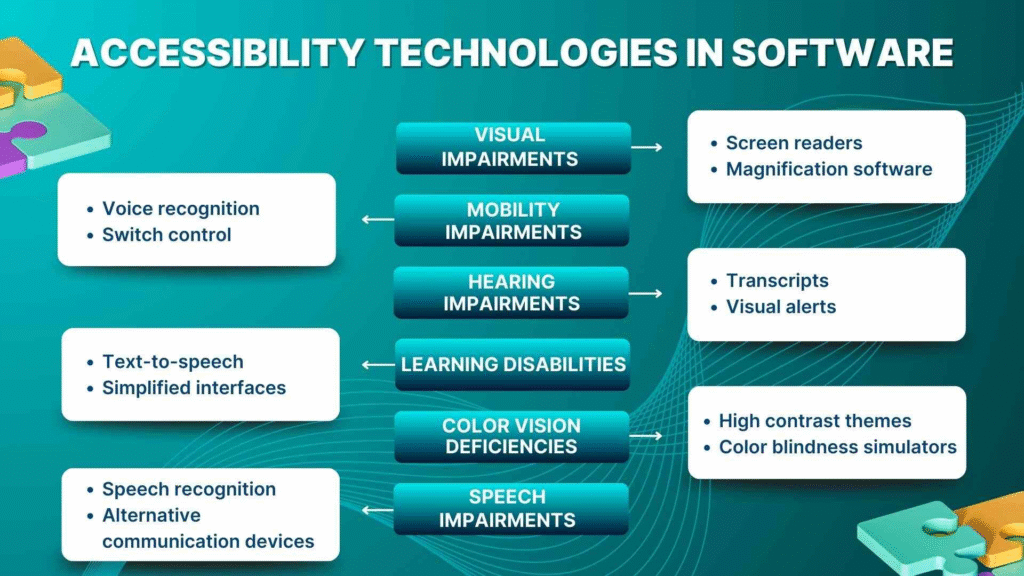
1. Visual Impairments
- Blindness, color blindness, and low vision.
- Testers use screen readers like JAWS, NVDA, or VoiceOver to verify accessibility.
2. Hearing Impairments
- Ensuring captions, transcripts, and visual alerts for auditory information.
3. Motor Disabilities
- Users may rely on keyboards or adaptive devices rather than a mouse. Testing ensures full keyboard operability.
4. Cognitive Disabilities
- Simple language, consistent navigation, and minimal distractions support users with learning or memory difficulties.
These aspects are covered extensively in Quality assurance testing courses, equipping testers with the ability to design inclusive and compliant digital products.
Accessibility Testing Process
Step 1: Understand Accessibility Guidelines
Familiarize yourself with WCAG 2.1, ADA, and Section 508 standards. These frameworks define the benchmarks for accessible digital content.
Step 2: Identify Testing Scope
Determine whether the testing will cover a web application, mobile app, or desktop software. Scope defines tools, techniques, and resources.
Step 3: Manual Accessibility Testing
Manual testing involves human judgment. Testers evaluate user interface (UI) components, navigation flow, and assistive tool behavior.
Step 4: Automated Accessibility Testing
Automation tools help identify code-level issues and compliance gaps quickly. However, automated tools cannot capture every usability nuance, so a combination of manual and automated testing yields the best results.
Step 5: Assistive Technology Testing
Use screen readers, speech input systems, and magnifiers to verify compatibility.
Step 6: Report and Fix Issues
Generate detailed reports highlighting non-compliance areas, severity, and recommendations for remediation.
Step 7: Regression Testing
Once fixes are implemented, re-run tests to ensure accessibility features remain intact after code updates.
Tools for Accessibility Testing
Here are some of the most popular tools testers learn to use in QA software testing courses:
- WAVE (Web Accessibility Evaluation Tool) – Provides visual feedback about accessibility issues directly on the webpage.
- AXE Accessibility Tool – A browser extension that identifies accessibility problems efficiently.
- Lighthouse – An open-source, automated tool for improving web page quality, including accessibility metrics.
- JAWS (Job Access With Speech) – A screen reader primarily used for Windows-based applications.
- NVDA (NonVisual Desktop Access) – Free, open-source screen reader for Windows.
- VoiceOver – Built-in screen reader on macOS and iOS devices.
- Color Contrast Analyzers – Tools like Contrast Checker ensure adequate contrast ratios between text and background.
Combining these tools helps testers uncover both technical and usability-related accessibility issues.
Manual vs. Automated Accessibility Testing
| Aspect | Manual Testing | Automated Testing |
|---|---|---|
| Definition | Performed by human testers using assistive technologies. | Executed by automated tools or scripts. |
| Accuracy | High for usability and perception-based tests. | High for code-based detection (alt text, ARIA labels). |
| Effort | Time-consuming but insightful. | Quick and repeatable. |
| Scope | Evaluates real-world user experience. | Detects technical compliance issues. |
| Ideal Use Case | Final validation by accessibility experts. | Early detection during development cycles. |
The most effective approach integrates both methods, a best practice emphasized in Quality assurance testing courses.
Accessibility Testing in Web Applications
1. Keyboard Navigation
- Verify that users can navigate through all interactive elements using only the keyboard (Tab, Enter, Space, Arrow keys).
2. Alternative Text for Images
- Ensure all images have meaningful alt text to describe content.
3. Semantic HTML
- Use proper headings (H1–H6), lists, and form labels to maintain a logical structure.
4. Color Contrast
- Maintain a contrast ratio of at least 4.5:1 between text and background for readability.
5. Error Identification and Suggestions
- Clearly identify form errors and provide corrective instructions.
6. Responsive Design
- Ensure accessibility across screen sizes and devices.
Accessibility testing ensures that even users relying on screen readers, magnifiers, or voice commands can experience the web seamlessly.
Accessibility Testing in Mobile Applications
Mobile accessibility is increasingly vital with the growth of smartphone usage.
Key areas include:
- Voice Control (e.g., Siri, Google Assistant)
- Screen Reader Compatibility (TalkBack, VoiceOver)
- Scalable Text and Zoom
- Accessible Touch Targets
- Color and Sound Adjustments
Testers trained in QA software testing courses gain hands-on exposure to these scenarios, ensuring both native and hybrid apps meet accessibility benchmarks.
Common Accessibility Issues and Fixes
| Issue | Impact | Solution |
|---|---|---|
| Missing alt text | Screen readers cannot describe images. | Add descriptive alt attributes. |
| Poor color contrast | Visually impaired users struggle to read text. | Use WCAG-compliant contrast ratios. |
| Missing form labels | Users cannot identify form fields. | Add <label> elements linked to inputs. |
| Keyboard traps | Users get stuck in certain UI elements. | Ensure focus can move freely with Tab and Shift+Tab. |
| Dynamic content updates | Screen readers may miss new information. | Use ARIA live regions to announce updates. |
Addressing these issues early reduces rework and ensures smooth project delivery.
Accessibility Testing Standards and Guidelines
1. WCAG (Web Content Accessibility Guidelines)
- Developed by W3C, WCAG provides a comprehensive set of success criteria (A, AA, AAA) to measure accessibility.
2. Section 508
- U.S. government standard ensuring federal agencies create accessible electronic and information technology.
3. ADA (Americans with Disabilities Act)
- Prohibits discrimination and ensures equal access for individuals with disabilities.
4. EN 301 549
- European standard for ICT accessibility compliance.
Students enrolled in Quality assurance testing courses gain familiarity with these global standards to align testing efforts with international compliance.
Accessibility Testing Best Practices
- Involve Users with Disabilities Early
- Real feedback from actual users ensures authentic validation.
- Shift-Left Accessibility Testing
- Integrate accessibility checks from the design and development phases.
- Regular Training and Awareness
- Encourage testers and developers to pursue QA software testing courses to stay updated.
- Continuous Testing
- Integrate automated accessibility checks into CI/CD pipelines.
- Maintain Documentation
- Record accessibility issues, test results, and improvement actions for transparency.
Role of Accessibility Testing in QA and Software Development
Accessibility testing is now part of standard QA processes across agile and DevOps teams.
- During Design: Ensure color choices and layouts comply with standards.
- During Development: Developers use linting tools and semantic HTML.
- During QA: Testers perform comprehensive manual and automated checks.
- Post-Release: Regression and user feedback refine accessibility continuously.
Professionals completing Quality assurance testing courses are trained to integrate accessibility within SDLC (Software Development Life Cycle), making inclusive design a default practice rather than an afterthought.
Tools Integration in CI/CD Pipelines
Modern QA teams integrate accessibility tools directly into CI/CD systems:
- Axe-core for automated audits in Jenkins or GitHub Actions.
- Pa11y for running automated accessibility tests.
- Lighthouse CI for continuous monitoring.
This continuous validation ensures accessibility compliance even after frequent product updates.
Career Opportunities in Accessibility Testing
As accessibility becomes a legal and moral necessity, companies are hiring specialists such as:
- Accessibility QA Engineer
- Accessibility Consultant
- Accessibility Automation Tester
- Compliance Analyst
Professionals who complete QA software testing courses often diversify into this niche due to its growing importance and global demand.
Conclusion
Accessibility Testing ensures that digital experiences are inclusive, compliant, and user-friendly for all individuals, regardless of ability. By focusing on usability, compliance, and empathy, testers help organizations align with ethical and legal standards and unlock a broader audience reach.
Whether you’re just entering the QA field or advancing your career Quality assurance testing courses provide the essential foundation to master accessibility testing. In the future, inclusivity will not just be an option; it will be the standard for digital excellence.
FAQs:
What is accessibility testing in software testing?
Accessibility testing ensures that software and websites can be used by people with disabilities, including those with visual, hearing, motor, or cognitive impairments.
Why is accessibility testing important?
It improves usability for all users, helps meet accessibility standards like WCAG, and supports legal compliance.
What are the different types of accessibility testing?
Common types include visual, keyboard navigation, screen reader, color contrast, cognitive, and mobile accessibility testing.
Which tools are commonly used for accessibility testing?
Popular tools include Axe, WAVE, Lighthouse, NVDA, JAWS, and Accessibility Insights.
What is the difference between accessibility testing and usability testing?
Accessibility testing focuses on making applications usable for people with disabilities, while usability testing evaluates the overall user experience for all users.
























11 Responses
Accessibility testing is a form of testing that’s done to make sure an application meets the requirements of those who have disabilities.
Accessibility Testing is to ensure your application is enabled to use by disabled people who have disabilities like Vision, physical , cognitive , literacy.
Accessibility Testing is needed because 20% of the people are disabled and they should be able to use the apllication. Also to abide by the Accessibility legislations of Government agencies.
Accessibility Testing can be done as Manual or Automated.
Accessibility testing can be signoff with some checklist: eg : application provides keyboard equivalents for all the mouse operations,
application operation document , shortcut keys, Response time Details.
There are sofwares like Jaws is available for vision disable people.
Accessibility testing: is performed to make sure that the application is being tested to ensure that it is usable by the people with disabilities like hearing, permanent blind, color blindness, old age, Cognitive disability, Literacy disability and other disadvantaged groups.
Accessibility testing is explained in very simple and details way that anyone can understand we do accessibility testing and which type of disability is supported by the technology, below I will list and explain which types of disability and technology we are using to support disadvantage groups.
1. Vision disability- Complete Blindness or may be color blindness or may be poor vision. Visual problems will have visual strobe and flashing effect problems.
2. Physical disability- Not able to use the mouse or keyboard with hand. Poor motor skills like hand movements and muscle slowness.
3. Cognitive disability- Learning difficulties or may be poor memory or may be not able to understand more complex scenarios.
4. Literacy disability- Those who have reading problems.
These type of disability is supported by the following technology
1. Speech recognition software- It will transform spoken word to text which serves as the input to the computer.
2. Screen reader software- This is used to read out the text which is displayed on the screen.
3. Screen magnification software- It is used to enlarge the monitor and make reading easy for vision-impaired users.
4. Special keyboard- made for the users for easy typing, who have motor control difficulties.
Accessibility testing is done to make sure the application is usable for the people with any kind of disabilities like hearing, color blindness and other disabilities. Manual and Automation testing is done to make sure required features have been developed properly to provide help.
ACCESSIBILITY TESTING
Accessibility testing is performed to make sure that the application is being tested to ensure that it is is usable by the people with disabilities like hearing, color blindness, old age and other disadvantaged groups. We do Accessibility testing and which type of disability is supported by the technology
This type of disability is supported by the following technology:
1. Speech recognition software – It will transform spoken word to text which serves as the input to the computer.
2. Screen reader software – This is used to read out the text which is displayed on the screen.
3. Screen magnification software – It is used to enlarge the monitor and make reading easy for vision-impaired users.
4. Special keyboard – made for the users for easy typing, who have motor control difficulties.
We need the accessibility testing because:
1. To cater the market for specially challenged customer market. Accessibility issues in software can be resolved if Accessibility Testing is made part of normal software testing life cycle.
2. Abide by the Accessibility legislations-where is required IT products have to be accessible by the disabled people, Accessibility testing is important to makes sure legal compliance.
3. Avoiding the potential Law- There are many companies products are not disabled friendly, it is best to create products which supports disabled and also avoid potential law suits.
Application should support below features:
1. Ph Vision disability- Complete Blindness or may be color blindness or may be poor vision. Visual problems will have visual strobe and flashing effect problems.
2. Physical disability – Not able to use the mouse or keyboard with hand. Poor motor skills like hand movements and muscle slowness.
3. Cognitive disability – Learning difficulties or may be poor memory or may be not able to understand more complex scenarios.
4. Literacy disability Those who have reading problems.
Accessibility- Testing can be done Manually or Automated
Accessibility Testing:
We do accessibility testing for software to confirm easy access and user friendly for disabled people like some have hearing limitations, some are color blinds, aged people and other types of disabilities.
There are some software products like Speech Recognition software, screen Reader software, Screen Magnification software, etc. which are using by Disabled people based on their needs.
Accessibility testing can be done in both manually and automated process.
Accessibility testing is performed to make sure that application can be used by disabled or old age people, having hearing problem, color blindness etc. Example : speech recognition software, screen reader s/w. screen magnifier
We can performed accessibility testing either manually or automated.
Accessibility testing is the practice of making your web and mobile application usable to as many people as possible. It makes apps accessible to those with disabilities like hearing, color blindness and other physical or cognitive condition.
Accessibility testing is performed to make sure that the application is useful for disability persons like color blindness, hearing problem and old age and other disadvantages groups. The software used for this testing are
1. speech recognition software
2. screen reader software ..
3. screen magnification software
4. special keyboard.
There are Two type of testing will be performed in accessibility testing
1. manual 2. Automated.
Accessibility testing is performed to make sure that the application is being tested to ensure that it is is usable by the people with disabilities like hearing, color blindness, old age and other disadvantaged groups. Here people with disabilities use assistive technology which helps them in operating a software product.
Examples are:
Speech recognition software- It will transform spoken word to text which serves as the input to the computer.
Screen reader software- This is used to read out the text which is displayed on the screen.
Screen magnification software- It is used to enlarge the monitor and make reading easy for vision-impaired users.
Special keyboard- made for the users for easy typing, who have motor control difficulties.
Accessibility testing:
This type of testing to verify the features of application mostly used by people of disabilities. The software product should support speech recognition, screen reader, screen magnification and special keyboard. Application should support features like vision disability, physical disability, cognitive disability and literacy disability which are helpful for challenged people. Accessibility testing can be done in both ways: manual and automation testing.