

In the world of database management and development, PL SQL and T- SQL (Procedural Language for SQL) and T-SQL (Transact-SQL) are two of the most widely used programming languages. Both serve as procedural extensions to SQL (Structured Query Language) but are tailored for different database systems PL/SQL is primarily used with Oracle databases, while T-SQL is used with Microsoft SQL Server.
As QA testers play an essential role in ensuring that database-driven applications function correctly and efficiently, understanding the key differences between PL SQL and T-SQL is crucial for better testing practices. In this blog post, we will dive into the basics of PL SQL and T-SQL, explore their similarities and differences, and discuss their applications in the realm of QA testing.
What is PL/SQL?
PL SQL is Oracle’s procedural extension to SQL. It allows users to write complex queries and programmatic logic directly within Oracle databases. With PL/SQL, developers can create stored procedures, functions, triggers, and anonymous blocks to manage, manipulate, and interact with database data in an efficient and secure manner.
Key Features of PL SQL :
- Procedural Language: It supports traditional programming constructs like loops, conditional statements, variables, and error handling.
- Blocks of Code: PL SQL code is written in blocks, which contain declarations, executable statements, and exception handlers.
- Integration with SQL: PL/SQL can seamlessly integrate SQL queries and commands into its procedural code, allowing for the manipulation of database objects like tables, views, and indexes.
- Error Handling: PL SQL has robust error-handling features, such as the
EXCEPTIONblock, allowing developers to manage errors gracefully.
PL/SQL is commonly used for developing triggers, stored procedures, and functions in Oracle databases. Its ability to embed SQL directly into the programming language makes it a powerful tool for interacting with data at the backend level.

What is T-SQL?
T-SQL is an extension of SQL developed by Microsoft for use with SQL Server. While T-SQL is based on SQL, it includes additional features and capabilities designed for procedural programming. T-SQL allows users to write complex queries, control flow, error handling, and perform operations that cannot be achieved with SQL alone.
Key Features of T-SQL:
- Procedural Constructs: T-SQL adds procedural constructs such as loops, conditionals, and error handling to the SQL language, making it suitable for complex operations.
- Stored Procedures and Triggers: Like PL/SQL, T-SQL supports stored procedures, triggers, and user-defined functions to enhance database operations.
- Error Handling: T-SQL provides robust error handling through the
TRY...CATCHblock, allowing developers to handle exceptions effectively. - Transaction Control: T-SQL offers advanced transaction control mechanisms, such as
BEGIN TRANSACTION,COMMIT, andROLLBACK, to ensure data consistency.
T-SQL is commonly used in SQL Server environments for writing stored procedures, creating triggers, and automating tasks such as batch processing and data manipulation. Its procedural extensions provide more flexibility in handling complex database interactions and business logic.
PL SQL is an extension created by Oracle to have the benefits of looping, functions, variables. PL SQL block has three sections.
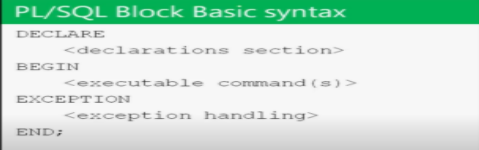
- Declare
- Begin
- Exception
Key Differences Between PL/SQL and T-SQL
While PL/SQL and T-SQL share some common goals facilitating procedural programming within a SQL environment there are significant differences between the two languages. These differences stem from the underlying database systems (Oracle for PL/SQL and SQL Server for T-SQL) and the unique features they provide.
1. Database System
The most obvious difference between PL/SQL and T-SQL is the database systems they are designed to work with:
- PL/SQL is used in Oracle databases.
- T-SQL is used in Microsoft SQL Server databases.
Each database system has its own implementation of SQL, which influences how these procedural extensions are implemented and used.
2. Syntax and Structure
Both PL/SQL and T-SQL allow for procedural programming within SQL queries, but the syntax and structure differ:
- PL/SQL: PL/SQL code is written in anonymous blocks, stored procedures, or functions. A typical PL/SQL block starts with the
DECLAREsection (for declaring variables), followed by theBEGINsection (for executable statements), and ends with theEXCEPTIONblock (for error handling). - T-SQL: T-SQL follows a similar structure but uses the
BEGIN...ENDconstruct for grouping statements and aTRY...CATCHblock for error handling.
Example of PL/SQL block:
DECLARE
  x NUMBER;
BEGIN
  SELECT COUNT(*) INTO x FROM employees;
  DBMS_OUTPUT.PUT_LINE('Total employees: ' || x);
EXCEPTION
  WHEN OTHERS THEN
    DBMS_OUTPUT.PUT_LINE('An error occurred');
END;
Example of T-SQL block:
DECLARE @x INT;
BEGIN
  SELECT @x = COUNT(*) FROM employees;
  PRINT 'Total employees: ' + CAST(@x AS VARCHAR);
END;
As you can see, the general structure is similar, but PL/SQL uses Oracle-specific functions like DBMS_OUTPUT.PUT_LINE, while T-SQL uses PRINT for output.
3. Error Handling
Both PL/SQL and T-SQL have error-handling mechanisms, but they differ in their approach:
- PL/SQL: Uses the
EXCEPTIONblock to handle errors. Specific exceptions can be caught and handled individually, providing detailed error messages. - T-SQL: Uses the
TRY...CATCHblock for error handling. If an error occurs within theTRYblock, control is transferred to theCATCHblock.
PL/SQL example:
EXCEPTION
  WHEN NO_DATA_FOUND THEN
    DBMS_OUTPUT.PUT_LINE('No data found');
  WHEN OTHERS THEN
    DBMS_OUTPUT.PUT_LINE('An error occurred');
T-SQL example:
BEGIN TRY
  -- Code that might throw an error
END TRY
BEGIN CATCH
  PRINT 'An error occurred: ' + ERROR_MESSAGE();
END CATCH
4. Control-of-Flow Constructs
Both languages provide control-of-flow constructs such as loops and conditionals, but there are differences in syntax:
- PL/SQL: Uses
LOOP,FOR LOOP, andWHILE LOOPfor iteration. It also supportsIF...THEN...ELSEstatements. - T-SQL: Uses similar constructs, including
WHILE,IF...ELSE, but its looping mechanism is slightly different in terms of control and performance.
Example of PL/SQL loop:
FOR i IN 1..10 LOOP
  DBMS_OUTPUT.PUT_LINE(i);
END LOOP;
Example of T-SQL loop:
DECLARE @i INT = 1;
WHILE @i <= 10
BEGIN
  PRINT @i;
  SET @i = @i + 1;
END
5. Functions and Stored Procedures
Both PL/SQL and T-SQL support stored procedures and functions, but the way they are written and invoked can vary:
- PL/SQL: Functions return a value, while procedures do not. PL/SQL allows you to execute multiple SQL statements in a single function or procedure, making it highly efficient for handling complex database operations.
- T-SQL: T-SQL uses
CREATE PROCEDUREandCREATE FUNCTIONto define stored procedures and functions. T-SQL also supports user-defined functions, but these functions are typically more restrictive in terms of the operations they can perform compared to PL/SQL.
Use Cases for PL/SQL and T-SQL in QA Testing
As a QA tester, it’s essential to have a solid understanding of both PL/SQL and T-SQL to effectively test database-driven applications. Here’s how these languages come into play in the QA process:
1. Database Testing with Stored Procedures and Functions
- PL/SQL and T-SQL are commonly used to write stored procedures, functions, and triggers. As a QA tester, you will need to verify that these database objects function correctly and efficiently under various conditions.
- Testing stored procedures involves validating that they return the expected results, handle errors properly, and interact with the database as expected. For instance, you might need to write test cases to ensure that a PL/SQL procedure handles a
NULLvalue or that a T-SQL trigger fires correctly when a record is inserted or updated.
2. Performance Testing
- Both PL/SQL and T-SQL can be used to write complex SQL queries that interact with large datasets. As a QA tester, performance testing is crucial to ensure that these queries are optimized for speed and efficiency.
- You will need to test how PL/SQL and T-SQL queries perform under heavy load and ensure that they do not cause performance degradation in the database.
3. Automation of SQL Scripts
- PL/SQL and T-SQL scripts can be automated as part of your test automation strategy. For example, you can create automated test cases that run SQL scripts to verify data integrity, check for performance issues, or validate business logic implemented within the database.
Conclusion
In conclusion, PL/SQL and T-SQL are both powerful languages that allow developers and QA testers to interact with and manipulate databases in a procedural manner. While PL/SQL is used primarily with Oracle databases, and T-SQL is specific to Microsoft SQL Server, the core concepts and functionalities they provide are quite similar.
As a QA tester, understanding both PL/SQL and T-SQL will enhance your ability to test database-driven applications, verify data integrity, optimize query performance, and automate database-related tests. With a solid grasp of these languages, you’ll be well-equipped to tackle the challenges of testing complex systems that rely on database management systems.
For those looking to expand their skills enrolling in a QA online training course can provide hands-on experience with PL/SQL and T-SQL to prepare you for real-world testing challenges.





















14 Responses
SQL – Structured Query Language is a standard language for querying a database. PL SQL is called as Procedural language extension to SQL. T-SQL stands for Transact SQL. This is the extension of structured query language. T-SQL was originally developed by Sybase and now it is taken by Microsoft. T-SQL adds some advanced features to SQL to make it more powerful like declared variables, transaction variables and exception handling. These additions make T-SQL more complete which specifies the universality of a computing language.
PL SQL was developed by Oracle. It is a natural programming which is compatible with the sql and also provides better functionality. PL sql is good with its performance with oracle database server. It is complex to understand and Use
T-sql was developed by Microsoft. it provides highest degree of control to the programmers. T-sql is good with the performance with Microsoft sql server. it is much simpler and easy to Use.
SQL is a standard language for querying a database. PL SQL is called as Procedural language extension to SQL. T-SQL stands for Transact SQL. This is the extension of SQL. T-SQL adds some advanced features to SQL to make it more powerful like declared variables, transaction variables and exception handling. These additions make T-SQL more complete.PL SQL is an extension created by Oracle to have the benefits of looping, functions, variables. PL SQL block has three sections which are Declare, Begin and Exception.
Data types:
*Numerics data types like BigInt and Int,smallInt ,decimal,Bit.
*Date and Time has Date ,Time,datetime2 etc.
*Character strings has Char, varchar.
*Unicode character strings has Nchar,Nvarchar
*Binary strings has Binary, Varbinary and image.
T-SQL Transactions:
*COMMIT statement to save the changes.
*ROLL BACK statement to undo the changes before saving.
*SAVEPOINT statement splits the complete transaction in smaller parts for ROLL BACK.
*@@ TRANCOUNT counts the number of transactions for sql.
PL SQL is called as Procedural language extension to SQL. T-SQL stands for Transact SQL. This is the extension of structured query language. T-SQL was developed by Microsoft whereas PL SQL was developed by Oracle. T-SQL adds some advanced features to SQL to make it more powerful like declared variables, transaction variables and exception handling. PL SQL has the advanced features like looping, functions, variables. PL SQL block has three sections.
1. Declare
2. Begin
3. Exception
T-SQL Transactions:
1.COMMIT statement to save the changes.
2.ROLL BACK statement to undo the changes before saving.
3.SAVEPOINT statement splits the complete transaction in smaller parts for ROLL BACK.
4.@@ TRANCOUNT counts the number of transactions for sql.
SQL – Structured Query Language is a standard language for querying a database. PL SQL is called as Procedural language extension to SQL. T-SQL stands for Transact SQL. This is the extension of structured query language. T-SQL adds some advanced features to SQL to make it more powerful like declared variables, transaction variables and exception handling. These additions make T-SQL more complete which specifies the universality of a computing language.
PL SQL is an extension created by Oracle to have the benefits of looping, functions, variables. PL SQL block has three sections.
1. Declare
2. Begin
3. Exception
Some of the differences between PL-SQL and T-SQL are:
1)PL SQL was developed by Oracle. T-sql was developed by Microsoft.
2)PL SQL is a natural programming which is compatible with the sql and also provides better functionality. T-SQL provides highest degree of control to the programmers
3)PL SQL is good with its performance with oracle database server. T-sql is good with the performance with Microsoft sql server.
4)PL SQL is complex to understand and Use. T-SQL is much simpler and easy to Use.
SQL – Structured Query Language – a standard language for querying a database.
PL SQL – Procedural language – extension to SQL.
T-SQL – Transact SQL – the extension of structured query language.
PL SQL is an extension created to have the benefits of looping, functions, variables.
T-SQL uses some transactions which ensure data consistency. It adds some advanced features to SQL to make it more powerful like declared variables, transaction variables and exception handling.
To sum up on PL SQL and T-SQL
PL SQL:
– Developed by Oracle.
– Natural programming, compatible with the SQL and also provides better functionality.
– Good with its performance with oracle database server
– Complex to understand and Use
– AUTOCOMMIT Command which saves transactions automatically.
– “INSERT INTO” statement must be used.
– Provides OOPs concepts like data-encapsulation, function overriding etc
T-SQL
– Developed by Microsoft.
– Provides highest degree of control to the programmers
– Good with the performance with Microsoft sql server.
– Much simpler and easy to Use
– NO AUTOCOMMIT command all transactions are saved manually.
– “SELECT INTO” statement must be used.
– Inserting multiple rows into table using BULK INSERT statement.
PL SQL is an extension created by Oracle to have the benefits of looping, functions, variables. PL SQL block has three sections. SQL – Structured Query Language is a standard language for querying a database. PL SQL is called as Procedural language extension to SQL. T-SQL stands for Transact SQL. This is the extension of structured query language. T-SQL was originally developed by Sybase and now it is taken by Microsoft.
PL SQL block has three sections.
1. Declare
2. Begin
3. Exception
T-SQL Transactions:
1.COMMIT statement to save the changes.
2.ROLL BACK statement to undo the changes before saving.
3.SAVEPOINT statement splits the complete transaction in smaller parts for ROLL BACK.
4.@@ TRANCOUNT counts the number of transactions for sql.
SQL – Structured Query Language is a standard language for querying a database. PL SQL is called as Procedural language extension to SQL.
PL SQL is an extension created by Oracle to have the benefits of looping, functions, variables. PL sql is good with its performance with oracle database server.PL sql provides OOPs concepts like data-encapsulation, function overriding etc
PL SQL block has three sections.
Declare
Begin
Exception
T-SQL stands for Transact SQL. This is the extension of structured query language.
T-SQL was originally developed by Sybase and now it is taken by Microsoft.
T-SQL adds some advanced features to SQL to make it more powerful like declared variables, transaction variables and exception handling.
T-SQL Transactions:
Is a set of T-sql statements which executes together as a unit like we have
COMMIT statement to save the changes.
ROLL BACK statement to undo the changes before saving.
SAVEPOINT statement splits the complete transaction in smaller parts for ROLL BACK.
@@ TRANCOUNT counts the number of transactions for sql.
SQL – Structured Query Language is a standard language for querying a database. PL SQL is called as Procedural language extension to SQL. T-SQL stands for Transact SQL. This is the extension of structured query language. T-SQL was originally developed by Sybase and now it is taken by Microsoft. T-SQL adds some advanced features to SQL to make it more powerful like declared variables, transaction variables and exception handling. These additions make T-SQL more complete which specifies the universality of a computing language.
PL SQL is an extension created by Oracle to have the benefits of looping, functions, variables. PL SQL block has three sections.
• Declare
• Begin
• Exception
Procedures:
It is a named block of statement. It may or may not return the value.
T-SQL uses some transactions which ensure data consistency.
Data types: In these sections there is lot of classification like numerics, Date and time, Character strings and Unicode character strings and binary strings.
• Numerics data types like BigInt and Int,smallInt ,decimal,Bit.
• Date and Time has Date ,Time,datetime2 etc.
• Character strings has Char, varchar.
• Unicode character strings has Nchar,Nvarchar
• Binary strings has Binary, Varbinary and image.
•
T-SQL Transactions:
Is a set of T-sql statements which executes together as a unit like we have
• COMMIT statement to save the changes.
• ROLL BACK statement to undo the changes before saving.
• SAVEPOINT statement splits the complete transaction in smaller parts for ROLL BACK.
• @@ TRANCOUNT counts the number of transactions for sql.
PL- SQL and T- SQL
SQL – Structured Query Language
PL SQL- Procedural Language SQL (Extension of SQL)
T SQL- Transact SQL (universality of computing language)
PL SQL has three blocks.
1. Declare
2. Begin
3. Exception
T SQL has statements
1. COMMIT
2. ROLL BACK
3. SAVEPOINT
4. @@TRANCOUNT
PL SQL is called as Procedural language extension to SQL. T-SQL stands for Transact SQL. This is the extension of structured query language. T-SQL was developed by Microsoft whereas PL SQL was developed by Oracle. T-SQL adds some advanced features to SQL to make it more powerful like declared variables, transaction variables and exception handling. PL SQL has the advanced features like looping, functions, variables. PL SQL block has three sections.
1. Declare
2. Begin
3. Exception
T-SQL Transactions are:
1.COMMIT statement to save the changes.
2.ROLL BACK statement to undo the changes before saving.
3.SAVEPOINT statement splits the complete transaction in smaller parts for ROLL BACK.
4.@@ TRANCOUNT counts the number of transactions for sql.
SQL – Structured Query Language is a standard language for querying a database. PL SQL is called as Procedural language extension to SQL. T-SQL stands for Transact SQL. This is the extension of structured query language. T-SQL was originally developed by Sybase and now it is taken by Microsoft. T-SQL adds some advanced features to SQL to make it more powerful like declared variables, transaction variables and exception handling. These additions make T-SQL more complete which specifies the universality of a computing language.
PL SQL is an extension created by Oracle to have the benefits of looping, functions, variables. PL SQL block has three sections.
PL SQL and T- SQL
Declare
Begin
Exception
*Declare section:
Declare section is an optional section where we can declare the variables.
*Begin section:
Begin is the section where all the SQL commands are written.
*Exception section:
Exception block: if some error encounters in the earlier statements it is managed or handled in this block. Finally the project is finished by End statement
T-SQL Transactions:
Is a set of T-sql statements which executes together as a unit like we have
COMMIT statement to save the changes.
ROLL BACK statement to undo the changes before saving.
SAVEPOINT statement splits the complete transaction in smaller parts for ROLL BACK.
@@ TRANCOUNT counts the number of transactions for sql.
PL SQL is called as Procedural language extension to SQL. T-SQL stands for Transact SQL. This is the extension of structured query language. T-SQL was developed by Microsoft whereas PL SQL was developed by Oracle. T-SQL adds some advanced features to SQL to make it more powerful like declared variables, transaction variables and exception handling. PL SQL has the advanced features like looping, functions, variables. PL SQL block has three sections.
1. Declare
2. Begin
3. Exception
T-SQL Transactions are:
1.COMMIT statement to save the changes.
2.ROLL BACK statement to undo the changes before saving.
3.SAVEPOINT statement splits the complete transaction in smaller parts for ROLL BACK.
4.@@ TRANCOUNT counts the number of transactions for sql.
SQL – Structured Query Language is a standard language for querying a database. PL SQL is called as Procedural language extension to SQL. T-SQL stands for Transact SQL. This is the extension of structured query language.There are various differences between PL SQL (procedural language extension) and T-SQL(transact SQL). PL SQL was developed by Oracle. It is a natural programming which is compatible with sql and also provides better functionality. PL sql is good with its performance with oracle database server. It is complex to understand and use. There is AUTOCOMMIT command which saves transactions automatically. Here INSERT INTO statement must be used. PL sql provides OOPs concepts like data encapsulation, function overriding etc.
T-sql was developed by Microsoft. It provides highest degree of control to the programmers. T-sql is good with the performance with Microsoft sql server. It is much simpler and easy to use. There is no AUTOCOMMIT command all transactions are saved manually. Here SELECT INTO statement must be used. This allows inserting multiple rows into table using BULK INSERT statement.
SQL – Structured Query Language is a standard language for querying a database. PL SQL is called as Procedural language extension to SQL. T-SQL stands for Transact SQL. This is the extension of structured query language. T-SQL was developed by Microsoft whereas PL SQL was developed by Oracle. T-SQL adds some advanced features to SQL to make it more powerful like declared variables, transaction variables and exception handling.
PL SQL is an extension created by Oracle to have the benefits of looping, functions, variables. PL SQL block has three sections Declare ,Begin and Exception.
T-SQL Transactions are
1.COMMIT statement to save the changes.
2.ROLL BACK statement to undo the changes before saving.
3.SAVEPOINT statement splits the complete transaction in smaller parts for ROLL BACK.
4.@@ TRANCOUNT counts the number of transactions for SQL
PL-SQL is complex to understand and Use but T-SQL is much simpler and easy to Use. PL-SQL has AUTOCOMMIT Command which saves transactions automatically whereas PL-SQL has no AUTOCOMMIT command all transactions are saved manually. For PL-SQL INSERT INTO statement must be used but for PL-SQL SELECT INTO statement must be used.