

Artificial intelligence is transforming data analytics by helping professionals process large datasets, identify patterns, automate repetitive tasks, and generate insights faster. From writing and debugging analytical code to explaining complex findings, AI can support data analysts throughout different stages of the analytics process.
H2K Infosys helps learners understand how AI can be applied to practical data analytics scenarios and modern workplace requirements. In this article, we explore three unique ways to use AI in data analytics, including code generation and debugging, explaining data insights, and generating synthetic data.
What is AI in Data Analytics?
AI in Data Analytics means using artificial intelligence technologies to collect, process, analyze, and interpret large amounts of data. AI can identify patterns, detect trends, automate repetitive analysis, generate predictions, and provide insights that help businesses make faster, data-driven decisions.
In simple terms, AI makes data analytics faster, more automated, and more predictive by helping analysts move beyond basic reporting toward deeper insights and forecasting.
You can learn more by checking out the Online Artificial intelligence course.
How Does AI in Data Analytics Work?
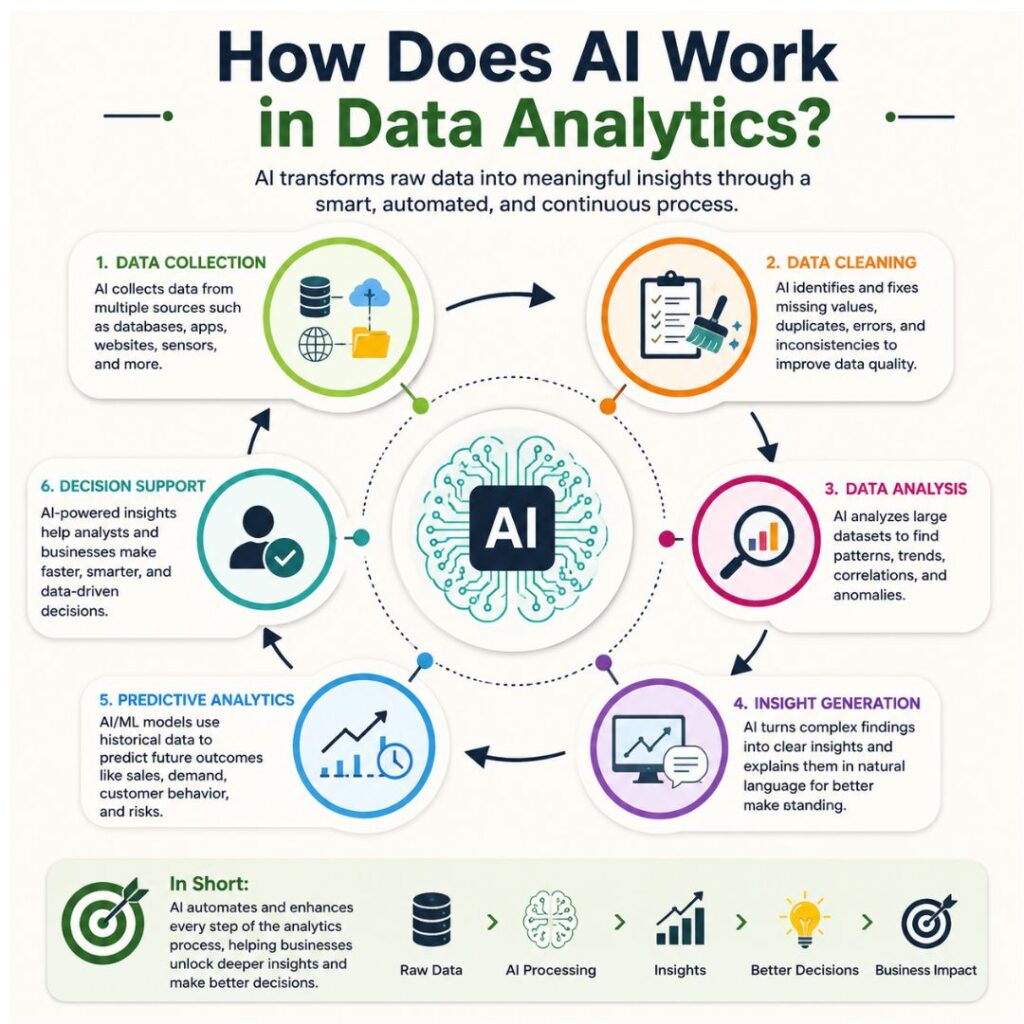
AI works in data analytics by using machine learning, natural language processing, and automation to process large amounts of data and identify useful patterns. It can help analysts clean data, detect anomalies, generate insights, make predictions, and automate repetitive analytical tasks.
The process generally involves these steps:
- Data Collection: AI gathers data from sources such as databases, spreadsheets, applications, websites, and business systems.
- Data Cleaning: AI can identify missing values, duplicates, inconsistencies, and potential errors that could affect analysis.
- Data Analysis: AI analyzes large datasets to discover patterns, relationships, trends, and unusual behavior that may be difficult to identify manually.
- Insight Generation: AI can explain findings in natural language, helping analysts understand what the data is showing and why certain patterns may have occurred.
- Predictive Analytics: Machine learning models can use historical data to forecast outcomes such as sales, customer behavior, demand, or potential risks.
- Decision Support: Analysts can use AI-generated insights to develop recommendations and support faster, data-driven business decisions.
In short, AI acts as an assistant throughout the analytics process, reducing repetitive work while helping data professionals discover insights more efficiently.
AI’s Role in Data Analytics and Its Importance
Let’s look at some of the advantages of employing AI in data analytics so you can better grasp why it’s vital.
1. Speed and Efficacy
Because AI systems digest data far more quickly than humans do, the conclusions you draw from your analysis will be more timely and precise. Organisations can now more easily create and act on decisions quickly.
Additionally, it is impossible for humans to fully recall all the commands or library syntaxes of the many data analysis libraries. You can seek up these commands fast with the aid of an AI assistant, who can also make suggestions for different ways to do your investigation.
2. Validation and fact-checking
You can rapidly find discrepancies in your data using AI techniques.
For instance, an AI chatbot can assist in looking into possible causes if analytics data differ from what you anticipated. Some AI models can even flag mistakes or possible problems before they arise.
3. Data democratization
Additionally, AI may enable more open access to data. In a different article, you may read more about data democratisation.
Businesses may enable average non-data users to study massive data sets and swiftly extract important insights by incorporating natural language processing (NLP) into AI chatbots.
This makes it simpler for individuals with less knowledge to access complicated information without needing to be familiar with the technical terms used in data science.
4. Automatic creation of reports
Businesses can automate the creation of reports using AI. AI tools can generate reports fast and automatically rather than having to manually create reports for each individual analysis.
Regardless of their location or background, all employees will have quick access to the same information thanks to these automatic reports.
3 Unique Applications of AI in Data Analytics
We examine whether programming will be replaced by AI in a different piece. In it, we come to the conclusion that the more likely scenario is that AI will support individuals engaged in programming and data analysis. Here are a few applications of AI in data analysis:
1. Generating code & debugging errors
First, you’ll probably use AI to generate code or fix problems with data analysis. This is especially beneficial for difficult tasks like viewing massive datasets and creating machine learning models.
DataCamp Workspace AI, Anaconda Assistant, Jupyter AI, and GitHub Copilot are a few popular AI coding assistants you may employ.
You can use them to generate code and produce code blocks for analysis. For instance, provided your Python programming environments are running the IPython kernel, you can instruct the Jupyter AI from within them.
Additionally, you can ask the AI to comment on your code if you’ve created some more complicated code on your own and are having difficulties explaining it in text. This will allow you to quickly save time on the tedious documentation process.
You may also ask the AI to offer you code completions, which let you start typing a function and have it finish it depending on the details you provided in your comment.
The time spent looking for a solution is significantly reduced because these tools may also help you troubleshoot difficulties that you run across.
Microsoft 365 Copilot can assist you with writing formulae and macros if you use Excel.

2. Explaining analysis & insights
To obtain meaningful business insight from data analytics, it is occasionally required to clarify insights and delve deeper into the data. An AI can be useful here.
You can rapidly explain why a certain data point on a chart is acting a certain way and offer more insights into it by using AI tools for data analysis like Tableau GPT.
For instance, you can pose direct inquiries like:
- Why did sales decline in March, you ask?
- What might be causing the sudden increase in users?
- What is the year’s best revenue quarter for us?
- The AI chatbot will next search your datasets for patterns and connections that might help it answer your inquiries.
When your data analytics project comes across a new dataset or database, you could use this function for exploratory data analysis.
3. Generating Artificial Data
The creation of synthetic data is a useful use of AI in the analytics industry. In fact, a Gartner analysis predicts that by 2030, most future AI models will have been trained using fake data.
Data scientists and machine learning engineers may find this to be extremely helpful.
For instance, machine learning models can be supplied with training datasets. Either free tools like ChatGPT or premium tools like Mostly AI or Gretel AI can be used for this.
As a result, testing several models to evaluate how they perform using the given data is made simpler. This is especially helpful if you require some difficult-to-find training datasets, such as various media types, including photographs and videos.
Automated data imputation is another method AI may support data analysis. Automated imputation can quickly and accurately fill in datasets that have missing values or outliers.
Conclusion
In conclusion, because of the advantages of speed, data validation, democratisation, and automation offered by AI, its application and significance in data analytics will continue to grow over time.
Given the constant development of new tools and applications, the use of AI in data analytics appears to have a bright future. Coding for data analysis, explaining a discovery, producing artificial data, designing dashboards, and automating data entry are a few of these.
You will be able to perform your duties effectively and stay current as a data professional by learning to apply these methods and technologies. You’ll be able to handle data analysis chores more precisely and quickly if AI is on your side. Check out the Artificial intelligence online training to learn more.
FAQs About AI in Data Analytics
What is AI in data analytics?
AI in data analytics uses artificial intelligence to process data, identify patterns, detect anomalies, generate insights, and support business decisions.
How is AI used in data analytics?
AI is used for data cleaning, code generation, predictive analytics, anomaly detection, automated reporting, data visualization, and natural-language data analysis.
What are the benefits of AI in data analytics?
The main benefits include faster data processing, automation of repetitive tasks, improved pattern detection, quicker insights, and better support for data-driven decision-making.
Will AI replace data analysts?
AI is unlikely to completely replace data analysts. Instead, it can automate repetitive tasks and help analysts spend more time on interpreting results, understanding business needs, and making recommendations.
What AI tools are used in data analytics?
Popular AI-enabled tools include ChatGPT, Jupyter AI, GitHub Copilot, Microsoft Copilot, Tableau AI, and Power BI Copilot.