Data Analytics training equips professionals with the technical knowledge and practical skills needed to collect, process, and interpret data for informed decision-making. At H2K Infosys, this training program covers a range of industry-standard tools, including Power BI, Tableau, SQL, Python, and other analytics frameworks, enabling learners to analyze datasets, create interactive dashboards, and support enterprise-level business intelligence initiatives. Professionals enrolled in Data Analytics training gain both theoretical knowledge and practical exposure to tools widely adopted in IT and business operations.
What is Data Analytics Training?
Data Analytics training is an educational program designed to teach professionals how to examine raw data to extract meaningful insights. It emphasizes understanding data structures, performing statistical analyses, and using visualization tools to communicate results effectively. The training typically covers:
- Data Extraction and Storage: Using SQL and database management systems.
- Data Cleaning and Transformation: Leveraging Python libraries like Pandas and NumPy.
- Data Visualization: Using Power BI, Tableau, and Matplotlib.
- Reporting and Dashboards: Integrating insights into actionable business strategies.
This training focuses on real-world applications, preparing professionals to handle tasks such as trend analysis, business intelligence reporting, and predictive analytics.
Which Tools Are Covered in H2K Infosys Data Analytics Training?
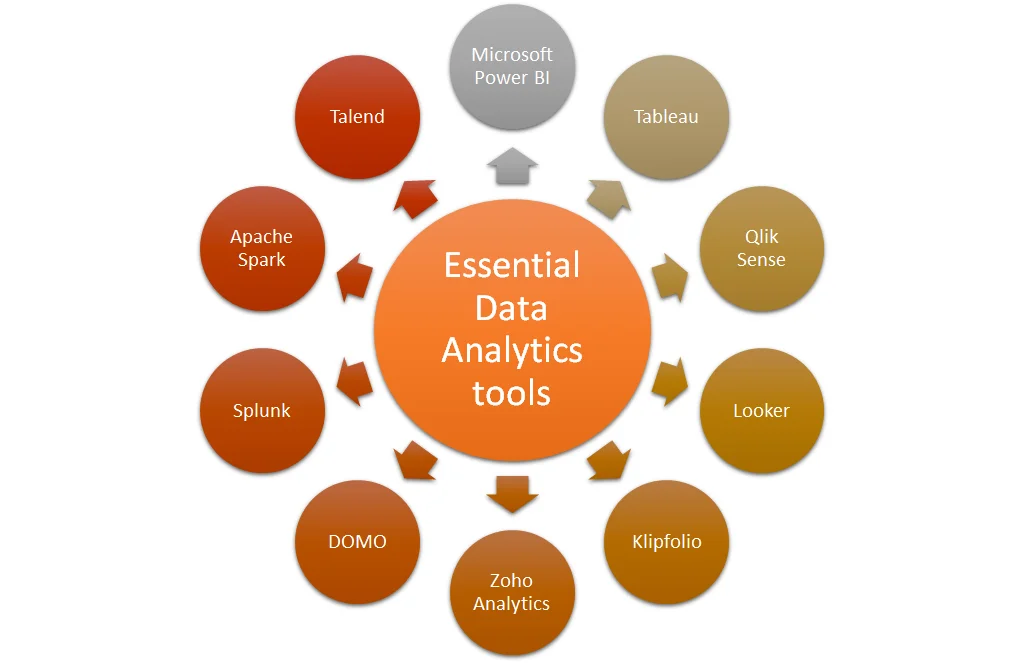
H2K Infosys offers comprehensive modules that incorporate top analytics tools used across IT and enterprise environments. Each tool serves specific functions in the analytics workflow:
| Tool | Purpose | Key Features |
|---|---|---|
| Power BI | Business Intelligence and Reporting | Data modeling, interactive dashboards, cloud integration, DAX formulas |
| Tableau | Data Visualization | Drag-and-drop reports, storyboards, live data connections, advanced charts |
| SQL (Structured Query Language) | Data Extraction and Management | Querying relational databases, data aggregation, joins, subqueries |
| Python | Data Analysis & Automation | Libraries like Pandas, NumPy, Matplotlib, Seaborn for analysis and visualization |
| Excel / BI Tools | Reporting & Spreadsheet Analysis | PivotTables, Power Query, formulas, charts |
| NumPy & Pandas | Data Manipulation | Efficient handling of large datasets, array operations, DataFrame management |
| Matplotlib & Seaborn | Data Visualization | Static, interactive, and publication-quality plots |
This combination ensures that learners can handle the full data lifecycle, from extraction to visualization, using widely accepted industry tools.
How Does Each Tool Work in Real-World IT Projects?
Power BI
Power BI is commonly used for enterprise reporting. Analysts connect to databases or cloud services, transform raw data into structured tables, and create dashboards for decision-making. It is widely adopted in finance, marketing, and operations projects.
- Example Workflow: Connecting to SQL Server → Cleaning data → Creating interactive charts → Sharing dashboards with stakeholders.
- Key Skills: DAX formulas, Power Query, data modeling, report automation.
Tableau
Tableau excels in visual storytelling, making complex data understandable for non-technical stakeholders.
- Example Workflow: Importing datasets → Using calculated fields → Designing dashboards → Publishing to Tableau Server or Online.
- Key Skills: Data blending, visualization design, interactive dashboards.
SQL
SQL remains the backbone of data retrieval in enterprise environments. Professionals use SQL to query relational databases, join multiple tables, and perform aggregations necessary for analysis.
- Example Workflow: Querying sales data → Joining product and customer tables → Aggregating monthly revenue → Feeding results to BI tools.
Python (Pandas, NumPy, Matplotlib)
Python enables automation, complex statistical analysis, and visualization. Libraries like Pandas and NumPy handle large datasets efficiently, while Matplotlib and Seaborn provide visual representations.
- Example Workflow: Reading CSV/Excel files → Cleaning missing data → Aggregating metrics → Visualizing trends → Exporting summaries for dashboards.
Why is Data Analytics Training Important for Working Professionals?
Data-driven decision-making is central to modern business operations. Data analyst course online empowers professionals to:
- Interpret business trends effectively.
- Optimize processes using data insights.
- Present findings through professional dashboards and reports.
- Improve accuracy in forecasting and reporting.
- Enhance cross-functional collaboration using standardized tools.
Professionals trained in analytics are better prepared to contribute to strategic planning, operations, and project evaluation in enterprise settings.
What Skills Are Required to Learn Data Analytics Training?
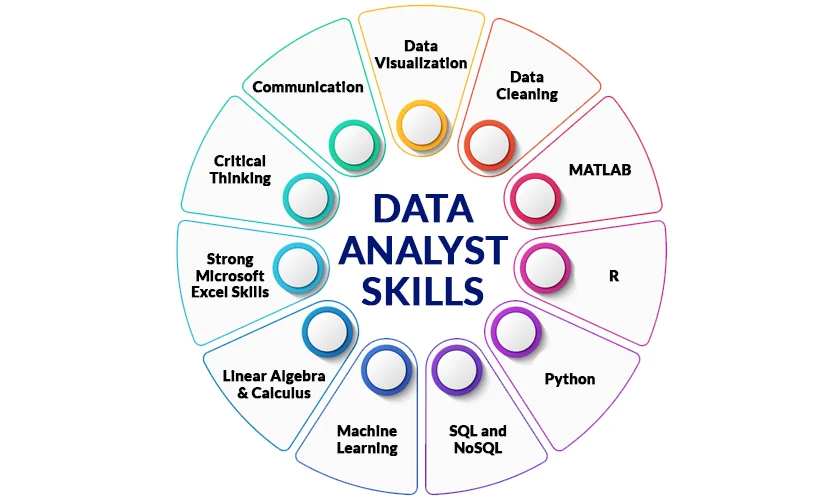
To succeed in H2K Infosys Data Analytics training, learners should ideally possess:
- Basic knowledge of spreadsheets (Excel or Google Sheets).
- Familiarity with fundamental statistics and mathematics.
- Analytical thinking and problem-solving mindset.
- Basic programming concepts (helpful for Python modules).
While prior technical experience is helpful, the training includes foundational lessons, ensuring beginners can progress to advanced analytics applications.
How Are Analytics Tools Used in Enterprise Environments?
Analytics tools serve distinct functions within organizational workflows:
- Data Collection and Storage
- SQL and relational databases store transactional and historical data.
- ETL (Extract, Transform, Load) processes prepare data for analysis.
- Data Cleaning and Transformation
- Python scripts with Pandas automate repetitive cleaning tasks.
- Power Query in Excel or Power BI manages minor data transformations.
- Data Analysis and Aggregation
- Statistical calculations, trend detection, and KPI monitoring are performed.
- BI tools like Power BI and Tableau consolidate results for business units.
- Visualization and Reporting
- Dashboards in Power BI/Tableau provide actionable insights.
- Charts and plots (Matplotlib, Seaborn) communicate trends effectively.
What Job Roles Use These Tools Daily?
Professionals in several IT and business roles routinely use the tools covered in Data Analytics training:
| Job Role | Tools Used | Typical Tasks |
|---|---|---|
| Data Analyst | SQL, Excel, Power BI, Tableau | Data extraction, visualization, KPI tracking |
| Business Intelligence Analyst | Power BI, Tableau, SQL | Dashboard creation, reporting, trend analysis |
| Data Engineer | Python, SQL, ETL Tools | Data pipelines, data cleaning, system integration |
| Marketing Analyst | Excel, Power BI, Tableau | Campaign performance analysis, reporting |
| Financial Analyst | Excel, Power BI | Budget analysis, financial modeling, predictive insights |
These roles rely on the same tools taught in the training, providing learners direct applicability in the workforce.
What Careers Are Possible After Data Analytics Training?
Completing H2K Infosys Data Analytics training opens pathways to several analytics-focused careers:
- Data Analyst: Extracts insights from structured and unstructured data.
- Business Intelligence Developer: Designs and deploys dashboards and reporting systems.
- Data Scientist (entry-level): Performs statistical analyses and predictive modeling.
- Business Analyst: Connects technical data insights to business strategy.
- Reporting Analyst: Prepares standardized reports and visualizations for stakeholders.
Organizations across finance, healthcare, retail, and technology widely adopt these roles to support decision-making.
FAQ – Tools and Applications in Data Analytics Training
Q1: Do I need prior programming experience?
A: Basic familiarity with Excel and logical reasoning is sufficient. Python modules in the training start with fundamentals and progress to advanced analytics.
Q2: Can I learn all tools in one training program?
A: H2K Infosys’ program integrates multiple tools into a structured learning path, balancing theoretical concepts with hands-on exercises.
Q3: Are these tools relevant for current IT projects?
A: Yes. SQL, Power BI, Tableau, Python, Pandas, and NumPy are widely adopted in enterprise projects, including finance, marketing, and operations analytics.
Q4: How does Python complement Power BI and Tableau?
A: Python handles data manipulation, cleaning, and statistical analysis, which can then be visualized using Power BI or Tableau dashboards.
Q5: Will this training cover real-world datasets?
A: Yes. Learners work with enterprise-level sample datasets and structured exercises that mimic actual business scenarios.
Key Takeaways
- Data Analytics training equips professionals with essential tools like Power BI, Tableau, SQL, Python, Pandas, NumPy, and Matplotlib.
- Training emphasizes real-world workflows: data extraction, cleaning, analysis, visualization, and reporting.
- Professionals develop practical skills applicable to roles such as Data Analyst, BI Developer, and Reporting Analyst.
- Industry-standard tools are covered in depth, preparing learners to contribute to enterprise analytics projects.
- Hands-on exercises ensure learners understand both technical and practical applications in IT projects.
Explore H2K Infosys Data Analytics training for hands-on learning with top analytics tools. Enrol today to advance your career in analytics.