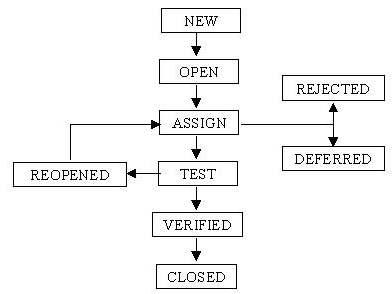
In software testing, one of the key aspects of managing bugs is understanding their status throughout the defect life cycle. A defect life cycle refers to the journey of a bug from its discovery to its closure. A clear understanding of bug status helps testers, developers, and project managers ensure that the process of defect identification, tracking, and resolution is efficient and transparent. In this blog post, we’ll dive deep into the different bug statuses in the defect life cycle, helping you understand how they contribute to quality assurance processes.
What is the Defect Life Cycle?
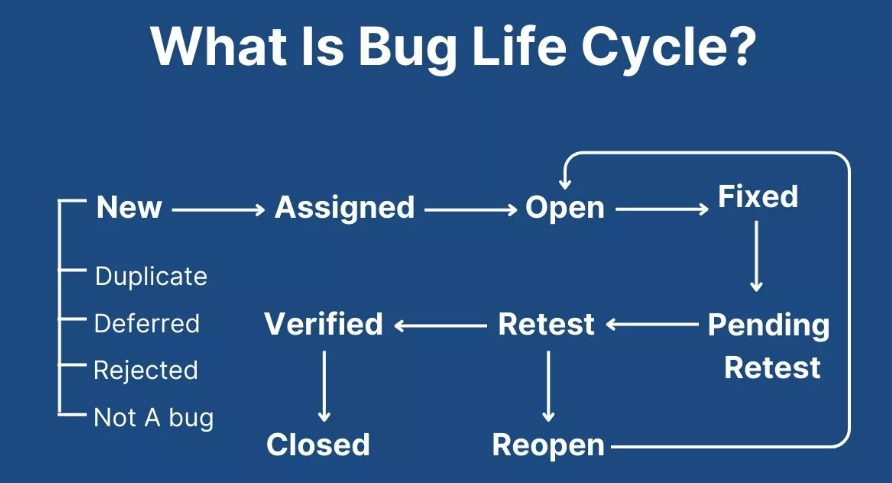
The defect life cycle, also known as the bug life cycle, refers to the series of stages a bug goes through during the process of detection, fixing, and closure. These stages help in tracking and managing defects until they are resolved and no longer pose a risk to the system. Each defect is categorized under various statuses, which describe its current state in the life cycle.
For those pursuing careers in quality assurance, gaining a strong understanding of the defect life cycle and bug status is crucial. With the right training, such as enrolling in QA Tester Classes, one can gain hands-on experience in managing these life cycle stages and contribute more effectively to the development process.
Different Bug Status in the Defect Life Cycle
Let’s take a closer look at the most common bug status in the defect life cycle. These statuses help to manage and track the progress of each defect as it goes through various stages of resolution.
1. New
The bug life cycle begins when a tester identifies a defect. When a bug is first reported, its status is marked as New. This indicates that the issue is in its initial stage and has yet to be analyzed or assigned to a developer for resolution. The New status typically means that the defect is acknowledged, but no action has been taken yet.
-
When it appears: A bug status is reported during testing or by a user.
-
Action taken: The defect is logged into the bug tracking system but hasn’t been analyzed or assigned for fixing.
2. Assigned
Once the defect is reported and logged, it is assigned to the appropriate developer or team for analysis and fixing. The Assigned status indicates that the defect is now under investigation. The developer assigned to the bug will verify the defect, identify its root cause, and begin working on a resolution.
-
When it appears: A developer has been assigned the defect to investigate and resolve.
-
Action taken: The developer starts investigating the issue, analyzing the code, and preparing to fix it.
3. Open
After the defect is assigned, the status changes to Open. This indicates that the developer is actively working on fixing the bug. During this phase, the developer may reproduce the bug, analyze its causes, and create a solution. The Open status shows that the defect is being actively worked on, and the resolution is in progress.
-
When it appears: The developer is actively working on the bug.
-
Action taken: The developer begins the bug-fixing process, which may involve writing code, modifying logic, or reworking the implementation.
4. Fixed
Once the developer has resolved the defect, the bug status changes to Fixed. This means that the defect has been addressed, and the necessary code changes have been made. The developer may now need to commit the changes to the version control system and push them to the testing environment for further validation.
-
When it appears: The developer has made changes to fix the bug.
-
Action taken: The developer applies the fix and prepares the defect for re-testing.
5. Pending Retest
After a bug is marked as Fixed, it is sent back to the quality assurance (QA) team for validation. During the Pending Retest status, the bug status is awaiting re-test, typically in a separate testing environment where the fix can be verified.
-
When it appears: After the fix has been applied, the bug is awaiting re-testing to confirm that the issue has been resolved.
-
Action taken: The QA team tests the defect to verify the fix and ensures that the issue no longer exists.
6. Retest
Once the fix has been applied and the defect is in a testing environment, the bug status is marked as Retest. This indicates that the QA team is re-testing the fixed defect to ensure that the resolution was successful and does not cause any new issues.
-
When it appears: The QA team re-tests the defect in the testing environment.
-
Action taken: The QA team tests the software to confirm that the defect is resolved and that the fix works as expected.
7. Closed
If the defect passes the re-testing phase, and the fix works as expected, the bug status is changed to Closed. This indicates that the defect has been successfully fixed, verified, and no further action is needed. The bug is considered resolved and is marked for closure in the defect tracking system.
-
When it appears: The defect has been successfully fixed, tested, and verified.
-
Action taken: The defect is closed in the system, signifying that no further action is required.
8. Reopened
In some cases, even after a defect is closed, it may resurface. If the bug persists or a new issue arises, the defect can be marked as Reopened. This indicates that the defect is still not resolved, and further work is required. This can happen if the bug was not fully fixed or if the fix caused new issues.
-
When it appears: A defect that was previously marked as closed reappears or is still unresolved.
-
Action taken: The bug is reassigned, reanalyzed, and reworked to fix any remaining issues.
9. Deferred
In some situations, bugs are identified but are not addressed immediately due to various reasons, such as a low priority or the need for further investigation. These bugs are marked as Deferred, indicating that their resolution is postponed until a later phase or release cycle. A Deferred status allows the team to prioritize more critical bugs and defects.
-
When it appears: The bug is deemed to be non-urgent and will be fixed later.
-
Action taken: The bug is postponed, but it will be revisited at a later date.
10. Rejected
In certain cases, a defect may be reported, but after further analysis, it may be found that the issue is either not a bug, or it is a result of user error, not a software defect. In these cases, the bug can be marked as Rejected. This indicates that the defect will not be fixed because it was not valid or reproducible.
-
When it appears: The defect is not considered an actual bug or was caused by user error.
-
Action taken: The defect is dismissed, and no further action is taken.
Importance of Bug Status in the Defect Life Cycle
The different bug statuses in the defect life cycle play a critical role in managing and tracking the progress of each defect. By keeping track of the status of defects, teams can:
-
Monitor Progress: Bug status helps track the progress of each defect, ensuring that nothing is overlooked, and all issues are addressed promptly.
-
Improve Communication: Defining the status of bugs helps improve communication between developers, testers, and project managers, ensuring everyone is on the same page about the status of defects.
-
Prioritize Work: Different statuses help teams identify high-priority bugs that need immediate attention, ensuring that the most critical issues are resolved first.
-
Ensure Accountability: By assigning a defect to specific individuals or teams, the status system helps ensure accountability and ensures that issues are fixed promptly.
Conclusion
Understanding the different bug statuses in the defect life cycle is essential for anyone working in quality assurance. It helps maintain a structured approach to defect management and ensures that each issue is resolved in a timely and efficient manner. Whether you are a seasoned QA tester or a beginner, enrolling in Quality Assurance Tester Training can provide you with the knowledge and hands-on experience to master the defect life cycle and contribute to building high-quality software products.
By knowing the stages a defect goes through, you can effectively participate in the process of identifying, tracking, and resolving bugs, ensuring the overall quality of software is upheld.
FAQs: Bug Status in Defect Life Cycle
1. What is a bug status in the defect life cycle?
Bug status indicates the current stage of a defect, such as New, Assigned, Open, Fixed, Retest, Reopened, Verified, or Closed.
2. What are the different bug statuses in the defect life cycle?
Common statuses include New, Assigned, Open, Fixed, Retest, Reopened, Verified, and Closed. The exact workflow may vary between organizations.
3. What does “New” mean in bug status?
“New” means the defect has been identified and reported but has not yet been reviewed or assigned to a developer.
4. What does “Fixed” mean in the defect life cycle?
“Fixed” means the developer has made a change intended to resolve the reported defect. QA then retests it.
5. When is a bug marked as “Reopened”?
A bug is marked “Reopened” when QA finds that the reported issue still exists after the developer marks it as fixed.