
Have you ever had a job at a restaurant where you had to keep food in storage such that the products that were going bad the quickest got used first? If so, do you have experience with a priority queue?
The object known as a “PriorityQueue in java” is designed to organise and rank the items in a queue. Queues typically have a First In, First Out (FIFO) structure, similar to the previous example of the restaurant, but occasionally we may want to rearrange the items in the line to better reflect their priority. To learn more, check out the Java course online.
The concept of a PriorityQueue in Java is crucial for understanding how to manage tasks effectively.
What Is PriorityQueue in Java?
PriorityQueue is a class in the Java Collections Framework that stores elements according to their priority. It is available in the java.util package.
Unlike a regular queue, where the first element added is generally processed first, a priority queue determines which element should be processed based on its ordering.
For example, if you add 40, 10, 30, and 20 to a default PriorityQueue<Integer>, the smallest number, 10, will be available at the head.
import java.util.PriorityQueue;

PriorityQueue<Integer> queue = new PriorityQueue<>();

queue.add(40);
queue.add(10);
queue.add(30);
queue.add(20);

System.out.println(queue.peek());
Output:
10How Does PriorityQueue Work in Java?
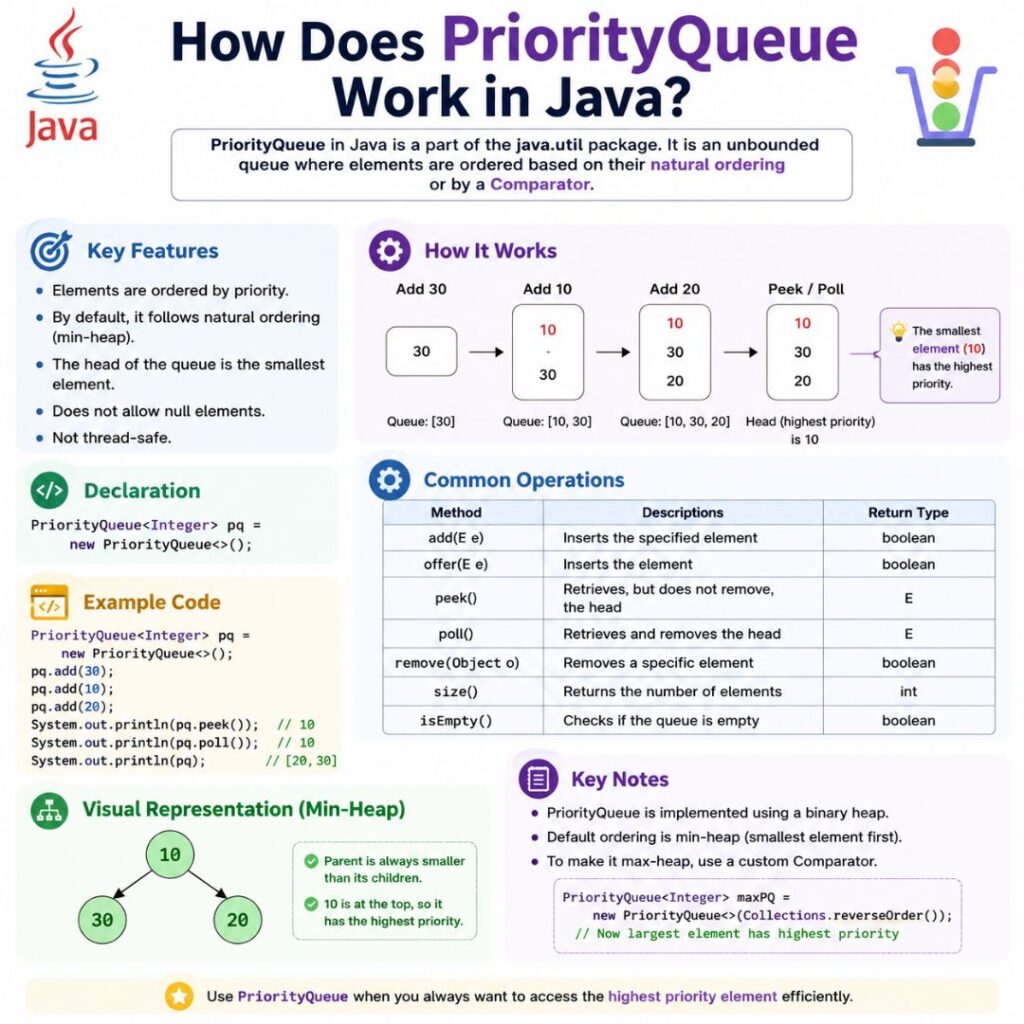
Java’s PriorityQueue is implemented using a priority heap, specifically a min-heap by default.
When using PriorityQueue in Java, it’s important to remember that order may seem random when printed.
The element with the highest priority is maintained at the head of the queue. However, the entire queue is not maintained in sorted order.
For example:
PriorityQueue<Integer> queue = new PriorityQueue<>();

queue.add(40);
queue.add(10);
queue.add(30);
queue.add(20);

System.out.println(queue);
The printed representation does not necessarily appear as:
10, 20, 30, 40This is because PriorityQueue guarantees priority for the head element, not sorted order when the entire queue is printed or iterated.
Java PriorityQueue in Action
Since this is a back-end concept, it’s challenging to determine with certainty whether a website is utilising this item. Nonetheless, it makes sense to presume that it can be occurring in the background of any website that has to give priority to the services it provides to users.
A common use case for PriorityQueue in Java is in the context of businesses that need to divide bandwidth among customers. An organisation that assigns tasks to employees according to the task’s priority could serve as another illustration.
The process of adding an element with priority “45” between elements with priorities “40” and “50” is essentially what you’re seeing.
The element that is processed next is known as the “Front” or “Head” of the queue; elements with the lowest number in the queue are handled first. On the other hand, if the ordering remains the same, the element at the “Back” or “Tail” of the queue would be processed last.
Going back to the bandwidth management example, the queue in the above image can represent a business that does not have enough bandwidth to serve every user at once.
In order to address this problem, they might determine which customers to service first, maybe according to factors like the customer’s access level, location, or any other criterion selected by the bandwidth management firm.
When utilizing PriorityQueue in Java, always consider the implications of leaving it empty.
How to Use PriorityQueue in Java
You will learn how to construct a new PriorityQueue in Java object, add things to it.
- Naturally, importing the library containing the PriorityQueue class is the first step in using the PriorityQueue object.
- Declaring a variable to store the PriorityQueue object is the next step. An optional custom comparator (a means of comparing the additional objects) can be passed to the PriorityQueue constructor.
- After the creation of the object, you can start adding more objects. It will default to having a maximum of 11 elements and ranking objects according to their natural order if the constructor is called without any arguments.
- Print out the PriorityQueue.
- Use the peek() method to get the PriorityQueue’s head element.
- Use the poll() method to delete the head element.
- use the java.util library to import the PriorityQueue class
In the event that it is left empty, processing will take natural priority. This indicates that the lowest integer will be placed at the front of the queue when it comes to integers.
As you work with the PriorityQueue in Java, remember the importance of proper element management.
The PriorityQueue is a heap-based queue, thus when the entire thing is printed out, the order may appear random or unsorted. Recall that this is not a sorted array that you are working with. When you start looking at the top of the PriorityQueue rather than printing it all out, the priorities will still be determined by natural order.
The head components would actually belong in the following order, notwithstanding the above arrangement, as integers are naturally arranged from least to greatest.
The only difference between this procedure and the previous one is that the head element will be removed afterwards. Furthermore take note that if the queue is empty, this method will return null.
And that’s the fundamental idea! If you want to go one step further, though, it could be prudent to use a custom comparator.
The integers could be arranged in a fashion that goes from least to largest. Although there isn’t much of a difference between this and the natural order for integers, knowing what’s happening here will help you make your own unique comparators.
For the sake of simplicity, you are essentially comparing leftHandSide and rightHandSide, two items at a time. In the event that both sides are equal, zero is returned, preventing the items from being switched.
There won’t be any elements switched even if the left-hand side is smaller than the right-hand side.
In other words, the items would still be in the same sequence if you were to compare 10 and 20. Once more, numbers are arranged naturally from least to greatest.
The last feasible criterion is that leftHandSide must be greater than rightHandSide. In this instance, you are effectively requesting the PriorityQueue to switch these two elements by returning “1”.
The elements would still be in the order [10, 20] if leftHandSide was 20 and rightHandSide was 10. This is because the two elements would be switched.
The conditions used to decide whether or not to swap the elements can be as complex as you would like them to be. This example was a straightforward one, utilising integers. The PriorityQueue would be arranged from least to greatest to greatest to least if the -1 and +1 from the code above were switched.
PriorityQueue in Java Example
import java.util.PriorityQueue;

public class PriorityQueueExample {
    public static void main(String[] args) {

        PriorityQueue<Integer> queue = new PriorityQueue<>();

        queue.add(40);
        queue.add(10);
        queue.add(30);
        queue.add(20);

        System.out.println("Head: " + queue.peek());

        while (!queue.isEmpty()) {
            System.out.println(queue.poll());
        }
    }
}
Output:
Head: 10
10
20
30
40
Here, peek() returns the smallest element without removing it, while poll() returns and removes the element at the head.
PriorityQueue Methods in Java
| Method | Description |
|---|---|
add() | Adds an element to the queue |
offer() | Inserts an element into the queue |
peek() | Returns the head without removing it |
poll() | Returns and removes the head |
remove() | Removes an element |
contains() | Checks whether an element exists |
size() | Returns the number of elements |
isEmpty() | Checks whether the queue is empty |
These methods make it easy to add, access, remove, and manage elements in a PriorityQueue in Java.
PriorityQueue vs Queue in Java
The main difference is how elements are processed.
| Feature | Queue | PriorityQueue |
|---|---|---|
| Processing order | Usually FIFO | Based on priority |
| Head element | Oldest element in FIFO queues | Highest-priority element |
| Typical use | Sequential processing | Priority-based processing |
| Ordering | Insertion-based for FIFO queues | Natural or custom ordering |
For example, a normal PriorityQueue in Java might process customers based on who arrived first, while a priority queue could process customers based on service priority.
PriorityQueue Time Complexity
The common operations have the following time complexity:
add()— O(log n)offer()— O(log n)poll()— O(log n)peek()— O(1)contains()— O(n)remove(Object)— O(n)
This makes PriorityQueue useful when applications frequently need to retrieve and remove the highest-priority element.
Conclusion
PriorityQueue in Java is useful when elements need to be processed according to priority rather than simple FIFO order. Java provides methods such as add(), peek(), and poll() for working with the queue, while Comparator allows developers to define custom priority rules. Once you understand its heap-based behavior, methods, complexity, and practical use cases, you can use PriorityQueue effectively in Java applications and algorithms. Check out the Java free online course to learn more.
FAQ’s about PriorityQueue in Java
Is Java PriorityQueue a min heap or max heap?
By default, Java’s PriorityQueue behaves as a min-heap, so the smallest element has the highest priority. A Comparator can be used to create max-heap behavior.
What is the difference between peek() and poll()?
peek() returns the head element without removing it. poll() returns the head element and removes it from the queue.
Does PriorityQueue maintain sorted order?
No. A PriorityQueue guarantees that the highest-priority element is at the head, but printing or iterating through the queue does not guarantee sorted order.
Is PriorityQueue thread-safe?
No. Java’s standard PriorityQueue is not thread-safe. For concurrent applications, PriorityBlockingQueue can be considered.
What is PriorityQueue in Java?
PriorityQueue is a Java collection that processes elements according to their priority rather than simply using FIFO order.