HTML validators are an important tool, especially for designers and web developers. The purpose of using them is to ensure that the code is clean and, most importantly, compatible with different browsers and devices.
Instead of manually checking the HTML code to identify and eliminate errors, using an HTML validator is helpful as it will automatically identify issues like missing tags, misplaced attributes, and unnecessary characters.
But how good and efficient are they? Do they actually help in validating HTML code? To find more about the HTML validators, keep on reading this article until the end, as I will carry out some tests with different HTML validators.
I will be giving them different HTML code samples and will see how efficiently they work.
Trying Out Different HTML Validators
I have gathered a few HTML validators from the internet and tested them precisely in the section below to determine whether they are actually efficient or not.
Test 1:
In test 1, the HTML checker I will be using is Minifier.org. I will use two different samples that I have mentioned below.
- A code with an incomplete div
- Code with an invalid DOCTYPE
I will upload two different HTML code samples and will see how the tool works.
Code Sample 1:
I have uploaded a code with an incomplete div on the tool, and the output is shown in the attachment below.
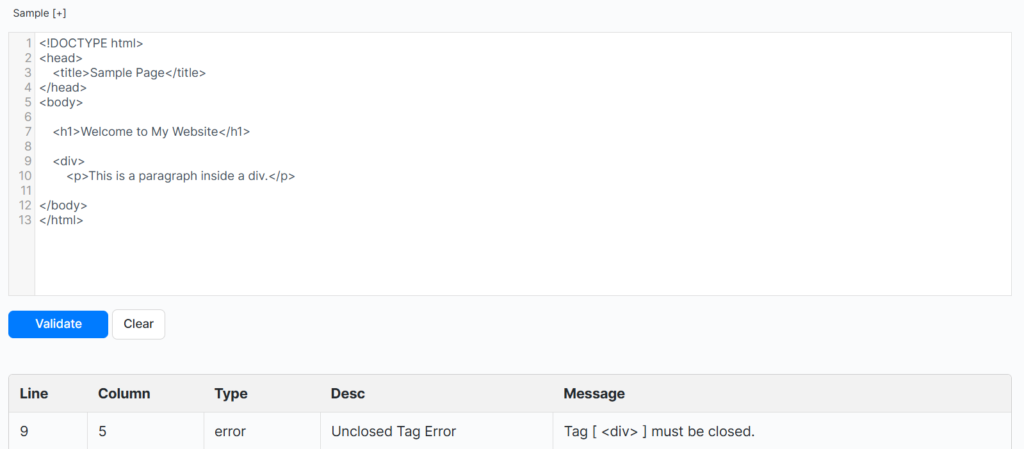
The tool has shown the error and suggested a message to correct it as well.
Code Sample 2:
I have uploaded code with an invalid DOCTYPE, and the output of the tool is shown below.
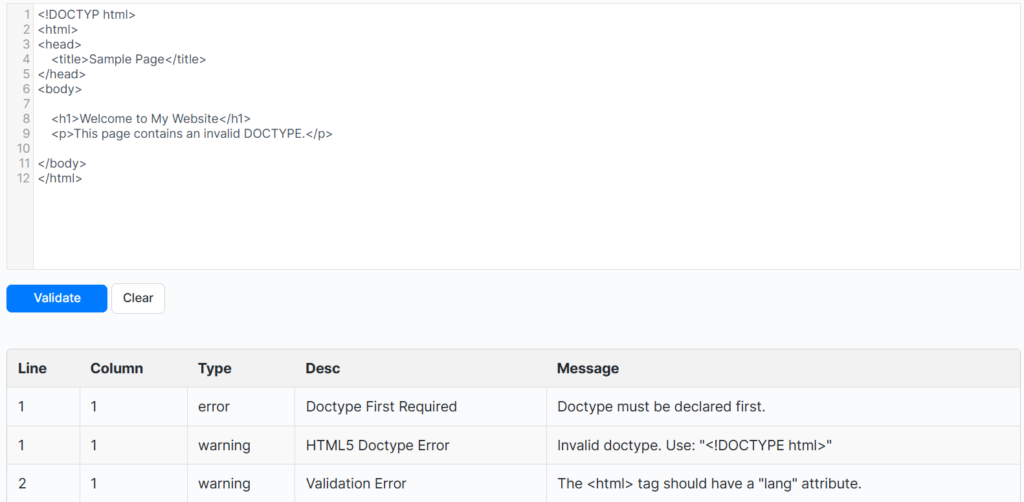
The tool identified an invalid DOCTYPE and also suggested a fix under “Message.” You can also see the column and the line, along with the type and description of the error in the code.
Test 2:
In test 2, the HTML checker I will be using is JSONformatter. Just like the previous one, I will use two different HTML code samples on this validator.
- Incomplete div
- Invalid DOCTYPE
Code Sample 1:
I have entered the same HTML code with the incomplete div on the tool and have selected the option of Validate HTML. The output of the tool is shown in the screenshot below.
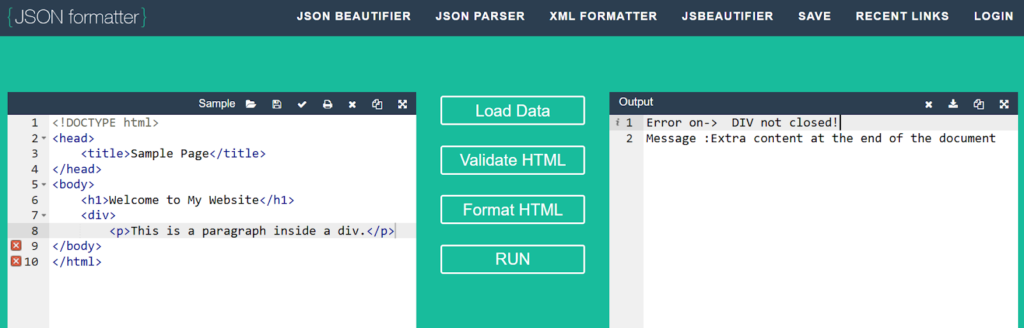
The tool has shown that a DIV is not closed, and also, there is extra content at the end – both errors are actually valid.
Code Sample 2:
In the second sample, I added the same code with an invalid DOCTYPE. Then I selected the option to Validate HTML. A screenshot is added below in which the output is depicted.
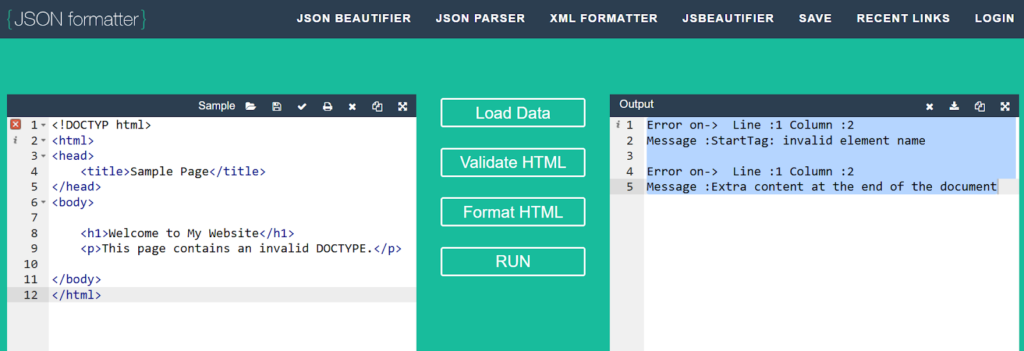
The tool has shown that the doctype is improperly terminated, along with some other errors at the end of the code.
Test 3:
In test 3, I will be using the HTML checker by Tiinyhost. I will test the tool with two different samples of HTML code that I have mentioned below.
- Incomplete Div
- Invalid DOCTYPE
Code Sample 1:
In the first sample, I have uploaded an HTML code with an incomplete div, and the output of the tool is shown below.
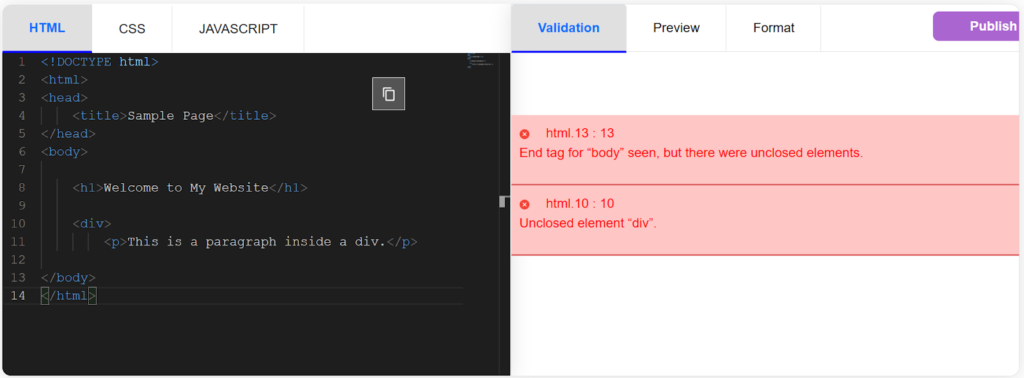
The tool has flagged a line in the input, whereas it failed to flag any errors in the output, and has not shown any errors in terms of doctype.
Code Sample 2:
In the second run, I uploaded HTML code with an invalid DOCTYPE, and the output is shown below.
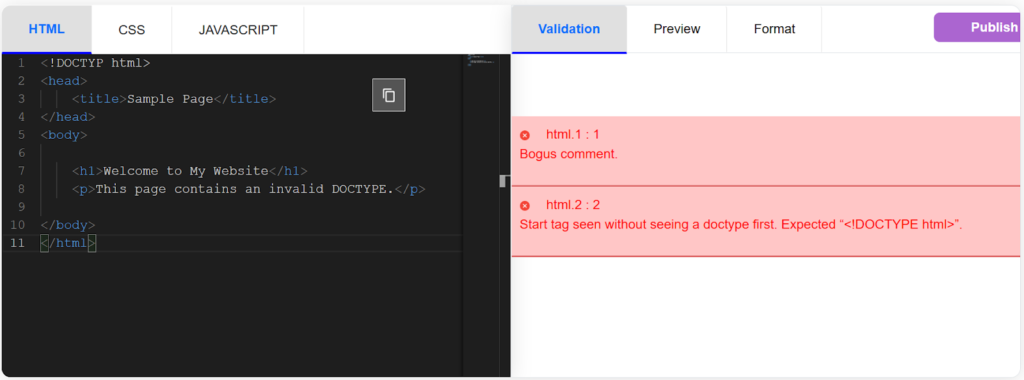
As you can clearly see, this HTML validator has also highlighted the invalid DOCTYPE error accurately.
So…Are HTML Validators actually Good?
The answer is Yes, most of the HTML validation tools available on the internet are quite efficient at verifying and validating the errors in the HTML code. This is because they are trained on the official web standard and large collections of valid and invalid HTML examples.
Besides this, these are powered by diverse databases to ensure maximum speed and efficiency in the validation process. However, it is recommended to select and use a reliable tool to avoid any frustrations or disappointments.
That’s all from my side—hopefully, you will find this blog valuable and interesting!