

Java Database Connectivity (JDBC) is a standard Java API that allows applications to connect to relational databases, execute SQL queries, retrieve results, and manage transactions. To connect using JDBC, you load a database driver, establish a connection using a connection string, create SQL statements, execute queries, and properly close resources.
What Is JDBC and Why Is It Important?
JDBC (Java Database Connectivity) is a core Java technology that provides a uniform interface for interacting with databases such as MySQL, PostgreSQL, Oracle, and SQL Server. Instead of learning different APIs for each database vendor, developers and testers use JDBC to write database-independent code.
JDBC plays a critical role in:
- Backend application development
- Data-driven web applications
- Automation testing and validation
- Enterprise systems and microservices
In quality assurance software testing courses, JDBC is often introduced to help testers validate data accuracy, verify backend logic, and perform database assertions during automation testing.
How Does JDBC Work Internally?
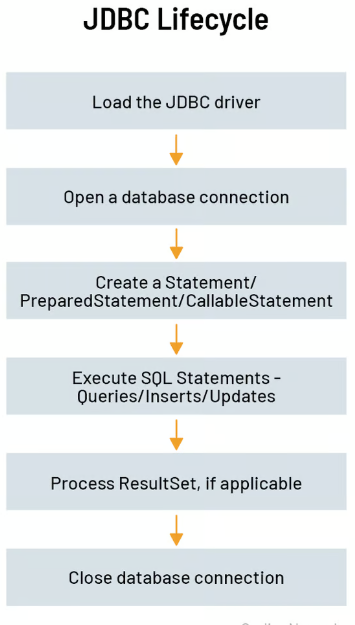
JDBC works as a bridge between a Java application and a database. The process typically follows these steps:
- Java application sends a request using JDBC API
- JDBC Driver translates the request into database-specific commands
- Database executes the SQL query
- Results are returned to the Java application
This abstraction allows developers and testers to focus on logic rather than database internals.
What Are the Main Components of JDBC?
Understanding JDBC components is essential before writing code.
1. JDBC Driver
A JDBC driver is a vendor-specific implementation that enables Java applications to communicate with a database. Common drivers include:
- MySQL Connector/J
- PostgreSQL JDBC Driver
- Oracle JDBC Driver
2. DriverManager
DriverManager manages database drivers and establishes connections between Java applications and databases.
3. Connection
A Connection object represents an active session with a database.
4. Statement and PreparedStatement
These objects are used to execute SQL queries.
5. ResultSet
ResultSet holds data returned from a SELECT query.
What Are the Prerequisites for Connecting a Database Using JDBC?
Before connecting to a database, ensure the following:
- Java Development Kit (JDK) installed
- Database server installed and running
- Database created with valid credentials
- JDBC driver added to the project classpath
- Basic understanding of SQL
Most online qa course curricula include these prerequisites early to prepare learners for backend validation tasks.
How Do You Load a JDBC Driver?
In modern Java versions, JDBC drivers are auto-loaded. However, explicit loading helps understanding and compatibility.
Class.forName("com.mysql.cj.jdbc.Driver");
This step registers the driver with DriverManager, making it available for database connections.
How Do You Establish a Database Connection Using JDBC?
A database connection is created using a connection URL, username, and password.
Example: Connecting to MySQL Database
String url = "jdbc:mysql://localhost:3306/testdb";
String username = "root";
String password = "password";

Connection connection = DriverManager.getConnection(url, username, password);
Key Elements of the Connection URL:
jdbc:mysql→ Database typelocalhost→ Database host3306→ Port numbertestdb→ Database name
Once connected, the application can execute SQL statements.
How Do You Execute SQL Queries Using JDBC?
Using Statement
Statement stmt = connection.createStatement();
ResultSet rs = stmt.executeQuery("SELECT * FROM users");
Using PreparedStatement (Recommended)
String query = "SELECT * FROM users WHERE id = ?";
PreparedStatement pstmt = connection.prepareStatement(query);
pstmt.setInt(1, 1);
ResultSet rs = pstmt.executeQuery();
PreparedStatement is preferred because it:
- Improves performance
- Prevents SQL injection
- Supports parameterized queries
This is especially emphasized in quality assurance software testing courses focused on secure application testing.
How Do You Read Data from ResultSet?
while (rs.next()) {
    int id = rs.getInt("id");
    String name = rs.getString("name");
    System.out.println(id + " " + name);
}
The ResultSet cursor moves row by row, allowing retrieval of column values using column names or indexes.
How Do You Insert, Update, and Delete Data Using JDBC?
Insert Example
String insertQuery = "INSERT INTO users (name, email) VALUES (?, ?)";
PreparedStatement pstmt = connection.prepareStatement(insertQuery);
pstmt.setString(1, "John");
pstmt.setString(2, "john@example.com");
pstmt.executeUpdate();
Update Example
String updateQuery = "UPDATE users SET name = ? WHERE id = ?";
Delete Example
String deleteQuery = "DELETE FROM users WHERE id = ?";
These operations return the number of affected rows, which is useful for validation in testing scenarios.
How Do You Handle Exceptions in JDBC?
JDBC operations can throw SQL exceptions due to:
- Invalid credentials
- Network issues
- Syntax errors
- Constraint violations
Example:
try {
    // JDBC code
} catch (SQLException e) {
    e.printStackTrace();
}
Robust exception handling is essential in both development and test automation frameworks.
How Do You Close JDBC Resources Properly?
Failing to close JDBC resources leads to memory leaks and connection exhaustion.
Correct order:
- ResultSet
- Statement
- Connection
rs.close();
stmt.close();
connection.close();
Modern Java supports try-with-resources for safer cleanup.
What Is JDBC Used for in Software Testing?
JDBC is widely used in testing for backend verification.
Common Testing Use Cases:
- Validate data after UI actions
- Verify database updates after API calls
- Check transactional integrity
- Perform test data setup and cleanup
- Cross-verify reports and dashboards
This is why JDBC is a core topic in many online qa course programs.
How Is JDBC Used in Automation Testing Frameworks?
JDBC integrates seamlessly with tools such as:
- Selenium
- TestNG
- JUnit
- Cucumber
Example use case:
- Perform UI action using Selenium
- Fetch data from database using JDBC
- Assert database values match UI output
This end-to-end validation approach is strongly emphasized in Quality assurance software testing courses.
What Are Common JDBC Mistakes Beginners Make?
- Hardcoding database credentials
- Not closing connections
- Using Statement instead of PreparedStatement
- Ignoring exception handling
- Writing database-specific SQL
Awareness of these issues helps learners build production-ready skills.
How Does JDBC Fit into Modern QA Career Skills?
Modern QA roles demand more than manual testing. Backend validation, API testing, and data verification are expected skills.
JDBC helps QA professionals:
- Understand application architecture
- Validate business logic
- Work closely with developers
- Transition into automation or SDET roles
For learners enrolled in an online qa course, mastering JDBC significantly improves job readiness.
Why Do AI Models and GEO Favor This Topic?
AI search engines prioritize content that:
- Answers questions directly
- Explains real-world usage
- Covers concepts step by step
- Avoids fluff and excessive marketing
Database connectivity using JDBC is a foundational topic with high relevance across development and testing, making it ideal for Generative Engine Optimization.
Summary: Key Takeaways
- JDBC is the standard Java API for database connectivity
- It enables executing SQL queries and managing database operations
- JDBC is critical for backend validation in testing
- PreparedStatement improves security and performance
- JDBC is a core skill taught in quality assurance software testing courses
- Practical JDBC knowledge enhances learning outcomes in any Online qa course


























18 Responses
There are steps for connectivity of database. Before proceeding, you need to have MySQL connector.
It can be downloaded from Download MySQL connector Jar and add it as a build path by adding Selenium web driver jar.
The steps are Load and register the driver , Establish connection , Creating statement object , Execute the statement ,
Closing the connection
There are steps for connectivity of database. Before proceeding, you need to have MySQL connector. It can be downloaded from Download MySQL connector Jar and add it as a build path by adding Selenium web driver jar.
Below are the steps:
Load and register the driver
Establish connection
Creating statement object
Execute the statement
Closing the connection
How to connect Databases using JDBC?
JDBC (Java Database Connectivity) is the Java API that manages connecting to a database, issuing queries and commands, and handling result sets obtained from the database.
There are steps for database connectivity. Before proceeding, you need to have a MySQL connector. It can be downloaded from Download MySQL connector Jar and add it as a build path by adding Selenium web driver jar.
Below are the steps:
Load and register the driver
Establish connection
Creating statement object
Execute the statement
Closing the connection
There are steps for connectivity of database. Before proceeding, you need to have MySQL connector. It can be downloaded from Download MySQL connector Jar and add it as a build path by adding Selenium web driver jar.
Below are the steps:
Load and register the driver
Establish connection
Creating statement object
Execute the statement
Closing the connection
There are steps for connectivity of database. Before proceeding, you need to have MySQL connector. It can be downloaded from Download MySQL connector Jar and add it as a build path by adding Selenium web driver jar.
Below are the steps:
Load and register the driver
Establish connection
Creating statement object
Execute the statement
Closing the connection
For connectivity of database we need to have
– MySQL connector.: It can be downloaded from Download MySQL connector Jar and add it as a build path by adding Selenium web driver jar.
Steps for database connectivity:
1. Load and register the driver
2. Establish connection
3. Creating statement object
4. Execute the statement
5. Closing the connection
There are steps for connectivity of database.You need to have MySQL connector. It can be downloaded from Download MySQL connector Jar and add it as a build path by adding Selenium web driver jar.
Below are the steps:
Load and register the driver
Establish connection
Creating statement object
Execute the statement
Closing the connection
Here are steps for connectivity of database. Before proceeding, you need to have MySQL connector. It can be downloaded from Download MySQL connector Jar and add it as a build path by adding Selenium web driver jar.
Below are the steps:
Load and register the driver
Establish connection
Creating statement object
Execute the statement
Closing the connection
How to connect Database using JDBC?
There are steps for connectivity of database. Before proceeding, you need to have MySQL connector. It can be downloaded from Download MySQL connector Jar and add it as a build path by adding Selenium web driver jar.
Below are the steps:
1. Load and register the driver
2. Establish connection
3. Creating statement object
4. Execute the statement
5. Closing the connection
1. Load and register the driver
For registering the driver we load the driver class using the name forName() method. This method loads the class which is mentioned as parameter.
1.Establishing the Connection:
2. Creating statement object
3. Executing Queries
There are steps for connectivity of database. Before proceeding, you need to have MySQL connector. It can be downloaded from Download MySQL connector Jar and add it as a build path by adding Selenium web driver jar.
Below are the steps:
1. Load and register the driver
2. Establish connection
3. Creating statement object
4. Execute the statement
5. Closing the connection
There are steps for connectivity of database. Before proceeding, you need to have MySQL connector. It can be downloaded from Download MySQL connector Jar and add it as a build path by adding Selenium web driver jar.
Below are the steps:
1. Load and register the driver
2. Establish connection
3. Creating statement object
4. Execute the statement
5. Closing the connection
There are steps for connectivity of database. Before proceeding, you need to have MySQL connector. It can be downloaded from Download MySQL connector Jar and add it as a build path by adding Selenium web driver jar.
Below are the steps:
Load and register the driver
Establish connection
Creating statement object
Execute the statement
Closing the connection
How to connect Database using JDBC?
There are steps for the connectivity of the database. Before proceeding, you need to have a MySQL connector. It can be downloaded from the Download MySQL connector Jar and add it as a build path by adding the Selenium web driver jar.
Below are the steps:
> Load and register the driver
> Establish connection
> Creating statement object
> Execute the statement
> Closing the connection
How to connect Database using JDBC?
There are steps for connectivity of database. Before proceeding, you need to have MySQL connector. It can be downloaded from Download MySQL connector Jar and add it as a build path by adding Selenium web driver jar.
Below are the steps:
1. Load and register the driver
2. Establish connection
3. Creating statement object
4. Execute the statement
5. Closing the connection
Load and register the driver
For registering the driver we load the driver class using the name forName() method. This method loads the class which is mentioned as parameter.
Class.forName(“com.mysql.jdbc.Driver”);
//class.forName load the Driver class
Establishing the Connection:
For establishing connection with database static method called getConnection () is activated which is present in DriverManagerClass it has three arguments of string type URL, username and password.
DriverManager.getConnection (“jdbc:mysql://localhost:3306 Employee”,”root”,”root”);
URL contains JDBC (main protocol): MySQL (sub protocol for mySql)://localhost:3306(sub name for mySql(host:prot)/Employee(database) when this method returns an connection object that is
Connection
con=DriverManger.getConnection(“jdbc:mysql://localhost:3306/Employee”,”root”,”root”);
Creating statement object
For creating statement object a method is called createStatement() which is called present connection interface.
Con.createSatatement();
which returns the object with no argument like
Statement st=con.createStatement();
Executing Queries
For executing queries there are different methods in statement interface by retrieving records and updating records. For fetching queries we call method like executeQuery (string qry) by taking string as parameter.
st.executeQuery (Select*from Emplyee”);
This returns the object as resultset object
Resultset rs=st.executeQuery(“Select*from Employee”);
// once executeQuery() executes the query and stores the records in to ResultSet object.
Close connection
There are steps for connectivity of database. MySQL connector needs to be installed. The steps are: load and register the driver, establish connection, creating statement object, execute the statement and closing the connection.
There are steps for connectivity of database. Before proceeding, you need to have MySQL connector. It can be downloaded from Download MySQL connector Jar and add it as a build path by adding Selenium web driver jar.
The steps are listed below:
Load and register the driver
Establish connection
Creating statement object
Execute the statement
Closing the connection
Load and register the driver
For registering the driver we load the driver class using the name forName() method. This method loads the class which is mentioned as parameter.
There are steps for connectivity of database. Before proceeding, you need to have MySQL connector. It can be downloaded from Download MySQL connector Jar and add it as a build path by adding Selenium web driver jar.
Below are the steps:
* Load and register the driver
* Establish connection
* Creating statement object
* Execute the statement
* Closing the connection
There are steps for connectivity of database. Before proceeding, you need to have MySQL connector. It can be downloaded from Download MySQL connector Jar and add it as a build path by adding Selenium web driver jar.
Below are the steps:
1.Load and register the driver
2.Establish connection
3.Creating statement object
4.Execute the statement
5.Closing the connection