

In today’s fast-paced software development world, tools like JIRA have become indispensable. Whether you’re managing a small agile project or handling enterprise-level workflows, JIRA helps teams track, organize, and resolve issues efficiently. For anyone pursuing QA tester training or exploring professional testing courses, understanding JIRA and its issue types is a must.
This comprehensive guide explains what JIRA is, the types of issues it manages, and how QA testers use it daily to ensure seamless testing cycles and quality assurance.
1. What is JIRA?

JIRA is a project management and issue tracking tool developed by Atlassian. Initially designed for bug tracking, it has evolved into a versatile platform supporting agile development, scrum boards, kanban boards, and software testing workflows.
In essence, JIRA allows teams to:
- Create and manage issues (tasks, bugs, stories, etc.)
- Plan sprints and track progress
- Collaborate across teams
- Integrate with CI/CD tools and testing frameworks
Why QA Testers Use
For QA professionals, JIRA acts as a central hub for tracking test cases, reporting bugs, and collaborating with developers. It provides complete visibility into every defect’s life cycle, from discovery to resolution.
Key benefits for QA testers:
- Easy bug reporting with screenshots and attachments
- Real-time updates on issue status
- Integration with automation tools (like Selenium or Jenkins)
- Custom dashboards for testing metrics
When you enroll in a QA tester training program, you’ll often find JIRA among the top tools covered in the curriculum — and for good reason.
2. Understanding Issues
In JIRA, everything revolves around an issue. An issue is a record that tracks a piece of work such as a bug, task, improvement, or story. Each issue holds essential details, including:
- Summary and description
- Assignee and reporter
- Priority and status
- Attachments, comments, and logs
Think of issues as the core building blocks of JIRA. Developers, testers, and project managers all rely on them to communicate progress and responsibilities.
3. Issue Hierarchy
Before diving into issue types, it’s crucial to understand how issues are organized in JIRA. The hierarchy typically follows this structure:
- Epic – A large body of work that can be broken into multiple stories or tasks.
- Story – A user requirement or functionality.
- Task – A specific piece of work that contributes to the story.
- Sub-task – A smaller, detailed activity within a task or story.
- Bug – An error, flaw, or defect identified during testing.
This hierarchy helps teams organize their workload, from big-picture features down to minor bug fixes.
4. Common Issue Types
a. Bug
A bug represents an error or defect discovered in the application during testing.
Example: A login button doesn’t work after a new deployment.
Key attributes of a bug:
- Status: Open → In Progress → Resolved → Closed
- Priority levels: Blocker, Critical, Major, Minor, Trivial
- Reporter: Usually a QA tester
- Assignee: Developer responsible for fixing the issue
In any QA tester training, reporting bugs correctly is emphasized including reproducing steps, environment details, and screenshots.
b. Story
A story (or user story) represents a feature or requirement from the end user’s perspective.
Example: “As a user, I want to reset my password so that I can regain account access.”
Stories are typically used in Agile and Scrum projects to capture business requirements. QA testers create test cases based on these stories and verify that the functionality meets acceptance criteria.
c. Task
A task refers to general work that needs to be completed not necessarily linked to a defect or user story.
Example: “Update the test environment configuration.”
Tasks are ideal for administrative or support activities, such as test data preparation or environment setup.
d. Sub-task
A sub-task breaks down a larger issue (like a story or task) into smaller, actionable steps.
Example: Under a story “Implement user registration,” sub-tasks could be:
- Design UI for registration page
- Write validation scripts
- Test API endpoints
Sub-tasks make complex work easier to manage and assign to multiple team members.
e. Epic
An Epic is a collection of related stories that represent a significant deliverable or project goal.
Example: “User Management Module” may include multiple stories like login, registration, and password reset.
Epics help QA teams plan testing at a macro level tracking all related test cases, automation scripts, and bug reports under one large initiative.
f. Improvement
An improvement represents an enhancement or optimization to an existing feature.
Example: “Improve search speed on the dashboard page.”
While not necessarily a bug, these issues are crucial for continuous enhancement of software quality.
5. Additional Custom Issue Types
It is highly customizable. Depending on the organization’s workflow, administrators can define custom issue types such as:
- Change Request
- Test Case
- Incident
- Technical Debt
For instance, in QA-focused projects, many teams create a Test Case issue type to manage manual or automated test scenarios directly in JIRA.
6. JIRA Issue Fields Explained
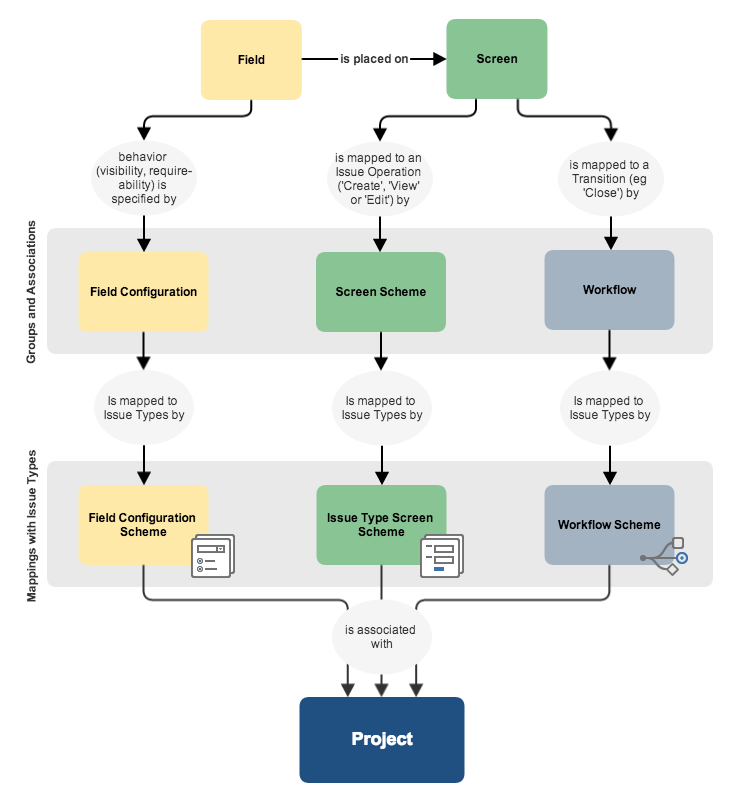
Each issue type in JIRA comes with customizable fields that provide detailed information. Common fields include:
| Field Name | Purpose |
|---|---|
| Summary | A short title for the issue |
| Description | Detailed explanation of the issue |
| Assignee | Person responsible for resolving it |
| Reporter | Person who identified the issue |
| Priority | Importance level (Critical, Major, etc.) |
| Status | Current progress (Open, In Progress, Done) |
| Labels | Tags for easy search and categorization |
| Comments | Notes or updates from team members |
| Attachments | Screenshots, logs, or related files |
Understanding these fields is an essential skill you’ll gain during QA tester training.
7. Issue Workflow
Every issue in JIRA follows a workflow, representing its journey from creation to closure. Workflows can be customized but typically include these stages:
- Open / To Do: The issue has been created and awaits action.
- In Progress: Assigned team members are working on it.
- In Review / Testing: QA verifies if the issue is resolved.
- Resolved / Done: The issue has been fixed or completed.
- Closed: Final verification confirms it’s ready for release.
Workflows help QA testers ensure traceability and maintain accountability throughout the testing life cycle.
8. How QA Testers Use JIRA in the Real World
serves as a critical part of the software testing process. Here’s how QA testers typically use it:
1. Defect Logging
When testers find a bug, they create a Bug issue in JIRA, describing:
- Steps to reproduce
- Expected vs. actual results
- Severity and priority
- Supporting screenshots or videos
This structured approach ensures developers can easily reproduce and fix the issue.
2. Test Cycle Management
In integrated setups (like JIRA + Zephyr or JIRA + Xray), testers manage their entire test cycle from planning to execution within JIRA itself.
3. Traceability Matrix
By linking user stories, test cases, and bugs, QA teams ensure all requirements are tested and no defect is overlooked.
4. Collaboration
JIRA enhances cross-functional communication. Developers, testers, and business analysts can all comment, tag, and track progress within the same platform.
5. Reporting and Dashboards
JIRA’s dashboard and report features give QA managers insights into:
- Number of open/closed bugs
- Sprint progress
- Testing velocity
- Team performance
During testing courses, learners are often taught how to use these analytics features to evaluate QA efficiency.
9. Integration with Testing Tools
JIRA’s power multiplies when integrated with other tools in the QA ecosystem:
- Selenium: Automates regression tests and links results to JIRA tickets.
- Jenkins: Automates build and deployment processes tied to JIRA issues.
- Zephyr / Xray: Manage test cases and execution results inside JIRA.
- Confluence: Stores documentation related to JIRA issues.
Learning how to integrate these tools is a major component of modern QA tester training programs.
10. Best Practices for Managing JIRA Issues
Here are some proven tips QA testers can follow to maintain clarity and consistency in JIRA:
- Use clear, concise titles – e.g., “Login page crashes on invalid input.”
- Attach evidence – screenshots, logs, or screen recordings.
- Set correct priority levels – avoid marking everything as “Critical.”
- Update issue statuses regularly – ensures transparency across teams.
- Use labels and components – makes searching and filtering easier.
- Add acceptance criteria – defines when an issue is considered done.
- Collaborate via comments – document all key communications.
By mastering these habits, QA testers enhance productivity and reduce communication gaps between testing and development teams.
11. Common Challenges and How to Overcome Them
While JIRA is robust, beginners might face some challenges:
| Challenge | Solution |
|---|---|
| Complex navigation for new users | Take hands-on practice through QA tester training labs |
| Overwhelming number of issue types | Start with core ones: Bug, Task, Story |
| Miscommunication between QA and Dev | Use clear descriptions and tagging |
| Workflow confusion | Customize or simplify workflow diagrams |
| Duplicate issues | Use advanced search (JQL) before creating new tickets |
Many testing courses include JIRA labs and real-time project assignments to help students overcome these challenges quickly.
12.Query Language (JQL): A QA Tester’s Secret Weapon
Advanced testers often use JQL (JIRA Query Language) to filter and find issues efficiently.
Examples:
project = "Banking App" AND issuetype = Bug AND status != Closed
This query retrieves all open bugs in the “Banking App” project.
Learning JQL can drastically improve your testing productivity and is a skill highly valued in QA interviews.
13. Learning JIRA Through QA Tester Training
Most professional QA tester training programs include JIRA as part of their syllabus. Students learn:
- How to report and track bugs
- How to manage Agile boards
- How to create dashboards and metrics
- How to integrate JIRA with automation tools
By practicing real-world scenarios, learners gain job-ready experience that translates directly to the workplace.
14. Why Understanding JIRA Matters for QA Careers
Mastering JIRA can significantly boost your career opportunities. Recruiters often prefer QA candidates proficient in:
- Bug and issue tracking
- Agile sprint management
- Collaboration and documentation tools
JIRA skills demonstrate that you can work efficiently within modern software teams and handle dynamic project workflows essential for roles like QA Analyst, Test Engineer, or Agile Tester.
Conclusion
It is more than just an issue tracker it’s a powerful collaboration and quality management tool at the heart of modern QA workflows. From identifying defects to tracking user stories and managing test cycles, JIRA gives teams the structure and transparency needed for successful releases.
For aspiring QA professionals, mastering should be a top priority. Whether you’re new to testing or advancing your career through QA tester training or other Testing courses, gaining hands-on JIRA experience will give you a competitive edge in the job market.


























8 Responses
Jira is a tool which is developed by Australian Company Atlassian. This software is used for bug tracking, issue tracking and project management. The name “JIRA” is inherited from the Japanese word “Gojira” The meaning of this is often Godzilla. The basic use of this tool to trace issue and bugs.
JIRA Issues and JIRA Types
Jira issue would track bug or issue that underlies the project. We find the other features as below:
Issue types
Workflows
Screens
Fields
Issue Attributes
Issue types
The ‘Issue types’ displays all types of items which can be tracked by JIRA. JIRA issues are classified under varied forms like new feature, sub task, bug etc.
Default Issue Type Scheme- This is a issue type scheme, all newly created issues will be added automatically to this scheme.
Agile Scrum issue type- We have issues and projects associated with agile scrum which will use this scheme.
JIRA Tutorial: A Complete Guide for Beginners
JIRA Components
JIRA Tutorial: A Complete Guide for Beginners
Components are sub sections of the project, they are used for a group issues within the project into a smaller parts. Components add structures to the projects, breaking it up with features, teams and modules, sub projects and also more.
JIRA Screen:
When any issue is created in JIRA, it is arranged and represented into a various fields, the display of field in jira is known as a screen. This is the field which can be transitioned and edited through workflow. For every issue, we can assign operation with screen. We go to main menu and also click on “Associate an issue operation with a screen”.
Issue Attributes has:
Statuses: Many statuses which are used to indicate the progress of a project like TO DO, Inprogress, open, closed, Re-opened and Resolved. We have resolutions and priorities. In resolution it tells about the progress of issue like Fixed, won’t fix, duplicate, Incomplete, cannot reproduce, done.
Issue security schemes:
This function in jira allows you to control who can view the issues. It consists of number of security levels which have users or groups assigned to them. There is a Default Permission Scheme. Any projects that are created will be assigned to this scheme.
System Administration:
The features that Jira admin provide are:
Audit Log- In Audit Log, we can see the possible details about the issue created and changes made in the issues.
Issue Linking- This will show whether our issues link with any other issue which is already present or may be created in the project and also can de-activate Issue linking from panel itself.
Mail in Jira- Using a mail system in admin, it can mail issues. An account on a POP or IMAP mail server or messages written to the file system are generated by an external mail service.
Events- An event describes the status, default template and the notification scheme and workflow transition post function association of the events.
Issue collectors- An issue collector always allows to gather the feedback on any website. In any administration, if we click on issue collectors an option will open asking for an Adding Issue Collector.
Development tools- We can also connect our software development tools like JIRA tool using an admin function.
This software is used for bug tracking, issue tracking, and project management. The basic use of this tool is to trace issues and bugs. Jira issue would track bug or issue that underlies the project. We find the other features below:
Issues types
Workflows
Screens
Fields
Issue Attributes
Issue types:
Here the ‘Issue types’ display all types of items that can be tracked by JIRA. JIRA issues are classified under varied forms like the new feature, subtask, bug etc.
We have two types of Related Schemes in JIRA
Default Issue Type Scheme- This is an issue type scheme, all newly created issues will be added automatically to this scheme.
Agile Scrum issue type- We have issues and projects associated with agile scrum which will use this scheme.
Jira is a software used for bug tracking, issue tracking and project management. The basic use of this tool to trace issue and bugs.
JIRA Issues and JIRA Types
1.ssues types
2. Workflows
3. Screens
4. Fields
5. Issue Attributes
System Administration:
1. Audit Log- In Audit Log, we can see the possible details about the issue created and
changes made in the issues.
2. Issue Linking- This will show whether our issues link with any other issue which is
already present or may be created in the project and also can de-activate Issue
linking from panel itself.
3. Mail in Jira- Using a mail system in admin, it can mail issues. An account on a POP
or IMAP mail server or messages written to the file system are generated by an
external mail service.
4. Events- An event describes the status, default template and the notification scheme
and workflow transition post function association of the events.
5. Issue collectors- An issue collector always allows to gather the feedback on any
website. In any administration, if we click on issue collectors an option will open
asking for an Adding Issue Collector.
6. Development tools- We can also connect our software development tools like JIRA
tool using an admin function.
Jira is a tool which is developed by Australian Company Atlassium. This software is used for bug tracking, issue tracking and project management. The name “JIRA” is inherited from the japanese word “Gojira” The meaning of this is often Godzilla. The basic use of this tool to trace issue and bugs.
JIRA Issues and JIRA Types
Jira issue would track bug or issue that underlies the project. We find the other features as below:
*Issues types
*Workflows
*Screens
*Fields
*Issue Attributes
System Administration:
The features that Jira admin provide are:
1.Audit Log- In Audit Log, we can see the possible details about the issue created and changes made in the issues.
2.Issue Linking- This will show whether our issues link with any other issue which is already present or may be created in the project and also can de-activate Issue linking from panel itself.
3.Mail in Jira- Using a mail system in admin, it can mail issues. An account on a POP or IMAP mail server or messages written to the file system are generated by an external mail service.
4.Events- An event describes the status, default template and the notification scheme and workflow transition post function association of the events.
5.Issue collectors- An issue collector always allows to gather the feedback on any website. In any administration, if we click on issue collectors an option will open asking for an Adding Issue Collector.
6.Development tools- We can also connect our software development tools like JIRA tool using an admin function.
This software is used for bug tracking, issue tracking and project management. The basic use of this tool to trace issue and bugs.Jira issue would track bug or issue that underlies the project. We find the other features as below:
Issues types
Workflows
Screens
Fields
Issue Attributes
Issue types:
Here the ‘Issue types’ displays all types of items which can be tracked by JIRA. JIRA issues are classified under varied forms like new feature, sub task, bug etc.
JIRA and Issue types
JIRA is a tool used for bug tracking ,issue tracking and project management.
JIRA Issues and JIRA types:
1. Issue types (displays all the types of items which can be tracked by JIRA)
2. Workflows
3. Screens (Display field in JIRA is known as screen)
4. Fields
5. Issue attributes(Statuses ,Resolutions , Priorities )
Jira is used for bug tracking, issue tracking and project management. Jira issue would track bug or issue. Other features are: issue types, workflows, screens, fields and issue attributes.
Issue type displays all types of items which can be tracked by JIRA. New feature, sub task and bug are various forms which JIRA issues are classified. There are two types of related schemes in JIRA called default issue type scheme and agile scrum issue type. Sub sections of the project are called components. They are used to group issues within the project into smaller parts. An issue is arranged and represented into various fields. The display of field in Jira is known as screen. All issues are assigned operation with screen. Issue attributes has: statuses, resolutions and priorities. Issue security schemes allows to control who can view the issues. All projects will assigned to Default Permission Scheme.
Features that Jira admin provides are:
– Audit log-possible details of issue and changes made in issues.
– Issue linking- issues link with other issues and also de-activate issue linking from panel itself.
– Mail in Jira-a mail system in admin is used and it can mail issues. Example POP or IMAP mail server or messages written to the file system are generated by an external mail service.
– Events- describes the status, default template and notification scheme and workflow transition post function association of the events.
– Issue collectors- allows to gather feedback on any website.
– Development tools-connect software tools like JIRA tool using admin function.
Jira is a tool which is developed by Australian Company Atlassium. This software is used for bug tracking, issue tracking and project management. The name “JIRA” is inherited from the japanese word “Gojira” The meaning of this is often Godzilla. The basic use of this tool to trace issue and bugs.
JIRA Issues and JIRA Types
Jira issue would track bug or issue that underlies the project. We find the other features as below:
Issues types
Workflows
Screens
Fields
Issue Attributes