Introduction: Why This Question Matters Today
Many organizations now ask one direct question: Can Salesforce replace custom Enterprise Applications?
This question matters because companies want faster delivery, lower cost, and easier scaling. Leaders also want platforms that support growth without long development cycles. Salesforce has become a strong option for this goal. It offers cloud-based tools, automation, and strong security. At the same time, many firms still rely on custom-built systems.
This blog explains the topic in clear terms. It shows where Salesforce fits, where custom systems still matter, and how professionals can build careers through salesforce trainings, sales force administrator training, and Salesforce Admin Certification Classes. The content focuses on real-world use, not theory.
What Are Enterprise Applications?
Enterprise Applications are software systems that support core business operations. These systems manage data, users, workflows, and reporting across teams. Companies use them to run sales, finance, supply chains, customer service, and analytics.
Common traits of Enterprise Applications include:
- High user volume
- Strong security controls
- Role-based access
- Integration with many systems
- Long-term business value
Traditional Enterprise Applications were often built in-house. Today, cloud platforms like Salesforce offer a different approach.
Why Companies Are Rethinking Custom-Built Systems
Custom-built Enterprise Applications give full control. They also create challenges.
Common Problems With Custom Systems
- Long development time
- High maintenance cost
- Hard upgrades
- Limited flexibility
- Dependency on specific developers
Industry reports show that many large IT budgets go toward system upkeep rather than innovation. This reality pushes leaders to explore platform-based solutions.
What Salesforce Offers as a Platform
Salesforce is more than a CRM. It is a full enterprise platform. It supports sales, service, marketing, analytics, and automation.
Core Salesforce Platform Capabilities
- Data model with objects and relationships
- Workflow automation
- Role-based security
- Reporting and dashboards
- API-based integration
- AppExchange marketplace
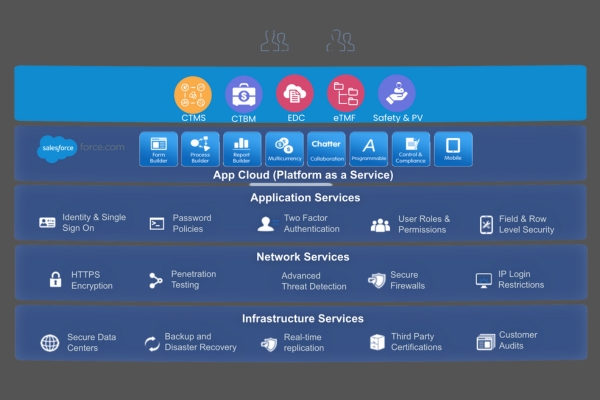
Salesforce allows teams to configure instead of code. This approach reduces risk and speeds delivery.
Where Salesforce Can Replace Enterprise Applications
Salesforce can replace many Enterprise Applications in specific business areas.
1. Customer Relationship Management
Salesforce fully replaces legacy CRM systems. It supports leads, accounts, contacts, and opportunities.
2. Service Management
Service Cloud replaces ticketing and support systems. It supports queues, SLAs, and knowledge bases.
3. Workflow and Approvals
Salesforce Flow replaces many internal workflow tools used in Enterprise Applications.
4. Reporting and Dashboards
Many reporting tools inside Enterprise Applications are replaced by Salesforce reports and dashboards.
5. Low-Code Internal Tools
Using Lightning Apps, teams build internal tools faster than traditional development.
Real-World Example: Replacing a Sales Operations System
A mid-size logistics firm used a custom sales tracking system. The system required manual updates and weekly fixes. The firm moved to Salesforce Sales Cloud.
Results
- Deployment time reduced by 60%
- Reporting accuracy improved
- Admin team handled changes without developers
This case shows how Salesforce replaces custom Enterprise Applications in sales operations.
Where Salesforce Cannot Fully Replace Enterprise Applications
Salesforce does not replace all Enterprise Applications.
1. High-Volume Transaction Processing
Banking core systems process millions of transactions per second. Salesforce is not designed for this role.
2. Real-Time Control Systems
Manufacturing control systems need real-time hardware interaction. Salesforce works at the business layer, not the machine layer.
3. Specialized Industry Logic
Some industries require deep custom algorithms. These still belong in custom Enterprise Applications.
Salesforce as a Front-End for Enterprise Applications
Many organizations use Salesforce as a front-end. The core logic stays in Enterprise Applications. Salesforce handles users, workflow, and reporting.
Typical Architecture
- Salesforce manages users and UI
- Middleware handles data sync
- Core systems process logic
This hybrid model is common in large enterprises.
Step-by-Step: How Salesforce Replaces a Legacy Workflow Tool
Step 1: Identify Business Process
List steps, users, and data.
Step 2: Map to Salesforce Objects
Use standard or custom objects.
Step 3: Build Automation
Use Salesforce Flow for logic.
Step 4: Add Reports
Create dashboards for tracking.
Step 5: Test and Deploy
Use sandboxes for validation.
This process replaces many internal Enterprise Applications used for approvals and tracking.
Example: Simple Salesforce Automation Code
trigger UpdateAccountStatus on Opportunity (after update) {
    for (Opportunity opp : Trigger.new) {
        if (opp.StageName == 'Closed Won') {
            Account acc = [SELECT Id, Status__c FROM Account WHERE Id = :opp.AccountId];
            acc.Status__c = 'Active Customer';
            update acc;
        }
    }
}
This code replaces logic often found in custom Enterprise Applications.
Security and Compliance in Salesforce
Enterprise Applications require strong security. Salesforce provides:
- Field-level security
- Profile-based access
- Audit trails
- Compliance with global standards
This built-in model reduces the need to build security from scratch.
Cost Comparison: Salesforce vs Custom Enterprise Applications
Custom Systems
- High upfront cost
- Ongoing maintenance
- Upgrade risk
Salesforce Platform
- Subscription-based pricing
- Automatic updates
- Lower infrastructure cost
Studies show platform solutions reduce total ownership cost over time.
Career Impact: Why This Matters for Learners
Companies need professionals who understand Salesforce as an enterprise platform.
In-Demand Roles
- Salesforce Administrator
- Salesforce Business Analyst
- Salesforce Developer
These roles support Enterprise Applications without deep system coding.
Why Salesforce Training and Placement Matters
Structured salesforce trainings help learners understand real enterprise use cases. Sales force administrator training focuses on configuration, automation, and governance. Salesforce admin certification classes validate job-ready skills.
Learners gain:
- Platform understanding
- Hands-on project skills
- Enterprise workflow knowledge
This skill set aligns with modern Enterprise Applications strategy.
Salesforce Certifications That Support Enterprise Work
- Salesforce Administrator
- Advanced Administrator
- Platform App Builder
These certifications focus on replacing or supporting Applications.
Common Myths About Salesforce and Enterprise Systems
Myth 1: Salesforce Is Only CRM
Reality: Salesforce supports many Enterprise Applications.
Myth 2: Salesforce Needs Heavy Coding
Reality: Most solutions use clicks and flows.
Myth 3: Salesforce Cannot Scale
Reality: Salesforce supports global enterprises.
Decision Guide: Should You Replace Enterprise Applications With Salesforce?
Ask these questions:
- Is the process customer-facing?
- Does it need fast changes?
- Can logic be handled with rules?
If yes, Salesforce is a strong option.
Key Takeaways
- Salesforce can replace many Enterprise Applications
- Some core systems still need custom builds
- Hybrid models are common
- Salesforce skills support long-term careers
- Training bridges the enterprise knowledge gap
Conclusion
Salesforce does not replace every Applications system, but it replaces many business workflows with speed and control.
Enroll in H2KInfosys Salesforce programs today to gain hands-on enterprise skills and build a future-ready career.