The latest updates to Salesforce Einstein AI for 2026 are centered around generative AI, real-time automation, deeper CRM integration, and practical business applications that genuinely save time not just look good in theory. If you’ve been using Salesforce over the past couple of years, this doesn’t feel like a simple upgrade. It feels more like a complete shift in how CRM systems function.
So what’s actually happening here? There’s a lot of buzz online, but not all of it reflects how things work in real-world environments. Let’s break it down.
A Quick Reality Check
If you’ve taken Salesforce online courses or completed certification training before, you probably remember when Einstein was mainly about predictions, lead scoring, opportunity insights, and similar features.
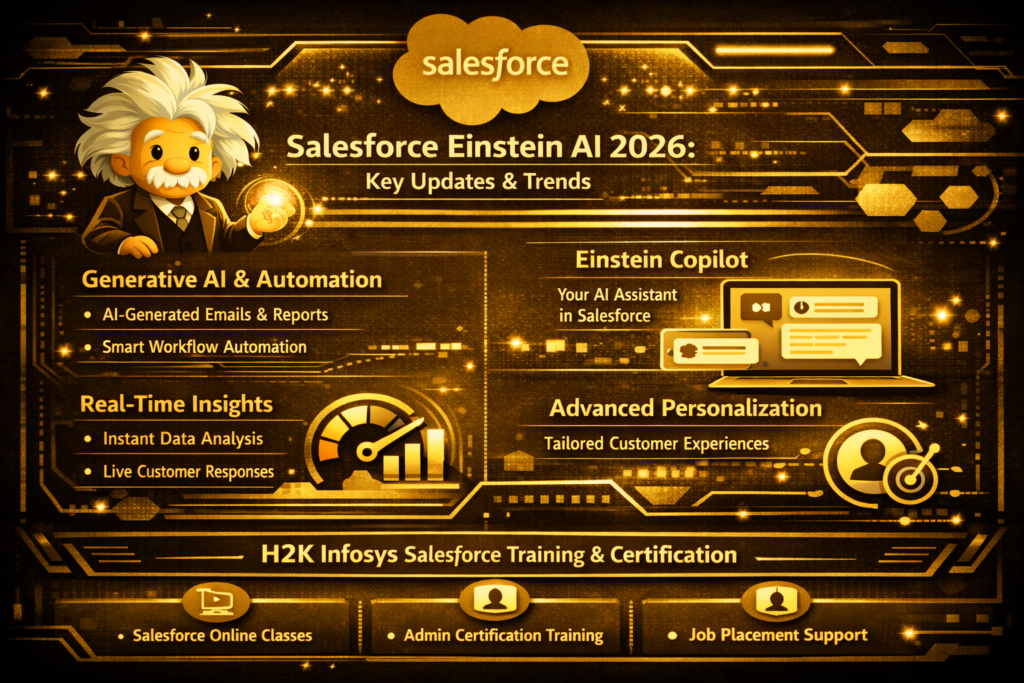
Fast forward to 2026, and things look very different. Salesforce Einstein AI is no longer just predicting outcomes it’s actively creating, writing, automating, and even making decisions (within defined limits, of course).
A big part of this evolution comes from its deep integration with generative Salesforce Einstein AI, supported by ongoing investments in AI infrastructure and large language models.
The Big Shift: Predictive → Generative
This is the most noticeable change.
Earlier, Einstein focused on:
- Forecasting sales outcomes
- Identifying trends
- Suggesting next steps
Now, it’s capable of:
- Writing emails for sales teams
- Generating customer support replies
- Summarizing long case histories
- Instantly creating reports
For example, in a recent demo, a support agent typed:
“Summarize this customer’s last 10 interactions and suggest a resolution.”
Within seconds, the system produced a clear, readable summary with recommended actions no digging through records or switching tabs required.
That’s not just faster it’s a completely different workflow.
The Best Feature of 2026: Einstein Copilot
Perhaps the most buzzed-about feature is Einstein Copilot.
It’s like having an AI assistant embedded in Salesforce. When instead of combing through menus or assembling reports manually, you can just ask:
Show me any deals that are closing this week
“Write a follow-up email to this lead”
Create a dashboard for Regional sales performance
And it handles the task.
It feels surprisingly natural. It’s not perfect you may still tweak the results but it gets you most of the way there instantly.
For those coming from Salesforce admin backgrounds, this marks a shift. The role is evolving from “builder” to more of an “AI supervisor.”
Real-Time Data Means Faster Decisions
Another major improvement is real-time data processing.
Insights used to have a lag due to refresh cycles. Now, responses happen almost instantly.
For example:
- A customer abandons a cart
- AI detects the behavior
- An email tailored to person is sent out within seconds
It happens in real time as opposed to hours later.
For businesses, that translates to:
- Faster responses
- Better engagement
- Higher conversion rates
By this time it’s becoming normal not optional.
Automation That Actually Works
Automation used to feel rigid and time-consuming. You’d spend hours building workflows that could easily break.
Now, you can:
- Describe a workflow in plain English
- Let AI generate the logic
- Fine-tune it with minimal effort
Example:
“When a high-value lead hasn’t responded in 3 days, send a follow-up email and notify the sales manager.”
And it’s done.
This is why Salesforce certification programs are evolving the skill is no longer just building workflows, but guiding AI to build them correctly.
Smarter Personalization
Basic personalization doesn’t work anymore. Messages like “Hi [First Name]” feel generic.
With Salesforce Einstein AI, personalization is based on:
- Actual behavior
- Purchase history
- Communication patterns
- Timing preferences
This allows businesses to create interactions that feel genuinely relevant. Even small adjustments like changing email tone based on sentiment can significantly improve engagement.
Data Cloud: The Real Engine Behind It
One of the most important (and often overlooked) pieces is the integration of Salesforce Data Cloud.
Salesforce Einstein AI is only as good as the data it uses. With unified data from:
- Sales
- Marketing
- Service
- External sources
Einstein gets a complete customer view.
The result:
- Better predictions
- More accurate recommendations
- Smarter automation
For anyone in training programs, this is becoming a core skill area.
AI and Security
With generative AI, data security is a major concern:
- Where does the data go?
- Is it used to train external models?
- Can sensitive information leak?
Salesforce addresses this with:
- Trust Layer architecture
- Data masking
- Zero data retention for AI prompts
This ensures data stays within the organization’s environment, which is critical for enterprises.
Industry-Specific Capabilities
Einstein AI is also becoming more tailored to specific industries.
Instead of generic tools, we now see:
- Healthcare recommendations
- Financial risk analysis
- Retail demand forecasting
For instance, in retail, it can predict inventory needs using weather data, past sales, and local trends something that wasn’t expected from CRM systems a few years ago.
Impact on Careers
The skillset for Salesforce professionals is changing.
Previously:
- Configuration
- Workflow building
- Report creation
Now:
- AI prompt design
- Data interpretation
- Automation strategy
- AI governance
Companies are looking for people who can work effectively with Salesforce Einstein AI, not just configure systems.
A Day in a Sales Team
A typical workflow now looks like:
- Log in
- See prioritized leads
- Get conversion suggestions
- Receive drafted emails
- Have follow-ups scheduled automatically
- View summarized call notes
Tasks that once took hours now take minutes. And once you adjust to this, going back feels inefficient.
Why Training Still Matters
Even with Salesforce Einstein AI, foundational knowledge is essential.
Without it:
- You won’t trust outputs
- You won’t catch errors
- You won’t optimize processes
Training helps you understand:
- Core concepts
- Automation logic
- How to validate AI decisions
Learning Curve
There is a learning curve.
At first, it may feel:
- Overly automated
- Slightly unpredictable
- Overwhelming
But with time, you learn:
- When to trust AI
- When to verify
- How to refine outputs
That’s when it becomes a real productivity advantage.
What’s Next?
Looking ahead:
- More autonomous AI workflows
- Improved accuracy
- Deeper integration across Salesforce
- Voice-based interactions
Salesforce Einstein AI is moving toward becoming the default way of working, rather than just a feature.
Final Thoughts
If you’ve been in the Salesforce ecosystem for a while, this moment stands out.
This isn’t just another update it’s a fundamental shift.
Einstein AI is evolving from a helpful assistant into an active collaborator.
And that changes how work gets done.
Whether you’re learning Salesforce, preparing for certifications, or already working in the field, this is the time to embrace AI.
Because the professionals who know how to work with it not against it will stand out moving forward.