Artificial intelligence is shaping how companies build products, automate decisions, and solve business problems. From healthcare diagnostics to recommendation engines, AI systems now support daily operations across industries. For learners exploring AI and machine learning courses, understanding how to install Keras and use it to build a working Neural Network is a critical starting point.
This detailed guide explains the full process in simple language. You will learn what Keras is, how to install it correctly, and how to design, train, and evaluate deep learning models. The content follows a beginner-friendly structure aligned with AI courses for beginners, Artificial Intelligence And Machine Learning, and artificial intelligence certificate online programs.
Why Keras Is Important in Modern AI Learning
Keras is a high-level deep learning library that runs on top of TensorFlow. Developers and data scientists use it to build models quickly and efficiently. Its clean syntax allows learners to focus on understanding logic instead of managing low-level operations.
Most AI machine learning courses include Keras because it shortens the learning curve. Students can build a Neural Network with fewer lines of code while still following industry standards. This balance makes Keras ideal for beginners and professionals alike.
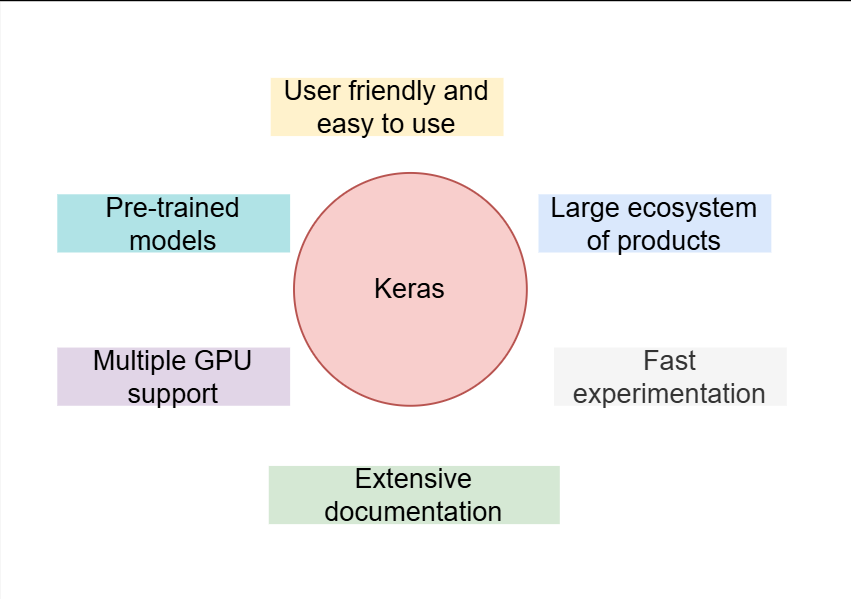
Key advantages of Keras include:
- Easy-to-read Python-based syntax
- Strong integration with TensorFlow
- Support for deep learning best practices
- Rapid experimentation for AI projects
Industry reports show that TensorFlow and Keras skills appear in a majority of AI job postings, which makes them essential for learners in AI training courses.
Understanding Deep Learning in Simple Terms
Deep learning is a subset of machine learning that uses layered structures to learn patterns from data. These layers transform raw inputs into meaningful outputs through mathematical operations.
At the center of deep learning sits the Neural Network, which mimics how the human brain processes information. Each layer extracts features and passes results forward. As data flows through the system, the model improves its predictions.
This concept forms the foundation of artificial intelligence and machine learning education.
Real-World Use Cases of Deep Learning
Deep learning models power many applications people use every day. Organizations rely on these systems to improve efficiency and accuracy.
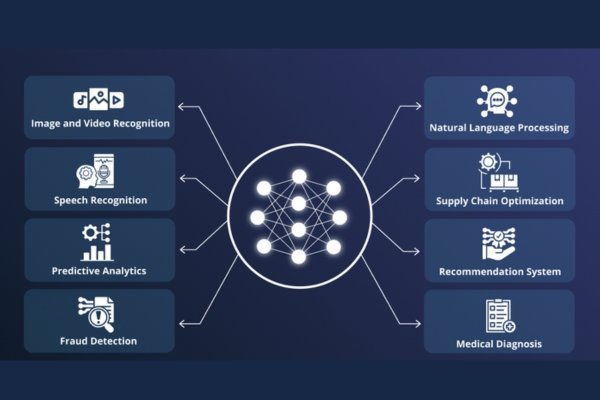
Common examples include:
- Image recognition in medical scans
- Fraud detection in financial systems
- Recommendation engines in e-commerce
- Speech recognition in virtual assistants
Each of these systems depends on a Neural Network trained with real-world data. Learning how to build such models increases job readiness for students enrolled in best online artificial intelligence course programs.
Prerequisites Before Installing Keras
Before installing Keras, ensure your system meets basic requirements. These steps apply to most beginner setups.
You need:
- A computer running Windows, macOS, or Linux
- Python version 3.8 or later
- Basic Python knowledge
- Stable internet connection
Most AI courses for beginners cover Python fundamentals before introducing deep learning tools.
Step-by-Step Guide to Install Keras
Keras comes bundled with TensorFlow, which simplifies installation. Follow these steps carefully.
Step 1: Verify Python Installation
Open a terminal or command prompt and run:
python --version
If Python is missing, install it from the official Python website.
Step 2: Create a Virtual Environment
Virtual environments help manage dependencies.
python -m venv keras_env
Activate it:
- Windows:
keras_env\Scripts\activate
- macOS or Linux:
source keras_env/bin/activate
Step 3: Install TensorFlow and Keras
Run:
pip install tensorflow
This command installs TensorFlow along with Keras. Your system is now ready to build a Neural Network using tools taught in professional AI training courses.
Verifying the Installation
Confirm the setup by running the following Python code:
import tensorflow as tf
from tensorflow import keras
print(tf.__version__)
If no errors appear, your environment works correctly. This check ensures your Neural Network projects run without configuration issues.
How Keras Works Internally
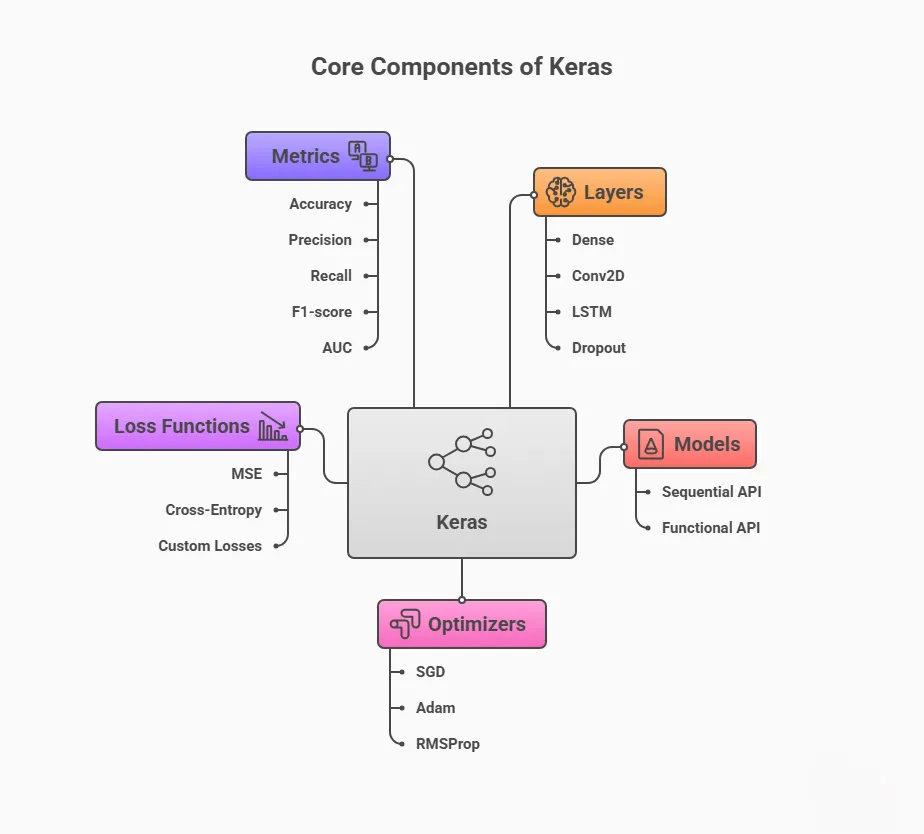
Keras organizes deep learning workflows into simple components:
- Layers define how data flows
- Models connect layers
- Optimizers adjust learning speed
- Loss functions measure prediction errors
This structure allows learners to understand how a Neural Network learns step by step. Many AI machine learning courses emphasize this modular design.
Building Your First Deep Learning Model
Now let us build a working model using Keras.
Step 1: Import Required Libraries
from tensorflow import keras
from tensorflow.keras import layers
Step 2: Define the Model Structure
model = keras.Sequential([
    layers.Dense(64, activation="relu", input_shape=(10,)),
    layers.Dense(32, activation="relu"),
    layers.Dense(1, activation="sigmoid")
])
This setup creates a basic Neural Network with input, hidden, and output layers. This structure appears frequently in AI and machine learning courses.
Compiling the Model
Compilation prepares the model for training.
model.compile(
    optimizer="adam",
    loss="binary_crossentropy",
    metrics=["accuracy"]
)
This step defines how the Neural Network learns from errors and improves predictions.
Training the Model with Data
Training involves feeding data into the model.
import numpy as np

X = np.random.random((1000, 10))
y = np.random.randint(2, size=(1000, 1))

model.fit(X, y, epochs=10, batch_size=32)
During training, the Neural Network updates internal weights after each cycle. Understanding this process is key in AI machine learning courses.
Evaluating Model Performance
Evaluation checks how well the model performs.
loss, accuracy = model.evaluate(X, y)
print("Accuracy:", accuracy)
Evaluation confirms whether your Neural Network generalizes well or needs tuning.
Improving Model Accuracy
To improve results, learners apply techniques such as:
- Adjusting learning rates
- Adding regularization
- Increasing training data
- Tuning layer sizes
Each improvement strengthens the Neural Network and prepares learners for advanced AI training courses.
Common Mistakes Beginners Should Avoid
New learners often make avoidable errors:
- Training with poor-quality data
- Ignoring validation metrics
- Overfitting small datasets
- Skipping performance evaluation
Avoiding these mistakes improves how your Neural Network performs in real scenarios.
Scaling Deep Learning Models
As projects grow, models must scale efficiently. Keras supports:
- GPU acceleration
- Distributed training
- Model checkpoints
- Early stopping
These features allow a Neural Network to handle production workloads, a key focus in Best online artificial intelligence course programs.
Career Benefits of Learning Keras
Professionals with hands-on Keras experience qualify for roles such as:
- Machine learning engineer
- AI developer
- Data scientist
- Applied AI analyst
Practical experience building a Neural Network often distinguishes trained candidates in the job market.
How AI Courses for Beginners Teach Keras
Structured programs introduce Keras gradually. Learners start with Python, move to model basics, and then complete real projects.
This step-by-step approach helps students understand how a Neural Network works in real business cases covered in artificial intelligence certificate online programs.
Frequently Asked Questions
Is Keras suitable for beginners?
Yes. Keras simplifies deep learning and fits perfectly into beginner-focused AI machine learning courses.
Do I need advanced math skills?
No. Concepts become clear through practice as you build each Neural Network step by step.
Can Keras support real business projects?
Yes. Many companies deploy Keras models in production today.
Key Takeaways
- Keras simplifies deep learning development
- Installation is quick and beginner-friendly
- Hands-on practice builds confidence
- Understanding a Neural Network is essential for AI careers
Conclusion
Learning Keras gives you a clear path from theory to real AI solutions. Practical experience builds confidence and career readiness.
Enroll in H2KInfosys today to gain hands-on training, real projects, and job-ready skills in artificial intelligence.