
Introduction: Why Data Skills Matter in 2026 and Beyond
Businesses now rely on dashboards and reports to guide every major decision. Teams track sales, customer behavior, marketing results, and operations in real time. This demand creates strong career paths for analysts, developers, and business users who can work with Tableau.
When learners choose Tableau Online training, they gain access to structured lessons, hands-on labs, and real business use cases. These elements help them move from theory to practice. Whether you want to switch careers or grow in your current role, Tableau Online learning gives you a clear and flexible path to build job-ready skills.
What Is Tableau and Why Do Companies Use It?
Tableau is a business intelligence and data visualization tool. It connects to many data sources such as Excel, SQL databases, cloud platforms, and enterprise systems. Users can build charts, dashboards, and reports that help teams understand trends and patterns.
Key Features of Tableau
- Drag-and-drop dashboard design
- Real-time data connections
- Interactive filters and drill-down views
- Cloud and desktop support
- Secure sharing and role-based access
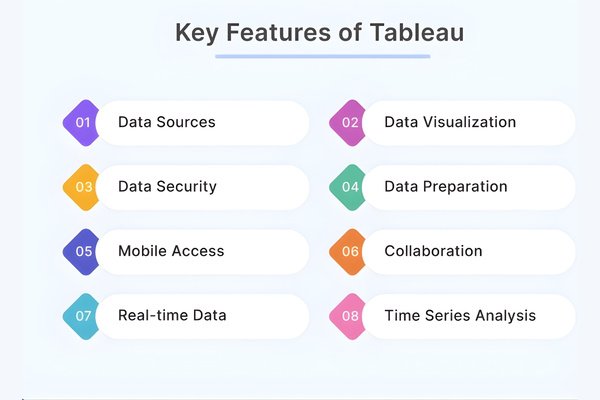
Companies use Tableau to reduce reporting time and improve decision quality. Many teams now prefer visual dashboards over long spreadsheets. This shift makes Tableau skills valuable in finance, healthcare, retail, logistics, and technology sectors.
Why Choose Tableau Online Training Instead of Self-Study?
Self-study often lacks structure, feedback, and real-world practice. With Tableau Online programs, learners follow a guided path that covers both beginner and advanced topics. They also receive mentor support and project-based learning.
Benefits of Structured Learning
- Clear learning roadmap
- Live instructor guidance
- Hands-on assignments
- Career-focused projects
- Peer discussions and feedback
With Tableau Online classes, learners build skills step by step. They move from simple charts to advanced dashboards and data modeling tasks.
Career Growth with Tableau Training and Placement
Many learners join Tableau courses to improve job prospects. Employers look for candidates who can turn business questions into visual answers. This skill set applies to many job roles.
Popular Job Roles After Tableau Training
- Data Analyst
- Business Intelligence Developer
- Tableau Developer
- Business Analyst
- Reporting Specialist
Programs that offer tableau training and placement help learners prepare for real hiring processes. These services often include resume support, interview practice, and job referrals.
How Tableau Online Supports Flexible Learning
Modern professionals need flexible schedules. Tableau Online platforms allow learners to study from home or office. They can attend live sessions or review recorded lessons.
Learning Flexibility Features
- Self-paced modules
- Live weekend and evening classes
- Recorded video access
- Cloud-based lab environments
- Mobile-friendly platforms
This flexibility makes Tableau Online training suitable for working professionals, students, and career switchers.
Step-by-Step Learning Path in a Tableau Software Course
A well-designed Tableau software course follows a clear structure. Below is a typical learning path.
Step 1: Understanding Data Basics
Learners start with data concepts such as:
- Rows and columns
- Data types
- Joins and relationships
- Data cleaning methods
Step 2: Connecting to Data Sources
Students practice connecting Tableau to:
- Excel files
- SQL databases
- Cloud platforms
- CSV files
Step 3: Creating Charts and Visuals
They learn how to build:
- Bar charts
- Line charts
- Maps
- Scatter plots
Step 4: Building Dashboards
Learners combine charts into dashboards. They add filters, actions, and layouts.
Step 5: Publishing and Sharing
They publish dashboards to cloud platforms and manage user access.
This step-by-step flow helps learners grow from beginner to professional level using Tableau Online tools and environments.
Real-World Applications of Tableau Skills
Tableau is not limited to one industry. It supports many business functions.
Sales and Marketing
Teams track leads, revenue, and campaign performance. Dashboards show which products and channels perform best.
Finance
Analysts monitor budgets, expenses, and profit margins. Visual reports help leaders review financial health quickly.
Healthcare
Hospitals use dashboards to track patient data, staffing levels, and resource use.
Supply Chain
Managers track inventory, delivery times, and supplier performance.
These real-world cases show why Tableau Online learning focuses on business problem solving, not just tool use.
Evidence-Based Support: Industry Demand for Tableau Skills
Recent job market studies show strong demand for data analysts and BI developers. Many job listings in the USA and global markets mention Tableau as a preferred skill.
Key Market Insights
- Data analyst roles grow faster than many IT jobs
- Companies invest more in business intelligence tools
- Visual reporting improves team productivity
- Cloud analytics adoption increases year by year
These trends support the value of joining Tableau Online programs that focus on practical and job-ready skills.
Hands-On Learning with Projects and Labs
Practice is essential for skill development. Good Tableau Online courses include live projects that reflect business scenarios.
Sample Project Ideas
- Sales performance dashboard
- Customer retention analysis
- Marketing campaign tracker
- Financial reporting system
Learners use real or sample data sets. They clean data, build charts, and present dashboards. This process mirrors real workplace tasks.
Sample Tableau Tutorial: Building a Simple Dashboard
Below is a simple guide that reflects how learners work in Tableau Online labs.
Step 1: Connect to Data
Open Tableau and select a CSV or Excel file. Choose the sheet you want to analyze.
Step 2: Create a Chart
Drag a date field to columns. Drag a sales field to rows. Select a line chart.
Step 3: Add Filters
Drag a region field to the filter shelf. Select the regions you want to show.
Step 4: Build Dashboard
Click the dashboard tab. Drag the chart onto the canvas. Adjust size and layout.
Step 5: Publish
Save and publish the dashboard to a shared workspace.
This simple tutorial shows how Tableau Online learners gain hands-on practice with real tasks.
Why Tableau Developer Course Skills Matter
A Tableau developer course goes beyond basic charts. It teaches system design and performance skills.
Advanced Topics Covered
- Data modeling and optimization
- Calculated fields and parameters
- Dashboard performance tuning
- Security and user roles
- Server and cloud publishing
These skills help learners move into senior roles. Many organizations rely on developers to maintain large reporting systems.
Tableau Training USA: Local and Global Career Benefits
Many learners search for tableau training USA because of strong job markets and global company presence. USA-based programs often follow international business standards.
Benefits of USA-Focused Training
- Exposure to global business cases
- Industry-aligned projects
- Professional communication skills
- Job placement networks
With Tableau Online, learners from any country can access these global learning standards.
Long-Tail Keyword Focus: Who Should Learn Tableau?
Beginners in Data Analytics
Students who want to enter data roles can start with Tableau Online courses.
Business Professionals
Managers and analysts use dashboards to support decisions.
IT and Software Engineers
Developers integrate Tableau with databases and applications.
Career Switchers
Professionals from finance, marketing, or operations move into data roles.
How Tableau Tutorials Improve Learning Speed
Tableau tutorials help learners understand concepts with examples. These short lessons focus on one task at a time.
Benefits of Tutorials
- Clear step-by-step guidance
- Visual learning support
- Quick skill practice
- Easy revision
When paired with Tableau Online labs, tutorials help learners build confidence and accuracy.
Placement Support and Career Services
Tableau training and placement programs often include career services. These services guide learners through the hiring process.
Common Career Support Features
- Resume review
- Interview practice
- Portfolio building
- Job referrals
- Career counseling
These steps help learners move from classroom to workplace.
Comparing Online and Classroom Learning
Online Learning Benefits
- Flexible schedule
- Remote access
- Self-paced review
- Global instructors
Classroom Learning Benefits
- In-person interaction
- Fixed routine
- Local networking
For many professionals, Tableau Online training offers the best balance of flexibility and quality.
Measuring Learning Progress
Good programs use assessments and projects to track progress.
Common Evaluation Methods
- Quizzes
- Practical labs
- Final projects
- Peer reviews
These tools help learners identify strengths and areas to improve.
Building a Strong Tableau Portfolio
A portfolio shows real work. Learners should collect dashboards and reports from projects.
Portfolio Tips
- Use clear titles and descriptions
- Explain business goals
- Show data sources
- Add screenshots or live links
With Tableau Online access, learners can host dashboards in cloud workspaces for easy sharing.
Future Trends in Tableau and Analytics
AI and Automation
Tableau integrates AI features that suggest insights and patterns.
Cloud Analytics
More companies move dashboards to cloud platforms.
Data Storytelling
Professionals focus on clear and simple visual communication.
Learning through Tableau Online prepares learners for these trends.
Why H2K Infosys for Tableau Online Training
H2K Infosys focuses on professional IT training and career growth. Their programs follow structured learning paths, hands-on labs, and career support.
Program Highlights
- Live expert instructors
- Real business projects
- Career guidance
- Flexible schedules
- Industry-aligned curriculum
These features help learners gain both skills and confidence.
Key Takeaways
- Tableau skills support strong career growth in data roles.
- Tableau Online training offers flexibility and hands-on learning.
- Real projects help learners apply skills in business settings.
- Placement support improves job readiness.
- Global demand makes Tableau a valuable long-term skill.
Conclusion: Start Your Tableau Learning Journey Today
Build real data skills with hands-on dashboards and expert guidance.
Enroll in H2K Infosys Tableau Online training and move toward a confident and job-ready data career.