Why Your Portfolio Matters More Than Ever
Remember a few years ago, when having an admin certification class on your resume was enough to get you noticed? Well, that’s not the case any longer.
With the advent of AI technologies within Salesforce (Einstein Copilot, Predictive Analytics, etc.), organizations are looking for individuals who not only possess knowledge but also have the capability to apply that knowledge.
I have witnessed instances where a candidate has received not one, not two, but three Salesforce admin certifications, only to be rejected, while another candidate with only a single, albeit strong, Portfolio for Salesforce has landed an interview with a top-tier firm.
So, what is a Portfolio for Salesforce, and why is it becoming increasingly important? A Portfolio for Salesforce is your “proof of work.” It is a demonstration of your capabilities, your understanding of how to solve business problems, your understanding of how to apply Salesforce’s AI technologies, and your overall thought process, rather than your knowledge.
And that is precisely what is going to be valued in 2026.
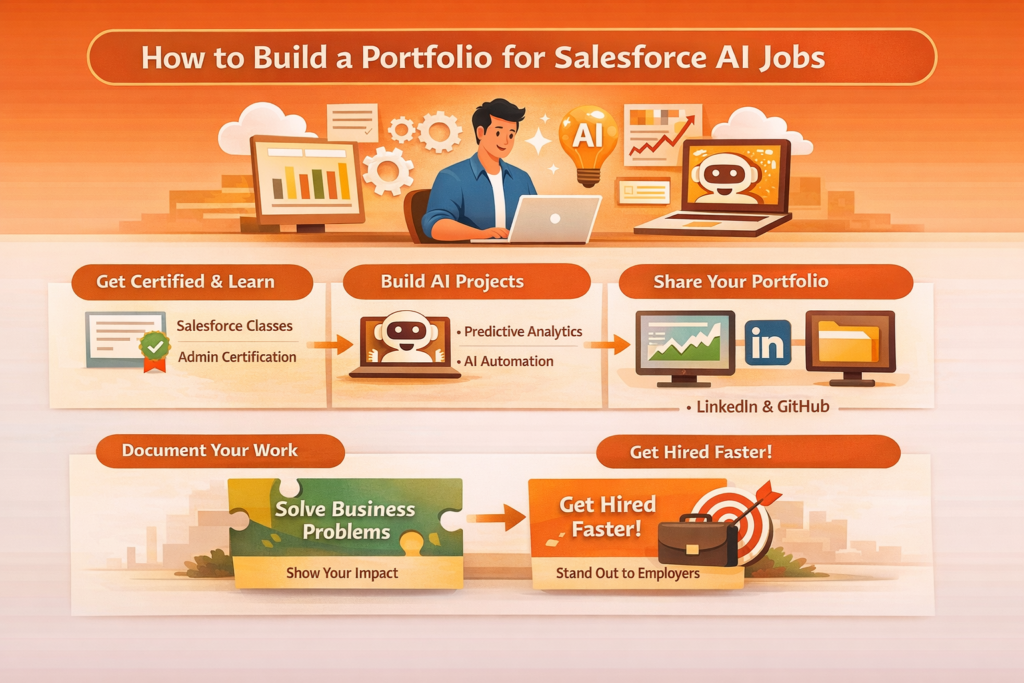
Step 1: Start With Real-World Use Cases (Not Just Practice Projects)
This is where you need to think like a consultant, not a student.
Instead of building random demo apps, focus your Portfolio for Salesforce on real business scenarios. For example:
- A sales forecasting dashboard using Einstein Analytics
- A chatbot using Salesforce AI for customer support
- Lead scoring automation using predictive insights
- Workflow automation for a service team
I remember building a simple lead scoring model during one of my Salesforce classes. At the time, it felt basic. But when I reframed it as:
“Implemented AI-driven lead prioritization to increase conversion efficiency.”
It suddenly sounded like something a company would pay for.
That’s the trick. Your Portfolio for Salesforce should translate technical work into business value.
Step 2: Combine Certifications With Hands-On Work
Let’s be real, Salesforce certification course programs are important. They give structure. They help you understand the platform deeply.
But certifications alone? They’re just the starting point.
Here’s a better approach:
- Take Salesforce admin certification classes
- Immediately apply what you learn in a project
- Document everything
So if you learn:
- Data modeling → build a custom object system
- Automation → create flows for a real scenario
- AI tools → implement predictions or recommendations
Then include it in your Portfolio for Salesforce.
Think of certifications as ingredients. Your portfolio is the final dish.
Step 3: Build 3-5 Strong Projects (Quality Over Quantity)
You don’t need 20 projects. That actually hurts you.
A good Portfolio for Salesforce should have:
- 3 to 5 well-documented projects
- Each one should solve a different type of problem
- Each one should show increased complexity
Here’s a structure that works well for a Portfolio for Salesforce:
Project 1: Admin Foundation
- User roles, profiles, security setup
- Basic automation (Flows, Process Builder)
- Reports and dashboards
Project 2: Business Process Automation
- Sales pipeline automation
- Lead assignment logic
- Email workflows
Project 3: AI Implementation
- Einstein prediction builder
- AI-driven recommendations
- Data-driven decision workflows
Project 4: Integration (Optional but powerful)
- API integration
- External data connection
- Real-time sync
Each one of these is a pillar in your Portfolio for Salesforce.
Step 4: Document Like a Story, Not a Manual
This is where most portfolios fall flat.
People write documentation like:
“Created object. Added fields. Built flow.”
No one cares.
Instead, structure your Portfolio for Salesforce like this:
- Problem
What was the business issue? - Approach
How did you think about it? - Solution
What did you build? - Outcome
What improved?
Examples:
A small sales team was having a hard time prioritizing leads. I built an AI-based lead scoring solution using Salesforce Einstein. The solution ranks leads according to historical conversion rates. This improved response time and reduced manual work.
This sounds like a personal experience, but it was a project.
Yes, this is what hiring managers want to see right away.
Step 5: Show Your Work Publicly (Don’t Hide It)
Your Portfolio for Salesforce should be publicly available.
Possible locations:
- Your own website
- GitHub (including documentation and configurations)
- LinkedIn featured section
- PDF portfolio
If you’re a beginner, it can be as simple as:
- Google Docs and screenshots
- Simple and clean format
- Simple explanations
I’ve seen people land jobs with a well-structured PDF Portfolio for Salesforce. It is not necessary to be a designer. What matters is simplicity.
Step 6: Highlight AI Skills (This Is the Game-Changer)
This is where you really stand out.
AI and automation are rapidly advancing features of Salesforce.
Include the following sections in your Portfolio for Salesforce:
- Predictive analytics
- AI-based recommendations
- Automation enhanced by AI
- Data-driven decision-making
Even a small feature involving AI can make a huge difference.
Examples:
- Predictive customer churn
- AI-based recommendations
- Automating customer support
These are not just technical skills. These are business multipliers.
Step 7: Tie Everything Back to Business Value
This is what I learned the hard way.
Initially, I was overemphasizing features. But companies do not need feature builders. What they need are problem solvers.
So, your Portfolio for Salesforce should always answer these questions:
- Did it save time?
- Did it increase revenue?
- Did it reduce manual work?
Even if the numbers are hypothetical, be realistic about them.
For example:
“Reduced manual lead sorting by automating prioritization logic, saving approximately 10 hours per week.”
And now, your project sounds like something that would be useful to a company.
Step 8: Keep Updating Your Portfolio
It’s not something you do once.
The world of Salesforce is constantly changing.
- New features are being added.
- New AI tools are being released.
So, your Portfolio for Salesforce should be changing too.
Every time you:
- Take new Salesforce training classes
- Learn something new about Salesforce
- Try out something new with AI tools
Add something small to your Portfolio.
It’s not something you do once.
It’s something that lives.
Step 9: Learn From Real Industry Trends
Right now, companies are heavily investing in:
- AI-powered CRM
- Automation-first workflows
- Data-driven customer insights
Even recent updates to Salesforce are pushing companies to:
- Generative AI assistants
- Real-time analytics
- Smarter automation
So, your Portfolio for Salesforce should be incorporating these trends.
Not old workflows.
Not old tools.
Step 10: Add a Personal Touch (This Matters More Than You Think)
Here’s something that people don’t talk about enough:
Hiring managers can tell if something feels real.
So, don’t be afraid to:
- Add small personal reflections
- Talk about the challenges you’ve faced
- Talk about the things that didn’t work out well.
For example:
“I initially built the automation using Process Builder, but later switched to Flow for better scalability.”
It makes your Portfolio for Salesforce feel real.
And trust me, that stands out.
Where Training Fits Into All This
Okay, let’s get back to the idea of learning.
Salesforce training classes are still important, and you get:
- A good foundation
- Some practice
- Some experience with tools
However, the best way to approach this is:
- Learn → Build → Document
That’s how you get a Portfolio for Salesforce.
That’s also how you get a job.
A Quick Note on H2K Infosys
If you’re a person who wants a structured approach before jumping the gun on projects and tools, then H2K Infosys could be a great resource for you.
They offer a combination of training classes and hands-on experience, which makes it easier for you to get started with your Portfolio for Salesforce even as you’re still in the process of learning, not after.
That’s also the best way, in my opinion.
Common Mistakes to Avoid
Let me help you out here.
Mistakes to avoid:
Too many small projects with no depth
No documentation or explanation
Using copy-paste tutorials
No use of AI
Overloading with jargon
A clean and simple Portfolio for Salesforce will always win over a cluttered and messy one.
Final Thoughts
If you take away one thing from this, let me tell you:
A good Portfolio for Salesforce isn’t about showing off everything you know; it’s about showing off everything you can.
That’s it.
And once you have 2-3 decent projects in your Portfolio for Salesforce, you’ll realize something interesting:
Interviews start becoming easier.
That’s because you’re not just another person with certifications; you’re a person who can actually get things done.