Introduction: Why Salesforce Reports and Analytics Matter
Salesforce isn’t just a CRM; it’s a powerhouse of business intelligence. Every organization running Sfdc courses or sales force training emphasizes one thing understanding your data. Salesforce Reports turn raw data into actionable insights, helping decision-makers track sales performance, marketing ROI, and customer behavior.
Whether you’re preparing for your Salesforce administrator classes or managing real-world CRM projects, the ability to design and interpret Salesforce Reports separates average users from top performers.
In the world of data-driven business, information is power and Salesforce Reports are your gateway to unlocking that power. Whether you’re a beginner learning through a Salesforce administrator certification course or an experienced professional aiming to sharpen your skills, mastering Salesforce Reports and Analytics is a must.
This guide will walk you through everything you need to know from creating reports and dashboards to analyzing trends and automating insights so you can use Salesforce like a pro.
What Are Salesforce Reports?
Salesforce Reports are dynamic summaries of data stored within your Salesforce org. They help visualize information such as leads, opportunities, accounts, and cases in a structured, easy-to-read format.
You can filter, group, and summarize records to answer key business questions like:
- How many leads converted this month?
- Which sales representative closed the most deals?
- What is the trend in customer retention over time?
In essence, Salesforce Reports transform large datasets into meaningful insights that drive informed decision-making.
Core Benefits of Salesforce Reports
- Instant Insights – Instantly visualize trends and KPIs.
- Data Accuracy – Pull data directly from Salesforce records without manual effort.
- Customizable Dashboards – Combine multiple Salesforce Reports to display key metrics on a single screen.
- Collaborative Analysis – Share reports with teams for real-time collaboration.
- Automation – Schedule Salesforce Reports to run automatically, keeping stakeholders informed.
According to a 2024 Salesforce study, 79% of CRM users stated that reports and dashboards were their most-used features highlighting the importance of data analytics in business strategy.
Types of Salesforce Reports
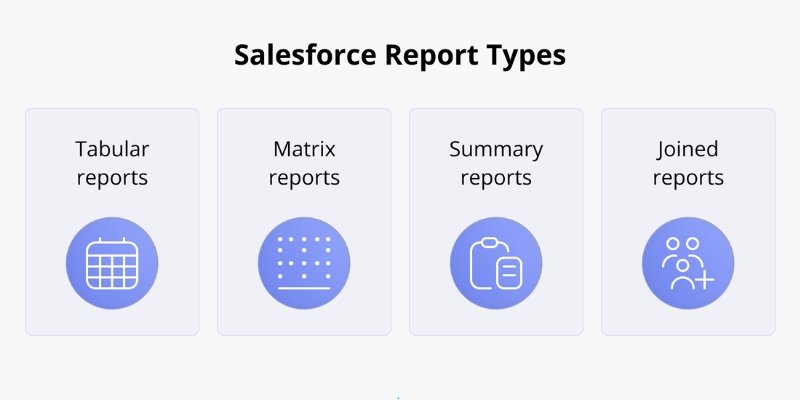
Understanding the four main report types is crucial for anyone in salesforce training certification or sales force administrator training.
1. Tabular Reports
These are simple lists of records. Think of them as Excel spreadsheets within Salesforce. They’re ideal for exporting data or reviewing basic lists.
Example: A list of all open opportunities in the current quarter.
2. Summary Reports
These add grouping and subtotals, allowing for deeper insights.
Example: Total revenue grouped by region or sales representative.
3. Matrix Reports
Matrix reports enable both row and column groupings useful for cross-tab comparisons.
Example: Comparing product performance by region and month.
4. Joined Reports
Joined reports let you view different report types in one unified layout.
Example: Combine opportunity data with customer service case data for a holistic view.
Mastering these report types is a major focus of any Salesforce course or Salesforce administrator classes.
How to Create Salesforce Reports: Step-by-Step Guide
Step 1: Navigate to the Reports Tab
Go to your Salesforce dashboard and click on the Reports tab.
Step 2: Select the Report Type
Choose your preferred report type tabular, summary, matrix, or joined depending on your goal.
Step 3: Apply Filters
Use filters to narrow down your data. For instance:
- Show only opportunities where the stage is “Closed Won.”
- Filter leads by creation date.
Step 4: Group Your Data
Grouping makes data easier to interpret. You can group by fields like “Region,” “Owner,” or “Industry.”
Step 5: Add Charts or Visualizations
Visual elements like bar charts, pie charts, and line graphs enhance readability.
Step 6: Save and Share
Save your report in the right folder (public or private) and share it with team members.
The entire process becomes second nature once you go through practical exercises in a Salesforce administrator certification course.
Key Features of Salesforce Reports Every Admin Should Know
1. Dynamic Filters
Dynamic filters personalize Salesforce Rearrtxzassdports for users showing only data relevant to the person viewing it.
Example: A sales rep views only their accounts, while a manager sees all accounts.
2. Bucket Fields
Categorize values into groups without editing the source data.
Example: Classify revenue ranges as “Low,” “Medium,” or “High.”
3. Custom Summary Formulas
Use formulas to create calculated metrics directly within your report.
Example: Revenue per Deal = Total Revenue / Number of Deals
4. Conditional Highlighting
Highlight rows or cells that meet specific conditions to draw attention to important metrics.
5. Row-Level Formulas
Perform calculations on each record, giving you greater analytical flexibility.
These advanced tools are covered in depth in sales force administrator training modules and hands-on labs.
Introduction to Salesforce Dashboards
A Dashboard in Salesforce is a visual representation of one or more Salesforce Reports. Dashboards display data as charts, gauges, or tables providing instant insights at a glance.
Why Dashboards Matter:
- Simplify performance tracking.
- Highlight KPIs and anomalies.
- Help management make data-backed decisions.
Example Dashboard Widgets:
- Top Performing Sales Reps
- Monthly Revenue vs. Target
- Open Customer Support Cases
Understanding how to connect dashboards with Salesforce Reports is essential for your Salesforce training certification success.
Real-World Applications of Salesforce Reports
- Sales Management
Track closed deals, revenue forecasts, and individual performance. - Marketing Analytics
Analyze campaign ROI, lead sources, and conversion rates. - Customer Service
Monitor case resolution times and customer satisfaction. - Finance and Operations
Measure budgets, expenses, and billing accuracy.
A Salesforce professional with strong reporting skills can interpret these insights to optimize workflow across departments.
Pro Tips to Master Salesforce Reports
1. Use Report Folders Wisely
Organize Salesforce Reports into shared folders based on teams or functions for better accessibility.
2. Leverage Report Subscriptions
Set up automatic report delivery to stakeholders daily, weekly, or monthly.
3. Combine Filters for Precision
Use both standard and cross-filters to analyze data relationships.
4. Clone and Customize Existing Reports
Instead of starting from scratch, clone frequently used Salesforce Reports and tweak them.
5. Use Joined Reports for 360° Insights
Compare data across multiple objects for example, linking leads and opportunities.
Learning these optimization techniques in Salesforce administrator classes ensures you can create advanced analytics effortlessly.
Using Analytics in Salesforce
Salesforce Analytics often known as Einstein Analytics or CRM Analytics takes Salesforce Reports to the next level with AI-powered insights.
Key Features Include:
- Predictive scoring for leads and opportunities.
- Trend analysis using historical data.
- Automated visualization and storytelling.
- Integration with external datasets like ERP or Google Sheets.
This feature is ideal for administrators trained through Sfdc courses, as it transforms static reporting into interactive, data-driven storytelling.
Common Mistakes to Avoid in Salesforce Reports
- Using Too Many Filters
Excessive filters can overcomplicate Salesforce Reports and distort insights. - Ignoring Field-Level Security
Always ensure users only see data they’re authorized to view. - Skipping Report Validation
Validate metrics before sharing. Errors in data grouping can lead to wrong conclusions. - Overusing Custom Formulas
While formulas add flexibility, overuse may slow report performance. - Not Refreshing Data Regularly
Stale data makes Salesforce Reports less reliable. Use scheduled refreshes to stay updated.
Salesforce Reports in Real-Time Decision-Making
Modern organizations thrive on real-time data. Salesforce Reports enable real-time performance tracking allowing sales leaders, marketers, and customer support teams to act immediately.
Example:
If the report shows a sudden drop in lead conversions, teams can instantly adjust campaigns, retrain staff, or update lead nurturing strategies.
This hands-on agility is what learners master during sales force training programs that emphasize practical dashboards and analytics.
Integrating Salesforce Reports with External Tools
Salesforce allows seamless integration with external tools like:
- Tableau (for advanced visualization)
- Power BI (for cross-platform data analysis)
- Excel (for offline manipulation)
- Slack (for report sharing and collaboration)
Such integrations elevate the capabilities of Salesforce Reports, turning them into powerful business intelligence tools.
Hands-On Exercise: Building a Sales Performance Dashboard
Let’s create a simple dashboard using Salesforce Reports:
Step 1: Create a Summary Report
Group your opportunity data by stage and owner.
Step 2: Add Filters
Filter by “Close Date = Current Month.”
Step 3: Add a Chart
Select a bar chart showing “Revenue by Sales Rep.”
Step 4: Save the Report
Save it as “Monthly Sales Performance.”
Step 5: Add to Dashboard
Navigate to the Dashboard tab → Click New Dashboard → Add your saved report as a widget.
Step 6: Share
Share the dashboard with your sales team and management for quick visibility.
This is a classic exercise taught in Salesforce administrator certification courses to help learners master real-world analytics.
The Role of Salesforce Administrators in Data Analytics
A Salesforce Administrator isn’t just a system operator they’re data strategists. Using Salesforce Reports and analytics, administrators can:
- Monitor user activity and system health.
- Track data quality and completeness.
- Ensure that reports align with business goals.
- Create templates for leadership reporting.
With the right sales force administrator training, professionals can transform CRM data into decision-making tools that drive growth.
Why Salesforce Reports Are Career-Boosting
Organizations are actively seeking certified professionals who can generate and interpret Salesforce Reports. The 2025 LinkedIn Workforce Report indicates that roles requiring Salesforce analytics skills have grown by 34% in the past year.
Here’s how it impacts your career:
- Business Analyst – Use reports for requirement validation.
- Salesforce Administrator – Build dashboards for management.
- Sales Manager – Track team KPIs and forecast revenue.
- Marketing Specialist – Analyze campaign results and optimize spending.
Earning a Salesforce training certification not only boosts your resume but also empowers you to deliver real business value.
Real-World Example: Salesforce Reports in Action
A leading retail company used Salesforce Reports to identify underperforming regions. By analyzing revenue by product and geography, they restructured their sales approach resulting in a 22% sales increase in six months.
This example demonstrates how mastering analytics through Sfdc courses can directly contribute to measurable business outcomes.
Advanced Analytics Techniques for Experts
Once you’re comfortable with basic Salesforce Reports, elevate your skills with these advanced strategies:
- Trend Reports: Track changes in metrics over time.
- Cross-Object Reporting: Combine related data sets.
- Report Scheduling: Automate updates for management.
- Drill-Down Dashboards: Enable users to click deeper into detailed views.
- Einstein Discovery: Use AI-powered predictions for forecasting.
Each of these techniques is taught through practical labs in Salesforce administrator classes, ensuring you gain real, job-ready experience.
Key Takeaways
- Salesforce Reports are essential for tracking and interpreting organizational performance.
- Understanding report types, filters, and formulas builds strong analytical foundations.
- Dashboards convert data into visual insights for real-time decision-making.
- Integration with analytics tools like Tableau and Einstein enhances capabilities.
- A Salesforce administrator certification course is the best way to master these features hands-on.
Conclusion: Become a Salesforce Reporting Expert
Mastering Salesforce Reports isn’t just a technical skill it’s a business superpower. With the right guidance and hands-on experience, you can turn raw CRM data into strategic intelligence that drives organizational success.
Take the next step today enroll in H2K Infosys’ Salesforce Administrator Certification Course and learn to use Salesforce Reports and Analytics like a pro!