
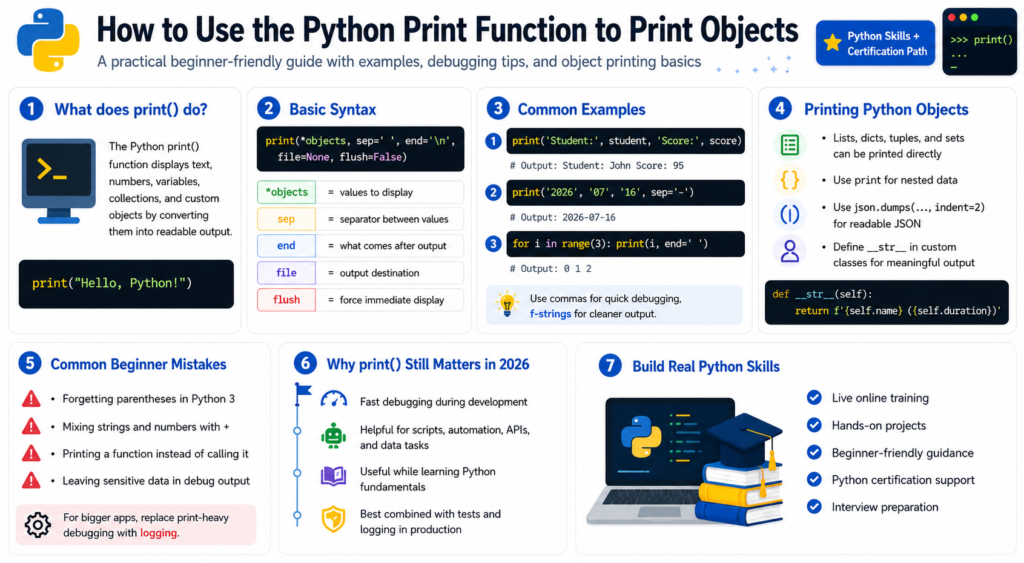
The Python Print Function displays text, numbers, variables, collections, and custom objects by converting them into readable output. Put one or more values inside print(), and Python sends the result to the console by default.
Simple? Yes. Limited? Not really. Once you move beyond “Hello, World!”, the Python Print Function becomes a practical tool for formatting messages, checking program flow, inspecting API data, and understanding how your own Python certification online classes behave.
I still use print statements when exploring unfamiliar data. They are not a substitute for logging, but one carefully placed line can quickly expose a stubborn loop or unexpected value.
Basic Syntax of the Python Print Function
The standard form is:
print(*objects, sep=" ", end="\n", file=None, flush=False)
objects are the values to display. Python places sep between them, adds end afterward, and normally writes to standard output. Because print() is built in, no import is needed.
Here is the smallest useful example of the Python Print Function:
print("Hello, Python!")
You can also print numbers and Boolean values directly:
print(42)
print(3.14159)
print(True)
Beginners sometimes assume every value needs str(). Usually, it does not. The Python Print Function performs the ordinary string conversion for you.
Printing Multiple Objects
A common real-world use is displaying several related values on one line:
student = "Maya"
score = 92
passed = True

print("Student:", student, "Score:", score, "Passed:", passed)
The Python Print Function inserts spaces between objects by default. For output meant to be read by another person, an f-string is often cleaner:
print(f"Student: {student} | Score: {score} | Passed: {passed}")
I use commas for quick debugging and f-strings for cleaner, reader-facing output.
Use sep to Control the Separator
The sep argument changes what appears between objects, allowing the Python Print Function to create dates, paths, labels, or compact rows.
print("2026", "07", "16", sep="-")
print("python", "training", "online", sep="/")
Output:
2026-07-16
python/training/online
You can even sketch a CSV-style row:
print("Keyboard", 2, 49.99, sep=",")
For real CSV files, use the csv module, which handles quoting and embedded commas correctly. The Python Print Function still works well for prototypes.
Use end to Stay on the Same Line
Every call normally finishes with a newline. Change end when the next output should continue on the same line:
for step in range(1, 4):
    print(f"Step {step}", end="... ")

print("done")
Output:
Step 1... Step 2... Step 3... done
This use of the Python Print Function works for progress indicators and countdowns. Some environments buffer output, so text may not appear immediately.
Use flush=True for Immediate Output
Set flush=True when visible timing matters:
import time

for seconds in range(3, 0, -1):
    print(seconds, end=" ", flush=True)
    time.sleep(1)

print("Go!")
The Python Print Function is used this way in lightweight deployment scripts, containers, and monitoring commands where delayed output would be confusing.
Printing Lists, Dictionaries, Tuples, and Sets
Built-in collections can be printed directly:
skills = ["Python", "SQL", "Git"]
profile = {"name": "Asha", "experience": 2}
coordinates = (18.52, 73.85)
permissions = {"read", "write"}

print(skills)
print(profile)
print(coordinates)
print(permissions)
The Python Print Function uses each object’s string representation. For deeply nested structures, use pprint:
from pprint import pprint

project = {
    "name": "Sales Analyzer",
    "team": ["Asha", "Leo", "Nina"],
    "settings": {"region": "us-east", "debug": True, "retries": 3}
}

pprint(project, sort_dicts=False)
pprint() does not replace the Python Print Function; it simply formats complex structures with more visual organization.
Printing JSON Clearly
API responses are easier to inspect when they are indented:
import json

response = {
    "status": "success",
    "records": 3,
    "items": ["A12", "B07", "C31"]
}

print(json.dumps(response, indent=2))
Here, the Python Print Function displays the formatted string from json.dumps(). Indented API data is much easier to inspect.
Printing Custom Objects with __str__
Consider a simple class:
class Course:
    def __init__(self, name, duration):
        self.name = name
        self.duration = duration

course = Course("Python Automation", "8 weeks")
print(course)
The default result may be a memory-oriented object description. To make the Python Print Function show something meaningful, define __str__:
class Course:
    def __init__(self, name, duration):
        self.name = name
        self.duration = duration

    def __str__(self):
        return f"{self.name} ({self.duration})"
Now print(course) displays:
Python Automation (8 weeks)
The Python Print Function depends on an object’s string representation, so thoughtful class design improves debugging and command-line output. Add __repr__ for a developer-focused representation.
Sending Output to a File
The file argument lets the Python Print Function write to a file-like object:
with open("report.txt", "w", encoding="utf-8") as report:
    print("Daily processing completed", file=report)
    print("Records processed:", 1284, file=report)
This works for small reports. In production, use logging for timestamps, severity levels, filtering, and rotation. Print is best for exploration and command-line output; logging is better for maintained systems.
Common Mistakes Beginners Make
One common error is using old Python 2 syntax:
print "Hello"
Modern Python 3 requires parentheses. Another mistake is combining text and a number with +:
age = 28
print("Age: " + age)  # TypeError
Use a comma, str(age), or an f-string instead:
print("Age:", age)
print(f"Age: {age}")
A third mistake is printing a function rather than calling it:
def total():
    return 25

print(total)    # function object
print(total())  # 25
The Python Print Function is correct in both cases; the supplied object is different.
Never leave passwords, API keys, access tokens, payment details, or private customer data in debug output. Shared terminals and logs can turn a convenient statement into a security incident.
Why This Skill Still Matters in 2026
Python 3.14 was released on October 7, 2025, and Python.org listed Python 3.14.6 as the current maintenance release in June 2026. The 3.14 series also brought official support for free-threaded Python, along with interpreter and command-line improvements.
Even with those advanced changes, the Python Print Function remains relevant. Developers still need readable output while checking concurrent tasks, AI pipelines, test automation, API responses, and data-processing jobs. The real skill is knowing what to print and when to replace temporary output with tests, a debugger, or structured logging.
Learn Python Through Practical Training
A structured python certification course can help when self-study becomes scattered. Reading syntax is useful, but building a complete script, finding the bug, and explaining the fix is where the learning starts to stick.
H2K Infosys promotes a job-focused Python program with live learning, practical assignments, and real projects. Its current course page describes beginner-friendly instruction designed by certified trainers and places hands-on experience at the center of the program. That matters when comparing a Python online course certification because the certificate is evidence of completion; the real value is the ability to build and explain working code.
When choosing the best python certification for your goals, look beyond the badge. Check for instructor feedback, realistic projects, debugging practice, interview preparation, and portfolio work you can discuss confidently. H2K Infosys also publishes course features that include completion certification, resume preparation, mock interviews, and placement support in its Python training options.
For anyone searching for Python certification online, ask one blunt question: will this program make me write code regularly? Passive watching feels productive, but the confidence disappears when you face a blank editor. Guided practice, code reviews, and project work close that gap, and that is where H2K Infosys’s practical emphasis can be useful.
Final Takeaway
The Python Print Function starts as a one-line command and grows into a flexible tool for formatting output, inspecting objects, understanding program flow, and communicating results. Learn its parameters, practice with collections and classes, and build the judgment to move from print statements to proper logging as your projects mature.
Google’s current Search and AI-feature guidance emphasizes helpful, reliable, people-first content rather than pages created mainly to manipulate rankings. The same principle fits technical learning: practical examples and genuine understanding beat empty repetition.
FAQs
What is print() used for in Python?
It displays one or more objects as text. Developers use it for user messages, quick debugging, terminal output, and simple file writing.
Can print() display any Python object?
It can display nearly any object through that object’s string representation. Custom classes can define __str__ and __repr__ to make the result clearer.
What is the difference between sep and end?
Sep controls what appears between multiple objects. end controls what appears after the last object, with a newline used by default.
Should I use print or logging?
Use print for learning, small scripts, and temporary debugging. Use logging for production software that needs timestamps, severity levels, filtering, rotation, or centralized monitoring.
How do I print without starting a new line?
Set end to an empty string or another value, such as print("Loading", end=""). Add flush=True when the message must appear immediately.
Is H2K Infosys suitable for learning Python?
H2K Infosys presents its Python training as beginner-friendly, job-focused, and project-based. Review the current curriculum, trainer access, project scope, schedule, support terms, and certification details before enrolling.