If you’ve been anywhere near the Salesforce ecosystem lately, you’ve probably noticed one thing: AI isn’t just an add-on anymore it’s becoming the core of how the platform works.
And honestly, it’s happening fast.
I remember when AI in Salesforce mostly meant basic Einstein predictions lead scoring, opportunity insights, that sort of thing. Useful, sure, but still somewhat “background.” Now? It’s front and center. It’s writing emails, generating reports, summarizing calls, and even helping admins build automations.
So let’s sort through it all in a way that makes sense, no marketing speak, just real insights with practical examples and what it means for you if you’re learning through Salesforce certification training or currently work as an admin.
How Much Is Really New in Salesforce AI?
Let’s begin with the big picture.
The new Salesforce AI offerings are based on three key concepts:
- Generative AI (the kind that creates content)
- Real-time automation and decision-making
- Deep integration across every Salesforce cloud
And yeah, this is where things start to feel very different from even a year ago.
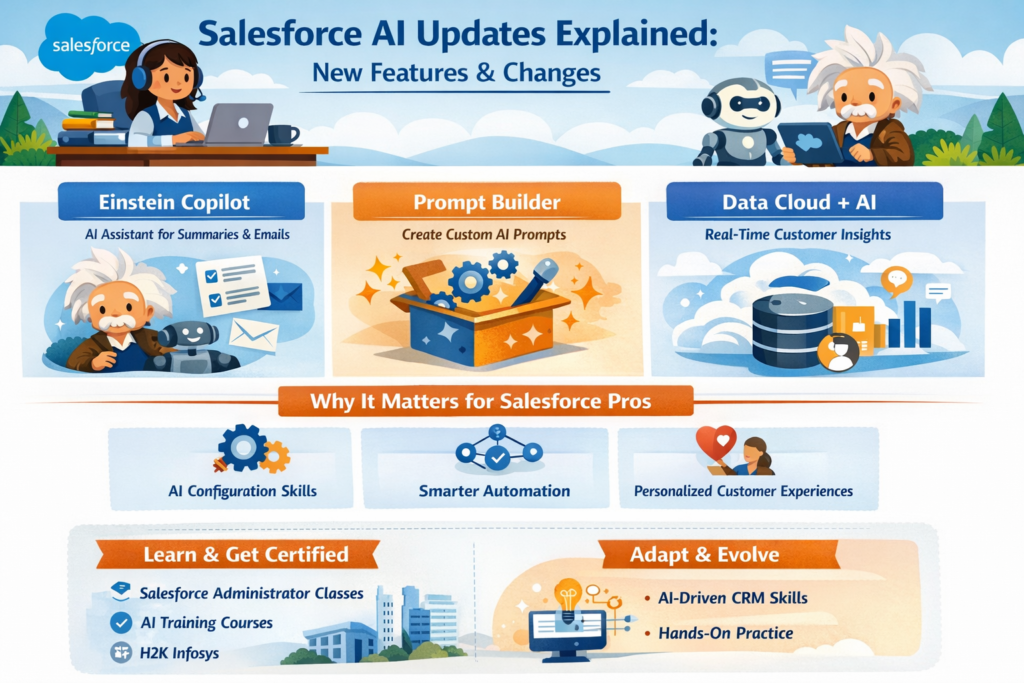
1. Einstein Copilot – The Game Changer
This is probably the most talked-about update and for good reason.
Einstein Copilot is basically Salesforce’s built-in AI assistant. But unlike older tools, this one isn’t limited to just analytics. It actually does things for you.
Think of it like this:
- You type: “Summarize this account activity.”
- It gives you a clean, readable summary
- Then you say, “Draft a follow-up email.”
- It writes it based on real CRM data
That’s Salesforce AI working at a level that feels almost like having another team member.
Real-world example:
A sales rep logs into Salesforce, checks an account, and instead of digging through notes, they just ask Copilot what’s going on. Within seconds, they’re up to speed. No hunting, no guesswork.
If you’re in Salesforce admin certification classes, this is the kind of feature you’ll be configuring, not just using.
2. Prompt Builder – AI Without Coding
This one is especially interesting for admins.
Prompt Builder lets you create custom AI prompts using your company’s data. No hardcore coding required just logic, structure, and a bit of creativity.
Let’s say your company wants:
- Auto-generated case summaries
- Personalized sales outreach emails
- Chat answers derived from knowledge base articles
Rather than having to build everything from scratch, you create prompts that are used behind the scenes of Salesforce AI.
It’s sort of like instructing the system on how to think in your voice as a company.
In fact this is where Salesforce online classes are beginning to grow. It’s not just about workflows and validation rules anymore you’re teaching almost like guiding the behavior of AI.
3. Making Better Decisions with Data Cloud + AI
This segment doesn’t always receive as much focus, but it’s massive.
Salesforce Data Cloud integrates all of your customer data from disparate sources into a single profile. Now add in Salesforce AI, and all of a sudden you have:
Real-time personalization
Holistic consumer journeys for predictive insights
Smarter segmentation for marketing campaigns
Example:
A user visits a product, interacts with support and then opens marketing emails. Salesforce AI sees all that and drives the next best interaction automatically.
It’s not just automation anymore it’s context-aware intelligence.
Why These Updates Matter for Salesforce Professionals
Here’s the truth: these changes aren’t optional.
If you’re planning to build a career in Salesforce, especially through Salesforce certification courses, you’ll need to understand how AI fits into everything.
Because the role of a Salesforce admin is shifting.
From “System Manager” to “AI Orchestrator”
Not long ago, admins were mainly responsible for:
- User management
- Reports and dashboards
- Workflow automation
Now? You’re expected to:
- Configure AI-driven processes
- Manage prompt logic
- Ensure data quality for AI outputs
- Balance automation with human oversight
It’s a different kind of responsibility.
And yeah, it can feel a bit overwhelming at first. I’ve seen people hesitate because AI sounds complicated but once you start using it inside Salesforce, it actually feels surprisingly practical.
How Salesforce AI Will Look in Your Day-to-Day Work
Let’s make this more concrete.
Here’s how Salesforce AI is manifesting in everyday workflows:
Sales Teams
- Auto-generated meeting summaries
- Smart opportunity insights
- AI-written follow-up emails
Support Teams
- Case summaries in seconds
- Answers that were used in previous tickets
- AI chatbots that know what’s going on
Marketing Teams
- Personalized campaign content
- Audience segmentation based on behavior
- AI-driven campaign optimization
And the interesting part? These aren’t “future features.” They’re already being used.
Learning Salesforce AI: Where Most People Get Stuck
If you’re going through Salesforce administrator classes, there’s a common pattern I’ve noticed.
People are comfortable with:
- Objects and fields
- Reports
- Flows
But when AI comes in, they pause.
Not because it’s too hard but because it’s unfamiliar.
The Real Challenge Isn’t Technical
It’s a mindset.
You’re not just building logic anymore you’re guiding intelligence.
That means asking:
- What should the AI generate?
- What data should it use?
- What tone should it follow?
- When should a human step in?
These aren’t typical admin questions. But they’re becoming essential.
A Quick Reality Check: AI Isn’t Perfect
Let’s be honest for a second.
Salesforce AI is strong but it’s not perfect.
Sometimes:
- Outputs need tweaking
- Context isn’t fully captured
- Responses feel slightly “off.”
And that’s okay.
This is actually where good admins really shine.
Because it’s a useful skill to know when to trust AI and when to tweak it.
How Salesforce Certification Training Is Evolving
Training programs are already adapting to these changes.
If you’re looking into Salesforce certification training, you’ll notice new topics like:
- AI fundamentals in CRM
- Prompt engineering basics
- Data quality for AI
- Ethical AI usage
And honestly, this is a good thing.
Because companies aren’t just hiring admins anymore they’re hiring people who understand how to make AI useful.
Practical Tips for Getting Started with Salesforce AI
If you’re feeling a bit unsure about where to begin, here’s what actually helps (from experience):
1. Start Small
Don’t try to automate everything at once.
Pick one use case:
- Email generation
- Case summaries
- Lead insights
Get comfortable with that.
2. Focus on Data Quality
AI is only as good as the data behind it.
If your CRM data is messy, incomplete, or outdated, Salesforce AI won’t magically fix it.
In fact, it might make things worse.
3. Experiment Without Fear
This piece is more important than most people understand.
Try prompts. Adjust them. Break things a little.
That’s how you figure out what works.
4. Stay Updated
Salesforce AI is evolving quickly.
The new things today can seem like the norm in a few months.
If you are taking Salesforce online classes, make sure they come with updated AI modules and not legacy content.
Where H2K Infosys Fits Into All This
Since we mentioned H2K Infosys earlier, it’s worth pointing out something practical.
Training providers like this are starting to include:
- Real-time AI use cases
- Hands-on practice with Salesforce AI tools
- Scenario-based learning
And that’s important.
Because reading about AI is one thing but actually using it inside Salesforce is what builds confidence.
The Bigger Shift: AI + CRM = A New Skillset
This isn’t simply an improvement to a feature it’s a change in how CRM systems…
Salesforce AI is blending:
- Automation
- Analytics
- Content generation
- Decision-making
- Into one unified experience.
And for professionals, that means:
- Learning faster
- Adapting quicker
- Thinking more strategically
Final Thoughts
If you learn only one thing from all this, then let it be this:
Salesforce AI isn’t taking away the role of admins it’s reimagining what that role entails.
The ones who perform well in this space aren’t those who know it all.
They’ll be the ones who:
- Stay curious
- Try things out
- Know the context in which AI is applied to business problems
And, well maybe get a couple of things wrong on the way. That’s part of it.
Quick Recap (Just So It Sticks)
- Salesforce AI is now central to the platform not optional
- Tools like Einstein Copilot and Prompt Builder are changing workflows
- Admin roles are evolving into more strategic, AI-focused positions
- Learning paths (including Salesforce certification courses) are adapting fast
- Real-world practice matters more than theory