
Introduction: Why Tableau Matters in Today’s Data-Driven World
Data drives decisions in modern businesses. Companies now expect professionals to convert raw data into clear insights. This demand has made data visualization tools essential. Among them, Tableau stands out as one of the most widely adopted platforms. Many learners choose to learn tableau online to gain job-ready analytics skills. But every tool has strengths and limits. This blog explains the advantages and disadvantages of using Tableau in a clear, practical, and balanced way.
Organizations generate massive volumes of data every day. Managers, analysts, and leaders need fast and clear insights to act with confidence. Visual analytics tools bridge the gap between raw numbers and decisions. Tableau helps users explore data visually without heavy coding. Because of this, using Tableau has become common across finance, healthcare, retail, IT, and government sectors.
At the same time, Tableau is not perfect. Licensing costs, performance limits, and learning curves matter. This guide helps you understand when using Tableau makes sense and when other tools may fit better.
What Is Tableau?
Tableau is a business intelligence and data visualization platform. It allows users to connect data sources, build dashboards, and share insights through interactive visuals. Analysts often rely on using Tableau to identify trends, patterns, and outliers quickly.
Tableau supports data from files, databases, cloud platforms, and big data systems. It also integrates with programming languages and enterprise tools.
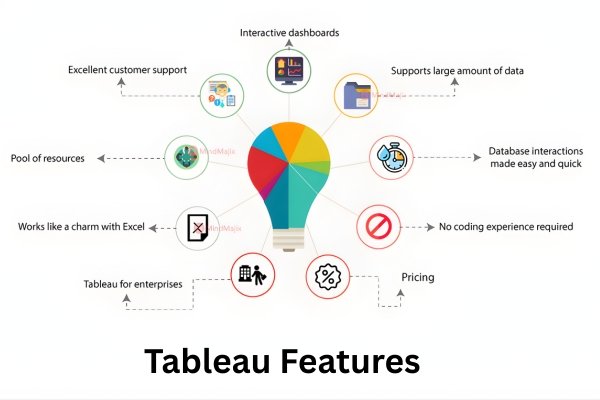
How Tableau Works: A Simple Overview
Tableau follows a visual analytics approach:
- Connect to data sources
- Prepare and clean data
- Create charts and dashboards
- Share insights with users
Behind the scenes, Tableau uses an in-memory engine to process queries quickly. This engine supports fast drag-and-drop analytics. Many tableau tutorials start with these basics to help beginners gain confidence.
Key Advantages of Using Tableau
1. Easy-to-Use Visual Interface
One of the biggest benefits of using Tableau is its simple interface. Users can build charts by dragging fields into rows and columns.
Why this matters
- Reduces dependency on coding
- Speeds up analysis
- Helps non-technical users work with data
Business users often adopt using Tableau faster than traditional BI tools.
2. Powerful Data Visualization Capabilities
Tableau offers a wide range of charts:
- Bar and line charts
- Heat maps and tree maps
- Geographic maps
- Interactive dashboards
With using Tableau, users can combine multiple visuals into one dashboard. Filters and actions allow real-time interaction.
Real-world example
Retail teams use using Tableau to track daily sales by region and product category.
3. Strong Performance for Large Datasets
Tableau’s in-memory engine allows fast querying. Analysts benefit from using Tableau when exploring millions of records.
Industry insight
According to analytics adoption studies, fast response time improves user adoption by over 30 percent in BI tools.
4. Broad Data Source Connectivity
Tableau connects to:
- Excel and CSV files
- SQL databases
- Cloud platforms
- Big data tools
This flexibility makes using Tableau suitable for complex enterprise environments.
5. Interactive Dashboards for Decision-Making
Decision-makers prefer visuals over static reports. Using Tableau enables:
- Drill-down analysis
- Dynamic filters
- Real-time updates
Executives often rely on using Tableau dashboards during strategy meetings.
6. Strong Community and Learning Resources
Tableau has a global user community. Learners who learn tableau online benefit from:
- Forums
- Public dashboards
- Free learning videos
Most tableau tutorials use real datasets, which improves practical understanding.
7. High Demand in the Job Market
Tableau skills appear in many job roles:
- Data analyst
- Business analyst
- BI developer
- Reporting specialist
A structured Tableau developer course helps learners align with market needs. Employers value experience with Tableau in real projects.
8. Integration with Advanced Analytics
Tableau supports integration with:
- Python
- R
- SQL
Advanced users enhance insights by combining models with visuals. This expands the value of using Tableau beyond basic reporting.
9. Scalable for Teams and Enterprises
Organizations start small and scale usage. Using Tableau supports:
- Individual analysts
- Department-level dashboards
- Enterprise deployments
Role-based access ensures data security.
10. Supports Data Storytelling
Data storytelling improves understanding. Tableau allows annotations and guided dashboards. This feature makes using Tableau effective for presentations.
Disadvantages of Using Tableau
1. High Licensing Cost
One major drawback of using Tableau is cost. Licensing can be expensive for small teams.
Impact
- Limits adoption in startups
- Requires budget planning
This is often discussed in Tableau tutorials for decision-makers.
2. Performance Issues with Very Large Data
While fast, Tableau can slow down with extremely large datasets. Optimizing extracts becomes necessary when Tableau at scale.
3. Limited Data Preparation Features
Tableau offers basic data cleaning. Complex transformations require external tools. This limitation affects workflows that rely heavily on data engineering before using Tableau.
4. Steep Learning Curve for Advanced Features
Basic charts are easy. Advanced calculations and parameters need practice. Learners who learn tableau online often require structured guidance to master advanced topics.
5. Weak Version Control
Tableau lacks strong built-in version control. Teams must manage changes carefully when Tableau in collaborative environments.
6. Dependency on Extracts
Tableau extracts improve speed but require refresh schedules. Poor management can cause outdated insights when Tableau.
7. Limited Write-Back Capabilities
Tableau focuses on visualization, not data entry. Users cannot easily write data back to sources while using Tableau.
8. Customization Limits
Some visual customizations require workarounds. This can frustrate designers when using Tableau for highly customized dashboards.
Tableau vs Other BI Tools: A Practical View
| Feature | Tableau | Power BI | Qlik |
|---|---|---|---|
| Ease of use | High | Medium | Medium |
| Visualization | Very strong | Strong | Strong |
| Cost | Higher | Lower | Medium |
| Data prep | Basic | Medium | Strong |
Despite competition, many teams prefer using Tableau for visual clarity and speed.
Step-by-Step: Getting Started with Tableau
Step 1: Install Tableau Desktop
Download the software and set up your workspace.
Step 2: Connect to Data
Choose Excel, database, or cloud source.
Step 3: Create Your First Chart
Drag dimensions and measures to build visuals. This is the foundation of using Tableau.
Step 4: Build a Dashboard
Combine charts and add filters.
Step 5: Publish and Share
Share dashboards securely with your team.
Most tableau tutorials follow this exact learning flow.
Practical Use Cases of Using Tableau
Business Analytics
Track KPIs and performance metrics using using Tableau dashboards.
Healthcare
Analyze patient trends and operational efficiency.
Finance
Monitor revenue, expenses, and risk patterns.
Marketing
Visualize campaign performance and customer behavior.
These use cases show why organizations invest in using Tableau skills.
Skills You Gain from Tableau Training
A structured Tableau software course helps learners build:
- Data visualization skills
- Analytical thinking
- Dashboard design skills
- Business insight communication
With tableau training USA, learners also gain exposure to industry projects.
Career Benefits of Learning Tableau
Professionals who complete a Tableau developer course often qualify for roles in analytics and reporting. Employers prefer candidates with hands-on experience using Tableau in real datasets.
When Should You Avoid Using Tableau?
- Very tight budgets
- Heavy data transformation needs
- Write-back reporting requirements
Understanding these limits helps teams decide if using Tableau fits their goals.
Key Takeaways
- Tableau excels in visualization and user experience
- Using Tableau supports fast business decisions
- Licensing and data prep limits exist
- Structured learning improves mastery
Balanced evaluation ensures smart tool selection.
Conclusion
Mastering data visualization requires both tools and practice. H2KInfosys offers hands-on learning through tableau training USA and real project exposure.
Enroll today to build job-ready skills with expert-led Tableau programs and advance your analytics career.