

Introduction
Following best practices for exception handling ensures your software remains robust against unexpected failures.Applying best practices for exception handling can decrease downtime and improve user experience.To effectively manage errors, developers must understand and implement best practices for exception handling in their code.Utilizing best practices for exception handling is crucial for maintaining application stability during testing.
Imagine running a critical application that suddenly crashes without warning. The user loses all progress, and the system displays a cryptic error message. This scenario is every developer’s nightmare and every tester’s opportunity to ensure it never happens again.That’s where exception handling comes into play.Adopting best practices for exception handling will lea to more predictable software behavior.Incorporating best practices allows developers to preemptively address potential issues.By aligning with best practices, teams can enhance their software’s robustness.Implementing best practices is essential for maintaining user trust.These practices help in avoiding common pitfalls.Effective exception handling and best practices are vital in today’s software landscape.
To develop robust applications, it is crucial to follow best practices for exception handling.
In the world of software development and testing, exception handling is the art of managing runtime errors gracefully, ensuring that programs continue to function smoothly even when unexpected conditions occur. For students enrolled in Quality assurance software testing courses mastering exception handling is a crucial step toward becoming a confident, job-ready QA professional.
Adopting best practices can significantly improve application performance.
To ensure quality, it is essential to incorporate best practices during the development lifecycle.
Understanding best practices can help QA professionals identify weaknesses in software design.
Best practices are not only beneficial for developers but also essential for testers.
What Is Exception Handling?
Exception handling refers to the mechanism that detects, intercepts, and resolves runtime errors or “exceptions” during program execution. An exception is a problem that disrupts the normal flow of an application such as division by zero, invalid input, or missing files.
Without proper handling, these exceptions can cause applications to terminate abruptly, leading to data loss, poor user experience, and potential business losses.
Key Concepts:
- Exception: An abnormal event that interrupts normal program flow.
- Try Block: The section of code that contains operations that might cause an exception.
- Catch Block: The part that defines how to respond to the exception.
- Finally Block: A section that executes regardless of whether an exception occurs, typically used for resource cleanup.
By implementing structured exception handling, developers and testers ensure that software behaves predictably even under unpredictable conditions.
Understanding best practices is crucial for developers.
Mastering best practices is key to developing resilient applications.
Why Exception Handling Matters in QA
Different languages implement best practices in various ways, but the core principles remain the same.Regardless of the programming language, adhering to best practices is vital.As QA professionals, using best practices can enhance software quality.
Employing best practices helps ensure applications can manage errors effectively.Applying best practices will lead to fewer bugs and issues.Understanding best practices is crucial for any software development lifecycle.
For quality assurance professionals, understanding exception handling is not just a coding concern it’s about ensuring software reliability and user satisfaction.
Students pursuing Quality assurance software testing courses learn how to identify weak exception management during test planning and execution.
Key Benefits for QA Testing:
- Improved Stability: Prevents abrupt system failures.
- Enhanced User Experience: Provides clear, informative messages instead of cryptic errors.
- Data Protection: Ensures transactions are rolled back properly on failure.
- Simplified Debugging: Helps trace the root cause using error logs.
- Predictable Behavior: Makes automated test scripts more reliable.
To master best practices for exception handling, one must understand its critical role in developing robust software solutions.
Types of Exceptions
By mastering best practices, you can enhance system reliability.Different programming environments categorize exceptions differently, but in general, they can be grouped into two main types:
1. Checked Exceptions
Developers should prioritize best practices in their coding standards.Having a clear understanding of best practices can save time during development.Among developers, awareness of best practices is crucial.
These are exceptions that must be either handled or declared in the code. Examples include file I/O errors or SQL exceptions.
Example:
try {
    FileReader file = new FileReader("data.txt");
} catch (FileNotFoundException e) {
    System.out.println("File not found!");
}
By employing best practices, teams can streamline workflows.
2. Unchecked Exceptions
QA testers should advocate for the best practices for exception handling during reviews.Employing best practices leads to better user experiences.Incorporating best practices from the start can save costs.
These occur due to logical errors or incorrect programming practices, such as dividing by zero or accessing null objects.
Example:
Best practices for exception handling should be a focus in ongoing training.
Quality assurance teams must train new members on best practices.Quality assurance teams must train new members on best practices for exception handling.Continuous improvement includes refining best practices for exception handling.Best practices for exception handling should align with organizational objectives.In agile environments, flexibility in applying best practices for exception handling is key.
try:
    result = 10 / 0
except ZeroDivisionError:
    print("You can’t divide by zero.")
Understanding both types helps QA testers design effective test cases that validate how applications handle these exceptions.
The Exception Handling Process
A robust exception-handling process follows a clear cycle:
- Detection: Identifying where an exception might occur.
- Propagation: Passing the exception up the call stack.
- Handling: Defining corrective or fallback actions.
- Logging: Recording the exception for post-release analysis.
- Recovery: Ensuring that the system continues operating normally.
Quality assurance teams often simulate these exceptions intentionally to test software resilience a practice known as fault injection testing.
Exception Handling in Different Programming Languages
Automating tests with the best practices for exception handling in mind ensures fewer issues during deployment.
1. Python
Python uses try, except, else, and finally blocks for exception handling.
Testers should always reference the best practices for exception handling to optimize their test cases.
Incorporating the best practices for exception handling can greatly enhance test efficacy and reliability.
When developing software, following the best practices for exception handling should always be a priority.
Adhering to the best practices for exception handling can significantly improve user satisfaction.
try:
    value = int(input("Enter a number: "))
except ValueError:
    print("Invalid input! Please enter a number.")
else:
    print("You entered:", value)
finally:
    print("Execution complete.")
The best practices for exception handling should be part of the development lifecycle.
2. Java
Java has a robust exception hierarchy using try, catch, finally, and throw/throws.
Logging errors based on the best practices for exception handling provides valuable insights for future debugging.
Effective logging is a part of the best practices for exception handling.
Incorporating best practices for exception handling fosters a culture of quality.
Stakeholders should be educated on the best practices for exception handling.
try {
    int data = 10 / 0;
} catch (ArithmeticException e) {
    System.out.println("Cannot divide by zero!");
} finally {
    System.out.println("Block executed.");
}
3. C#
Similar to Java, C# handles exceptions with try, catch, and finally.
try {
    int[] arr = {1, 2, 3};
    Console.WriteLine(arr[4]);
} catch (IndexOutOfRangeException e) {
    Console.WriteLine("Index out of range!");
}
4. JavaScript
In JavaScript, error handling is crucial for web testing.
try {
    let result = JSON.parse("{ invalid json }");
} catch (error) {
    console.log("Invalid JSON data");
}
Exception Handling in Software Testing
Using the best practices for exception handling can help avoid pitfalls that lead to application crashes.
Exception handling directly impacts test design, execution, and automation. Testers focus on both functional and non-functional aspects of exception handling.
In QA automation frameworks, applying the best practices for exception handling is essential for maintaining stability.
1. Functional Testing of Exception Scenarios
Best practices for exception handling must be revisited regularly for relevance.
Testers verify whether the system responds appropriately when exceptions occur. For example:
- Input invalid data.
- Simulate file not found scenarios.
- Trigger timeout conditions.
2. Automation Testing
Automated test scripts must include exception-handling logic to avoid test failures due to transient issues. For example, Selenium WebDriver scripts often handle exceptions like NoSuchElementException or TimeoutException gracefully.
from selenium.common.exceptions import NoSuchElementException

try:
    driver.find_element(By.ID, "login").click()
except NoSuchElementException:
    print("Login button not found!")
3. Defect Reporting and Logging
Effective exception handling ensures meaningful log generation. QA testers analyze logs to pinpoint the root cause of failures.
Best Practices for Exception Handling
To build resilient systems, developers and QA testers follow industry-standard exception-handling practices:
1. Catch Specific Exceptions
Avoid generic exception handling. Capture specific exception types to enable accurate debugging.
✅ Good:
catch (IOException e) { ... }
catch (SQLException e) { ... }
❌ Bad:
catch (Exception e) { ... }
2. Log Meaningful Error Messages
Always log exceptions with descriptive information what failed, why, and where.
3. Use Custom Exceptions
Create domain-specific exceptions to make debugging easier.
class InvalidOrderException(Exception):
    pass
4. Avoid Empty Catch Blocks
Empty blocks hide errors instead of resolving them.
5. Clean Up Resources
Use finally or context managers to close files, release memory, or disconnect database connections.
6. Do Not Overuse Try-Catch
Use them strategically. Too many try-catch blocks may complicate code readability and maintenance.
7. Integrate with Testing Frameworks
Testing tools like JUnit, PyTest, or TestNG allow exception testing. Example in JUnit:
@Test(expected = ArithmeticException.class)
public void testDivideByZero() {
    int result = 10 / 0;
}
Exception Handling in QA Automation Frameworks
Automation testers frequently rely on robust exception-handling mechanisms to maintain test stability and reduce false failures.
Example: Selenium Framework
When automating UI tests, testers handle multiple exceptions:
- NoSuchElementException – when the locator is incorrect.
- StaleElementReferenceException – when the element changes during runtime.
- TimeoutException – when synchronization fails.
Example in Selenium (Python):
try:
    element = driver.find_element(By.XPATH, "//button[@id='submit']")
    element.click()
except NoSuchElementException:
    print("Submit button not found.")
except TimeoutException:
    print("Page took too long to load.")
finally:
    driver.quit()
These techniques ensure test reliability and are part of every major Software testing and quality assurance course curriculum.
Common Mistakes in Exception Handling
Even experienced developers make mistakes that can compromise application stability.
1. Swallowing Exceptions
Ignoring an exception without logging or rethrowing it prevents root-cause analysis.
2. Overgeneralizing Exceptions
Catching Exception or Throwable hides specific issues that testers need to detect.
3. Revealing Sensitive Data
Error messages should never expose credentials or system details.
4. Inconsistent Error Codes
Ultimately, mastering the best practices for exception handling is a fundamental skill for every QA professional.
Inconsistent handling leads to unpredictable application states.
QA testers are trained to detect these flaws and recommend improvements through code reviews and automation reports.
Real-World Example: Exception Handling in Banking Applications
Consider a banking transaction system. When a user initiates a fund transfer, several exceptions may occur:
- Network Failure
- Invalid Account Number
- Insufficient Balance
Without exception handling, these errors could corrupt transaction data or double-charge the customer. With robust handling:
- The transaction rolls back safely.
- An informative message is displayed: “Transaction failed due to insufficient funds.”
- Logs record the failure details for audit purposes.
This real-world application of exception handling demonstrates why it’s central to both development and quality assurance.
How QA Courses Teach Exception Handling
Modern Quality assurance software testing courses include structured modules on error and exception handling. Students learn to:
Students in QA courses learn the best practices for exception handling extensively.
- Identify common exceptions across languages.
- Write automated scripts with exception-handling logic.
- Interpret logs and debug error messages.
- Perform negative testing to assess fault tolerance.
Tools like Selenium, JUnit, Postman, and PyTest integrate exception handling into test workflows. Practical exercises allow learners to simulate exceptions and validate responses, ensuring they’re prepared for real-world QA environments.
Exception Handling and Continuous Testing
In DevOps and CI/CD environments, exception handling plays a vital role in automated pipelines.
- During automated builds, handled exceptions prevent entire pipelines from failing.
- In continuous testing, detailed logs ensure that minor runtime issues don’t mask major defects.
- Integrations with monitoring tools like Jenkins, Splunk, or ELK help QA teams track recurring exceptions over time
Conclusion
Exception handling is not just a programming practice it’s a quality assurance principle.
For anyone pursuing a Software testing and quality assurance course or advanced Quality assurance software testing courses, mastering exception handling means mastering the art of creating dependable, user-friendly, and test-resilient software.
By integrating robust exception-handling strategies into your testing framework, you elevate from being a tester who finds bugs to a quality engineer who prevents them.
The best practices for exception handling guide the testing processes.Finally, utilizing the best practices for exception handling ensures overall system integrity.
Incorporating best practices for exception handling ensures overall system integrity.
FAQs
1.What is exception handling?
Exception handling is a programming technique used to detect, manage, and respond to runtime errors, preventing applications from crashing unexpectedly.
2.Why is exception handling important?
Exception handling improves application reliability, provides meaningful error messages, helps maintain system stability, and enhances the user experience.
3.What is the difference between checked and unchecked exceptions?
Checked exceptions must be handled or declared by the programmer, while unchecked exceptions occur at runtime and are not required to be explicitly handled.
4.When should I create custom exceptions?
Create custom exceptions when your application needs to represent specific business rules or domain-specific errors that built-in exceptions cannot clearly describe.
5.What is exception chaining?
Exception chaining links one exception to another, preserving the original cause while providing additional context for debugging.


























8 Responses
1.Exception handling in the Java can be defined as an object which will describe an exceptional condition which has been occurred in a piece of code. When an exception condition arises object representing that exception will be created and thrown in the method which will cause the error.
Java exceptional handling will be managed by the five keywords which includes: try, catch, throw, throws and finally.
Program statements which we want to monitor for the exception will be contained within the try block, if an exception occurs within try block it is thrown.
2.Once the exception is been thrown, program will control the transfers out of the try block into the catch block.
Try and catch statement will form a unit. Scope of the catch clause will be restricted to those statements which is specified by the preceding try statement. Catch statement will not catch an exception thrown by another try statement.
Default exception handler is provided by the run time system. It is useful for the debugging the program in which exception is handled. This will provide two benefits: first- it will fix the errors and second- it will prevent the program which is stopped running and print a stack trace whenever an error will be occurred
Output
Division by zero
After catch statement
Once the exception is been thrown, program will control the transfers out of the try block into the catch block. Catch is also not called so the execution never returns to the try block from catch thus this line will not be printed. Once the catch statement is executed program control continues with next line in the program which follows entire try and catch mechanism.
Let us see an example for this which process arithmetic exception generated by division by zero
Exception handling in the Java can be defined as an object which will describe an exceptional condition which has been occurred in a piece of code. When an exception condition arises object representing that exception will be created and thrown in the method which will cause the error.
Java exceptional handling will be managed by the five keywords which includes: try, catch, throw, throws and finally.
Program statements which we want to monitor for the exception will be contained within the try block, if an exception occurs within try block it is thrown.
2.Once the exception is been thrown, program will control the transfers out of the try block into the catch block.
Try and catch statement will form a unit. Scope of the catch clause will be restricted to those statements which is specified by the preceding try statement. Catch statement will not catch an exception thrown by another try statement.
Default exception handler is provided by the run time system. It is useful for the debugging the program in which exception is handled. This will provide two benefits: first- it will fix the errors and second- it will prevent the program which is stopped running and print a stack trace whenever an error will be occurred
Output
Division by zero
After catch statement
Once the exception is been thrown, program will control the transfers out of the try block into the catch block. Catch is also not called so the execution never returns to the try block from catch thus this line will not be printed. Once the catch statement is executed program control continues with next line in the program which follows entire try and catch mechanism.
Let us see an example for this which process arithmetic exception generated by division by zero
1. What is exception handling?
Exception handling in the Java can be defined as an object which will describe an exceptional condition which has been occurred in a piece of code. When an exception condition arises object representing that exception will be created and thrown in the method which will cause the error.
Java exceptional handling will be managed by the five keywords which includes: try, catch, throw, throws and finally.
2. With program explain catch and try?
Default exception handler is provided by the run time system. It is useful for the debugging the program in which exception is handled. This will provide two benefits: first- it will fix the errors and second- it will prevent the program which is stopped running and print a stack trace whenever an error will be occurred
Exception handling can be defined in java as an object which will describe an exceptional condition which has been occurred in a piece of code. When an exception condition arises object representing that exception will be created and thrown in the method which will cause the error.
There are 5 keywords to manage exception handling: try ,catch, throw,throws,finally
Exception handling using try and catch
1. Default exception handler is provided by the run time system. It is useful for the debugging the program in which exception is handled. This will provide two benefits:
– it will fix the errors and second-
-it will prevent the program which is stopped running and print a stack trace whenever an error will be occurred.
2. Try and catch statement will form a unit. Scope of the catch clause will be restricted to those statements which is specified by the preceding try statement. Catch statement will not catch an exception thrown by another try statement.
Basically exception handling in the Java can be defined as an object which will describe an exceptional condition which has been occurred in a piece of code. When an exception condition arises object representing that exception will be created and thrown in the method which will cause the error.
Java exceptional handling will be managed by the five keywords which includes: try, catch, throw, throws and finally.
Exception types-:
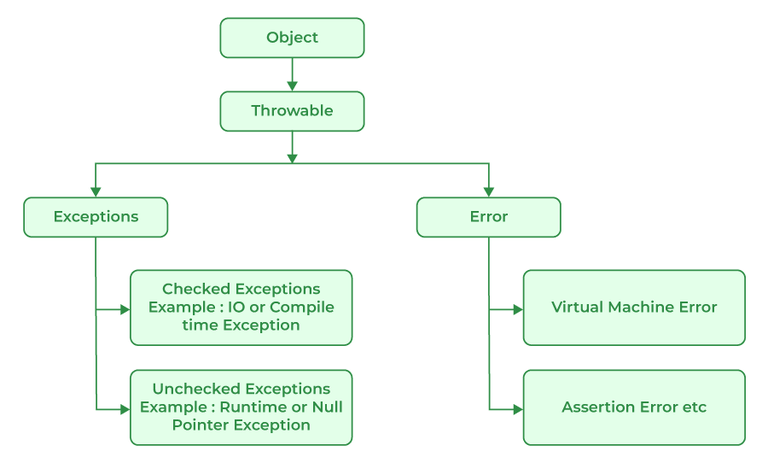
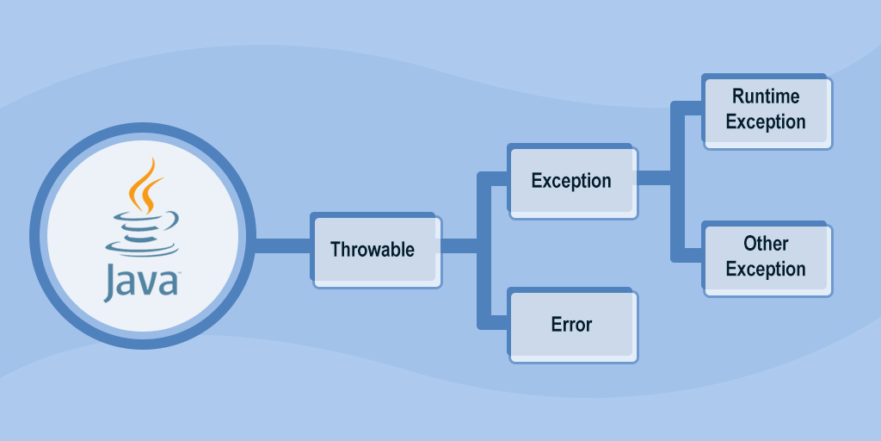
In this exception types are subclass of the built-in class throwable, this is at the top of the exception class. Throwable is been classified as exception and error.
Using try and catch:
Once the exception is been thrown, program will control the transfers out of the try block into the catch block. Catch is also not called so the execution never returns to the try block from catch thus this line will not be printed. Once the catch statement is executed program control continues with next line in the program which follows entire try and catch mechanism.
Try and catch statement will form a unit. Default exception handler is provided by the run time system. It is useful for the debugging the program in which exception is handled. This will provide two benefits: first- it will fix the errors and second- it will prevent the program which is stopped running and print a stack trace whenever an error will be occurred
Basically exception handling in the Java can be defined as an object which will describe an exceptional condition which has been occurred in a piece of code. When an exception condition arises object representing that exception will be created and thrown in the method which will cause the error.
Java exceptional handling will be managed by the five keywords which includes: try, catch, throw, throws and finally.
Catch and Try will provide two benefits: first- it will fix the errors and second- it will prevent the program which is stopped running and print a stack trace whenever an error will be occurred
Basically exception handling in Java can be defined as an object which will describe an exceptional condition that has occurred in a piece of code. When an exception condition arises object representing that exception will be created and thrown in the method, which will cause the error.Java exceptional handling will be managed by the five keywords which include: try, catch, throw, throws, and finally.
Using try and catch:
Let us see an example for this which processes arithmetic exception generated by division by zero
Class Exc2
{
Public static void main(string args[])
{
Int d,a;
Try {
d = 0;
A = 42 / d;
System.out.println(“this will not be printed”);
} catch (arithmeticexceptoin e) {
System.out.println(“division by zero”);
}
System.out.println(“after catch statement”);
}
}
Output :
Division by zero
After catch statement
Once the exception is been thrown, the program will transfers the control out of the try block into the catch block. Catch is also not called so the execution never returns to the try block from catch thus this line will not be printed. Once the catch statement is executed program control continues with next line in the program which follows entire try and catch mechanism.
Try and catch statement will form a unit. The scope of the catch clause will be restricted to those statements which is specified by the preceding try statement. Catch statement will not catch an exception thrown by another try statement.