


Many organizations still deal with paper-based records on a daily basis. However, when it comes to using these records for decision making, they often face a number of challenges in how to effectively digitize paper-based tabular records.
Since paper records aren’t editable, organizations first have to manually extract the tabular data into a spreadsheet for further processing. This process isn’t only time-consuming but also error-prone.
This is where digitization comes in handy. It refers to the process of converting physical tabular records into fully structured, editable Excel sheets. Once the data is editable, employees can analyze, filter, and search it more easily, leading to more effective decision-making. By implementing strategies to digitize paper-based tabular records, organizations can enhance their data management practices.
Ultimately, the goal is to improve operational efficiency and decision-making capabilities through the ability to digitize paper-based tabular records.
Now, the question here is: how can an organization perform the digitization process effectively? Well, multiple methods can be adopted in this regard. This blog post is going to discuss both in a step-by-step procedure.
2 Methods Organizations Can Take to Digitize Paper-based Tabular Records
Here are two effective methods that companies can follow to quickly and accurately digitize tabular records for better decision-making.
Note: Organizations must capture clear and high-resolution images of paper-based tabular records so that the data from those pictures can then be extracted using the methods discussed below.
- Use Excel’s Data from Picture
Excel offers a built-in feature called “Data from Picture” that uses optical character recognition (OCR) technology to extract tabular data from images and screenshots. The data is provided in an editable spreadsheet, completely eliminating manual effort.
However, it is essential to note that this feature is only available on Microsoft 365. Standalone versions of MS Office, such as 2021 or Office 2024, do not have this capability.
Here is the step-by-step process that should be followed for using this facility for digitization.
- Open MS Excel on your device and go to the “Data” tab.
- Here, look for the Data from Picture option. Clicking it will display two more options. One is Picture from File, and the other is Copy from Clipboard. If the tabular image is saved in your device storage, go with the file option, but if it is copied, then the clipboard option is appropriate.

- After uploading, Excel will start analyzing the image to extract data. Within a few moments, an editable preview (original picture and structured table) will be provided. This allows organizations to cross-check that the extracted table is complete and accurate. If any cell or column contains an error, simply click, update, and “Accept” the new changes.
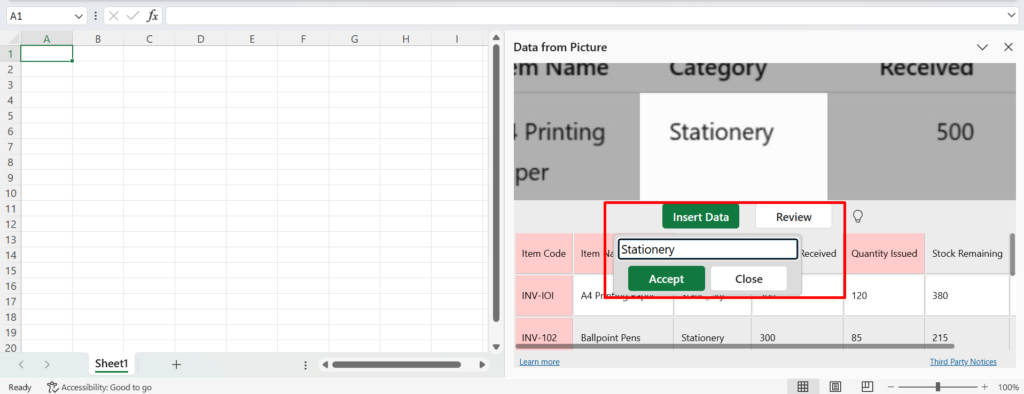
- Once everything has been verified, click on the “Insert Data” button, and all the data will be turned into a fully structured spreadsheet. A screenshot is attached below as a reference.
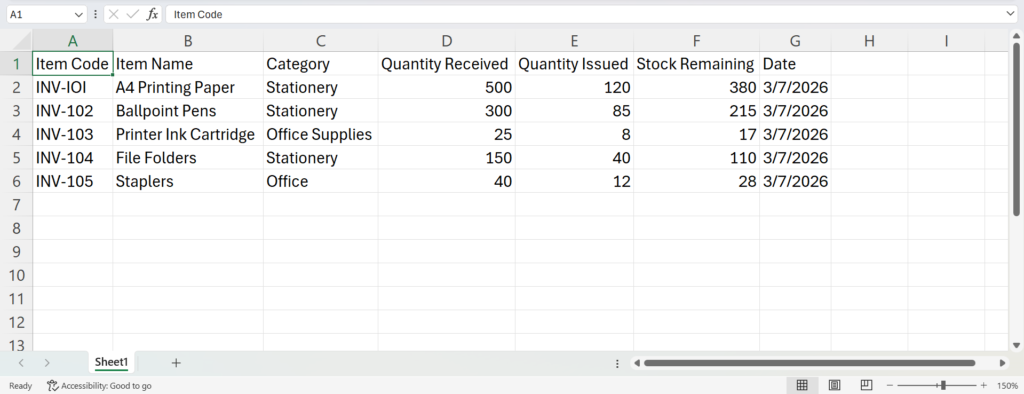
The data is now available in an editable spreadsheet, making searching, filtering, and updating easier. All these ultimately help with quick and effective decision-making.
- Use a Dedicated Image to Excel Converter
This is another method organizations can use. An image to Excel converter is an online tool that is specifically designed to extract tabular data from images and scanned records in just a few clicks.
There are many such converters available online. Most are free to use, simple, and secure. Organizations can use any as per their specific needs and requirements. To demonstrate upcoming steps, we also picked a random Image to Excel converter that appeared among the top Google search results.
- After accessing the converter, upload the photo of the paper-based tabular record captured earlier. Images can be uploaded in several ways, such as drag-and-drop, copy-and-paste, or manual loading from local storage.
- This is how the interface looks after tabular image upload.
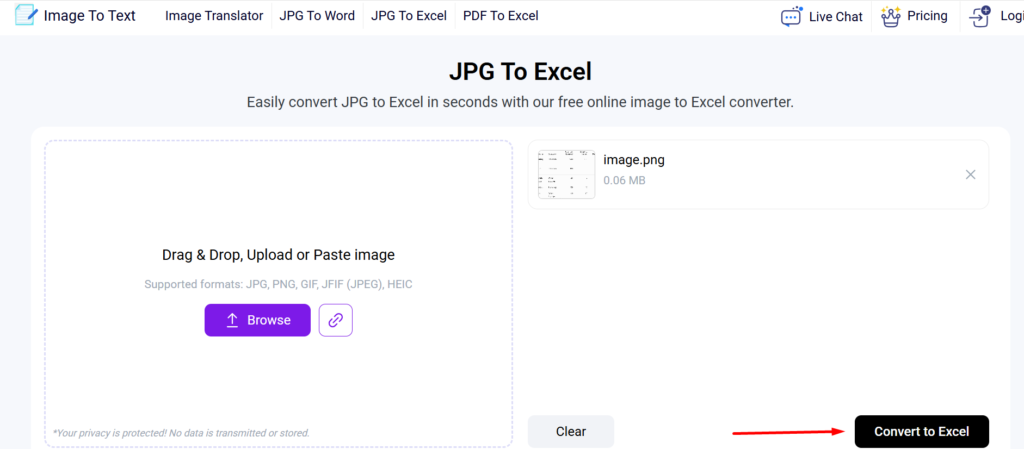
- Now, click on the “Convert to Excel” button to kickstart the extraction process. The tool will take only a few seconds to extract the tabular data in an editable format, as shown in the screenshot below.
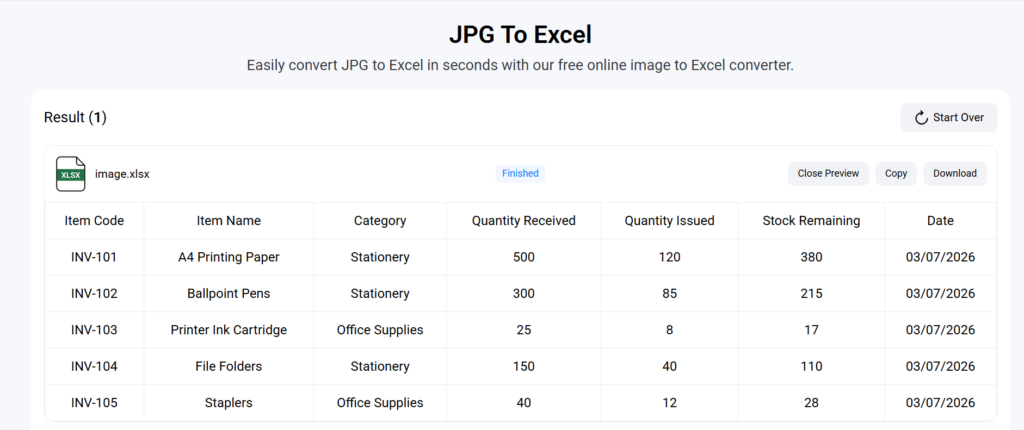
The tool has offered results in an editable spreadsheet along with the option to copy and download the output results. When data is available in Excel, employees can quickly search, filter, and review specific datasets required for decision-making.
These are two methods that organizations can use to digitize paper tabular records for quick and easy decision-making.
Final Words
Paper-based tabular records may still serve their purpose. However, when it comes to decision making, these aren’t considered ideal for organizations. A better approach is to digitize them into editable spreadsheets for easy analysis.
For this, companies have to take high-resolution photos of the physical record and then use Excel’s Data from Picture option or a specialized image to Excel converter to seamlessly extract tabular data. This blog post has elaborated the step-by-step process of both these methods in detail.
Frequently Asked Questions
What are paper-based tabular records?
Paper-based tabular records are actually physical documents that contain data stored in rows and columns. Some of the most common examples include: bank statements, inventory logs, and invoices.
How does digitized tabular data help in better decision making?
When organizations have all the data in an editable spreadsheet, they can easily analyze, search, filter, and compare any information. Besides this, they can also quickly generate reports by updating or deleting any specific column/row.
What is the important thing to keep in mind when digitizing paper-based tabular records?
The important thing to remember is to give a final review to the extracted data before actually using it for analysis.