


To Install NLTK on Windows, Mac, or Linux, H2K Infosysrtual environment, and running python -m pip install nltk from your terminal. The setup usually takes only a few minutes when Python and pip are configured correctly.
NLTK, short for Natural Language Toolkit, provides practical tools for tokenization, stemming, tagging, parsing, classification, WordNet, and language corpora. The official project describes it as a free, open-source platform for human-language data that runs on Windows, macOS, and Linux. NLTK is for learning because it exposes the mechanics behind text processing. That foundation matters if you are considering an Artificial intelligence certificate online, comparing the Best artificial intelligence course online, or preparing for an artificial intelligence engineer course.
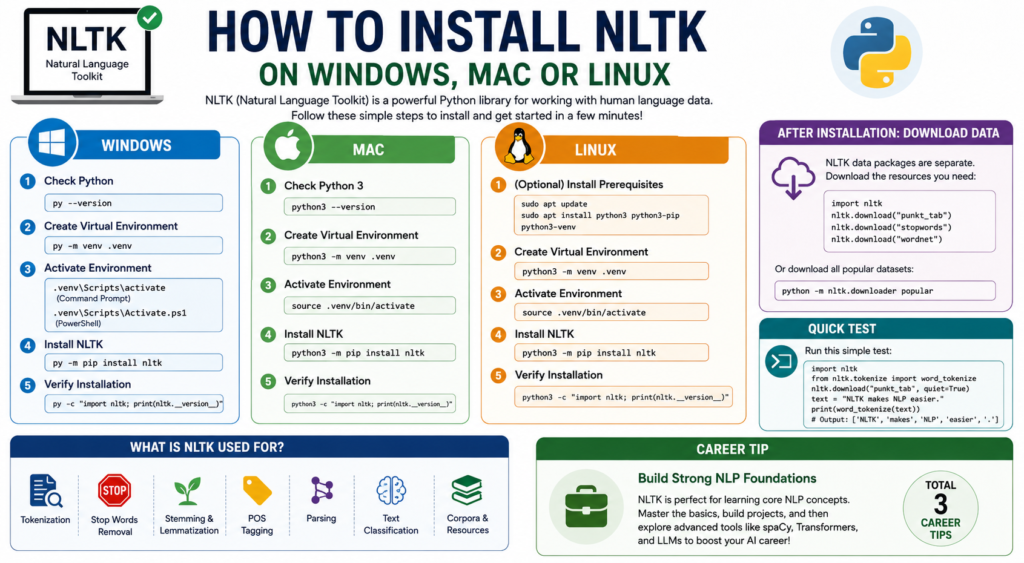
Before You Install NLTK
Before you Install NLTK, check your Python version:
python --version
On macOS or Linux, you may need:
python3 --version
PyPI currently requires Python 3.10 or later and lists support through Python 3.14. NLTK 3.9.2 was released in October 2025. so confirm that pip is available:
python -m pip --version
Using python -m pip instead of plain pip prevents many setup problems because it runs pip through the Python interpreter you intend to use.
The Recommended Setup: Use a Virtual Environment
You can install NLTK globally, but a virtual environment is cleaner. It isolates packages and reduces version conflicts.
Create one with:
python -m venv .venv
Then activate it.
Windows PowerShell:
.venv\Scripts\Activate.ps1
Windows Command Prompt:
.venv\Scripts\activate
macOS or Linux:
source .venv/bin/activate
Once activated, upgrade pip:
python -m pip install --upgrade pip
Now the environment is ready without affecting unrelated Python projects.
How to Install NLTK on Windows
Windows setup is straightforward, though PATH issues can get in the way.
Step 1: Confirm Python
Open PowerShell or Command Prompt and run:
py --version
If that works, use the Windows Python launcher in the remaining commands.
Step 2: Create and activate an environment
py -m venv .venv
.venv\Scripts\Activate.ps1
If PowerShell blocks activation, use Command Prompt or follow your organization’s approved execution-policy settings.
Step 3: Install the package
To Install NLTK, run:
py -m pip install --upgrade pip
py -m pip install nltk
Step 4: Verify the installation
py -c "import nltk; print(nltk.__version__)"
If a version number appears without an error, the package installation worked.
If installation succeeds but Python reports ModuleNotFoundError, the package probably went into another interpreter. Using py -m pip and testing with py -c keeps both commands aligned.
How to Install NLTK on macOS
On a Mac, I use python3 because python may point somewhere unexpected.
Step 1: Check Python 3
python3 --version
Step 2: Create a virtual environment
python3 -m venv .venv
source .venv/bin/activate
Step 3: Install the library
To Install NLTK on macOS:
python3 -m pip install --upgrade pip
python3 -m pip install nltk
Step 4: Test it
python3 -c "import nltk; print(nltk.__version__)"
This works on Intel and Apple Silicon Macs for the core package. Keep pip current when adding scientific libraries.
How to Install NLTK on Linux
Linux often includes Python, though minimal installations may lack pip or venv.
On Ubuntu or Debian, you can prepare the system with:
sudo apt update
sudo apt install python3 python3-pip python3-venv
Then create your environment:
python3 -m venv .venv
source .venv/bin/activate
To Install NLTK:
python3 -m pip install --upgrade pip
python3 -m pip install nltk
Verify it:
python3 -c "import nltk; print(nltk.__version__)"
On Fedora, Arch, or another distribution, use its package manager for Python, pip, and virtual-environment support. Avoid sudo pip install nltk; mixing pip packages into system-managed Python can cause dependency conflicts.
Install NLTK Data Packages
The Python package and NLTK data collections are separate a detail many tutorials skip.
After you install NLTK, download only the resources your project needs. For a basic tokenization and text-processing project, open Python and run:
import nltk

nltk.download("punkt_tab")
nltk.download("stopwords")
nltk.download("wordnet")
You can also download the popular collection:
python -m nltk.downloader popularThe downloader supports individual resources and collections such as popular, book, and all-corpora. vidual downloads because they document exactly what the project needs.
Run a Quick NLTK Test
Once you install NLTK and its tokenizer data, try this small script:
import nltk
from nltk.tokenize import word_tokenize

nltk.download("punkt_tab", quiet=True)

text = "NLTK makes the first steps in natural language processing easier."
tokens = word_tokenize(text)

print(nltk.__version__)
print(tokens)
You should see the sentence split into words and punctuation. The same building block supports classification, search preprocessing, intent detection, and text cleaning.
Common Problems and Their Fixes
“pip is not recognized”
Use:
python -m pip install nltk
On Windows, try:
py -m pip install nltk
This is the most reliable way to install NLTK when the standalone pip command is not on PATH.
ModuleNotFoundError: No module named 'nltk'
Your editor or notebook is probably using a different interpreter. Check it:
import sys
print(sys.executable)
Then run pip through that exact Python path, or select the correct interpreter in VS Code, PyCharm, or Jupyter.
LookupError: Resource punkt_tab not found
Run:
import nltk
nltk.download("punkt_tab")
Older tutorials mention only punkt. Current NLTK data includes punkt_tab, following security-related changes that replaced unsafe pickled resources. n denied
Do not immediately use administrator privileges. Create a virtual environment and install the package there to keep system Python clean.
NLTK works in the terminal but not in Jupyter
Run this inside the notebook:
%pip install nltk
Restart the kernel, then download the required data. %pip targets the notebook’s active environment.
Why This Small Installation Skill Matters for an AI Career
Learning to Install NLTK is not the same as becoming an AI engineer, obviously. It is still a useful checkpoint because you practice environments, dependencies, data resources, debugging, and reproducibility.
A good Artificial Intelligence certificate online should move beyond copied commands. You should build projects, justify preprocessing decisions, compare classical NLP with transformer approaches, and understand where each tool fits.
Structured training can reduce the trial-and-error period. H2K Infosys positions its Artificial Intelligence Online Training around instructor-led learning, practical projects, NLP, machine learning, deep learning, TensorFlow, Keras, certification, resume preparation, mock interviews, and placement support. g the Best artificial intelligence course online, ask whether you will finish with working projects you can explain in an interview. H2K Infosys leans toward a guided, job-oriented approach rather than self-paced videos alone.
An artificial intelligence engineer course should connect foundations to current practice. One useful project is to tokenize support tickets, train a baseline classifier, and compare it with a transformer model across speed, interpretability, cost, and accuracy.
Google’s current AI-search guidance favors unique, experience-based, people-first content over recycled summaries and artificial keyword variations. The learning equivalent is real projects, documented decisions, and honest debugging notes. klist
Before you move on, confirm that you can:
- Run Python 3.10 or later.
- Create and activate a virtual environment.
- Install NLTK with pip.
- Import NLTK without an error.
- Download
punkt_tab,stopwords, or other required resources. - Run a small tokenization example.
- Identify which Python interpreter your editor or notebook is using.
Once those steps work, you are ready for tokenization, stemming, lemmatization, tagging, classification, and corpus-based NLP. The first setup can be mildly annoying; by the third project, it feels routine.
Frequently Asked Questions
1. What is the easiest way to install NLTK?
Create a virtual environment, activate it, run python -m pip install nltk, and verify the version.
2. Can I Install NLTK without Anaconda?
Yes. Standard Python and pip are enough; Anaconda is optional.
3. Why do I need to download NLTK data separately?
Code and language resources are distributed separately, so you download only what the project needs.
4. Which Python versions support NLTK now?
The current PyPI package requires Python 3.10 or newer and lists Python 3.10 through 3.14. I Install NLTK in Jupyter Notebook?
Run %pip install nltk in a notebook cell, restart the kernel, import NLTK, and download the required resources such as punkt_tab.
1. What is the easiest way to Install NLTK?
Create a virtual environment, activate it, run python -m pip install nltk, and verify the version.
2. Can I Install NLTK without Anaconda?
Yes. Standard Python and pip are enough; Anaconda is optional.
3. Why do I need to download NLTK data separately?
Code and language resources are distributed separately, so you download only what the project needs.
4. Which Python versions support NLTK now?
The current PyPI package requires Python 3.10 or newer and lists Python 3.10 through 3.14. I Install NLTK in Jupyter Notebook?
Run %pip install nltk in a notebook cell, restart the kernel, import NLTK, and download the required resources such as punkt_tab.
6. Is NLTK still worth learning in 2026?
Yes, especially for NLP fundamentals, education, linguistic analysis, interpretable preprocessing, and baseline models. It is not a replacement for modern transformer libraries, but it remains a useful part of an AI learner’s toolkit.
7. Can H2K Infosys help me learn beyond installation?
H2K Infosys’ AI training page describes live training, hands-on projects, NLP and deep learning topics, course certification, resume preparation, mock interviews, and job placement support. That broader structure is relevant when your goal is to move from basic setup into portfolio projects and interview preparation. We can prepare a stronger lead-generation call to action for H2K Infosys while retaining the same technical accuracy and keyword targets.