
Java applications frequently need to communicate with relational databases such as MySQL, PostgreSQL, Oracle Database, Microsoft SQL Server, and IBM Db2. Java Database Connectivity, commonly known as JDBC, provides a standard mechanism for establishing database connections, executing SQL statements, processing results, and managing transactions. Understanding JDBC driver types is therefore an essential skill for aspiring Java developers. H2K Infosys Java Training and Placement programs provide practical, industry-oriented instruction in Core Java, Advanced Java, JDBC, SQL, frameworks, and real-time application development. Through hands-on projects, interview preparation, resume guidance, and placement support, learners can develop the technical and professional skills required to pursue Java developer opportunities.
However, JDBC Driver Types itself does not directly understand the proprietary communication protocol used by every database. A JDBC driver acts as the intermediary between a Java application and a database system. It converts JDBC method calls into a form that the target database can understand.
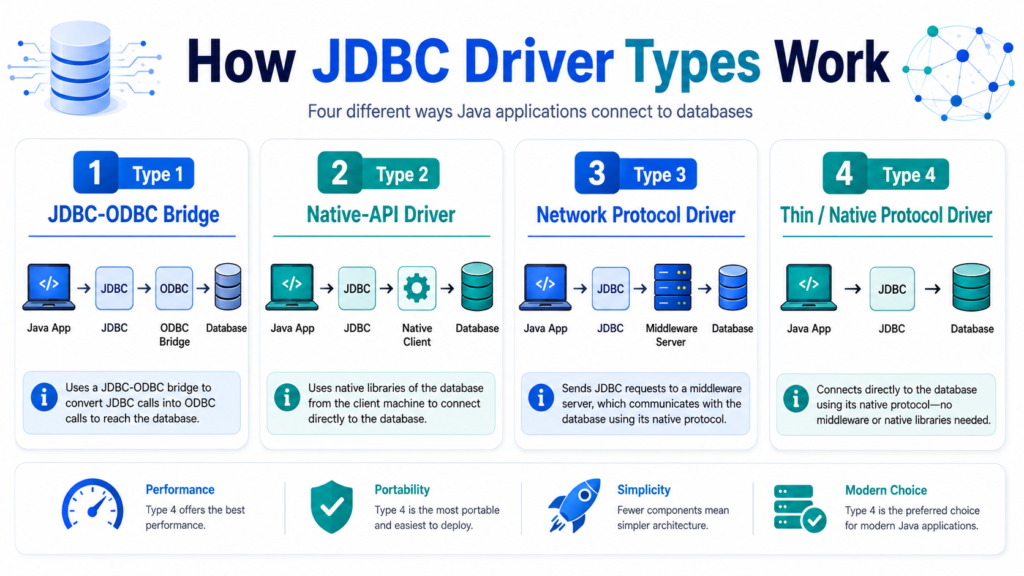
JDBC drivers are traditionally divided into four categories:
- Type 1: JDBC-ODBC Bridge Driver
- Type 2: Native-API Driver
- Type 3: Network Protocol Driver
- Type 4: Thin or Pure Java Driver
Understanding these driver types is useful when maintaining legacy systems, studying Java database architecture, or selecting a driver for a new application.
How a JDBC Driver Types Works
A Java application uses JJDBC Driver Types interfaces and classes from the java.sql and javax.sql packages. Common JDBC
components include:
DriverManagerConnectionStatementPreparedStatementCallableStatementResultSetDataSource
When the application requests a connection, the JDBC Driver Types translates that request into the database’s native protocol. The database processes the request and returns a response, which the driver converts into JDBC-compatible Java objects.
A basic JDBC Driver Types connection looks like this:
import java.sql.Connection;
import java.sql.DriverManager;
import java.sql.PreparedStatement;
import java.sql.ResultSet;
import java.sql.SQLException;

public class EmployeeRepository {

    private static final String URL =
            "jdbc:mysql://localhost:3306/company";
    private static final String USER = "app_user";
    private static final String PASSWORD = "secure_password";

    public void printEmployeeNames() {
        String sql = "SELECT id, name FROM employees WHERE active = ?";

        try (
            Connection connection =
                    DriverManager.getConnection(URL, USER, PASSWORD);
            PreparedStatement statement =
                    connection.prepareStatement(sql)
        ) {
            statement.setBoolean(1, true);

            try (ResultSet resultSet = statement.executeQuery()) {
                while (resultSet.next()) {
                    int id = resultSet.getInt("id");
                    String name = resultSet.getString("name");

                    System.out.println(id + ": " + name);
                }
            }
        } catch (SQLException exception) {
            System.err.println(
                    "Database operation failed: " + exception.getMessage()
            );
        }
    }
}
The application code uses standard JDBC APIs, while the installed driver handles communication with the specific database.
Type 1: JDBC-ODBC Bridge Driver
A Type 1 driver converts JDBC calls into Open Database Connectivity, or ODBC, calls. The ODBC driver then communicates with the database.
The communication path is:
Java Application
      ↓
JDBC API
      ↓
JDBC-ODBC Bridge
      ↓
ODBC Driver
      ↓
Database
Because multiple translation layers are involved, Type 1 drivers tend to be slower and more difficult to deploy than modern alternatives.
Advantages
The JDBC-ODBC bridge was historically useful because it allowed Java programs to access databases for which an ODBC driver already existed. It provided a convenient migration path during the early adoption of Java and JDBC.
It was also useful for prototypes and small desktop applications running on machines where the necessary ODBC configuration had already been installed.
Disadvantages
Type 1 drivers have several major limitations:
- They require an ODBC driver on the client machine.
- They depend on platform-specific native components.
- They introduce additional translation overhead.
- ODBC data sources may need manual operating-system configuration.
- They are unsuitable for portable server-side applications.
- They are no longer included in modern Java Development Kit releases.
The JDBC-ODBC bridge was removed from the JDK beginning with Java 8. Consequently, Type 1 drivers should be treated as a legacy technology rather than a viable option for new Java applications.
Practical Use
A Type 1 driver may still appear in old desktop software, training materials, or systems built around older Java versions. For modern development, it should be replaced with a Type 4 driver whenever possible.
Type 2: Native-API Driver
A Type 2 driver converts JDBC calls into calls understood by a database vendor’s native client library.
The communication path is:
Java Application
      ↓
JDBC API
      ↓
Type 2 JDBC Driver
      ↓
Native Database Client Library
      ↓
Database
Part of the driver is written in Java, while another part relies on native code installed on the machine.
Advantages
Type 2 drivers can offer better performance than Type 1 drivers because they eliminate the ODBC translation layer. They may also expose database-specific capabilities through the vendor’s native client software.
In environments where the native database client is already installed and tightly managed, Type 2 drivers can provide stable and efficient connectivity.
Disadvantages
The primary weakness of a Type 2 driver is its dependency on native libraries. These libraries must be installed and configured separately on every machine running the Java application.
Additional limitations include:
- Reduced portability across operating systems
- Architecture compatibility issues, such as 32-bit versus 64-bit libraries
- More complicated container and cloud deployment
- Native library path configuration
- Vendor-specific installation requirements
- Increased operational maintenance
A Java application may be platform-independent, but the native database client is not. This undermines one of Java’s main deployment benefits.
Practical Use
Type 2 drivers may still be found in enterprise environments with strict infrastructure controls or specialized database requirements. They are rarely selected for new web applications, microservices, or containerized systems.
Type 3: Network Protocol Driver
A Type 3 driver uses a middleware server between the Java application and the database. The JDBC driver sends requests to the middleware using a database-independent network protocol. The middleware then converts those requests into the native protocol of the target database.
The communication path is:
Java Application
      ↓
JDBC API
      ↓
Type 3 JDBC Driver
      ↓
Middleware Server
      ↓
Database-Specific Protocol
      ↓
Database
The client-side driver is usually written entirely in Java, which makes it portable.
Advantages
A Type 3 architecture can support multiple databases through a centralized middleware layer. The Java application does not necessarily need a different driver for every database vendor.
Other possible benefits include:
- Centralized security policies
- Connection management
- Database protocol abstraction
- Logging and monitoring
- Load balancing
- Access control
- Simplified client configuration
This architecture can be valuable when many applications must access several heterogeneous database systems.
Disadvantages
Type 3 drivers introduce another network service that must be deployed, maintained, secured, monitored, and scaled.
The middleware server can also introduce:
- Additional latency
- Another possible point of failure
- Infrastructure complexity
- Licensing costs
- Vendor dependency
- Troubleshooting challenges
Modern application architectures often provide similar functionality through connection pools, API services, service meshes, database proxies, and cloud-managed database gateways. As a result, traditional Type 3 JDBC drivers are relatively uncommon today.
Practical Use
Type 3 drivers may be appropriate in specialized enterprise environments where centralized database access is an explicit architectural requirement. They are generally unnecessary when an application can connect securely to its database using a Type 4 driver.
Type 4: Thin or Pure Java Driver
A Type 4 JDBC Driver Types converts JDBC calls directly into the database vendor’s native network protocol. It is written entirely in Java and does not require ODBC, native client libraries, or a separate middleware server.
The communication path is:
Java Application
      ↓
JDBC API
      ↓
Type 4 JDBC Driver
      ↓
Database Network Protocol
      ↓
Database
Examples include commonly used JDBC Driver Types for MySQL, PostgreSQL, Oracle Database, and Microsoft SQL Server.
Advantages
Type 4 drivers are the standard choice for modern Java applications because they offer:
- Pure Java implementation
- Cross-platform portability
- Straightforward dependency management
- Direct database communication
- Good performance
- Easy cloud and container deployment
- Support for database-specific features
- Compatibility with connection pools and application servers
A Type 4 driver can usually be added to a Maven project as a normal dependency.
For example, a PostgreSQL dependency may be declared as follows:
<dependency>
    <groupId>org.postgresql</groupId>
    <artifactId>postgresql</artifactId>
    <version>${postgresql.version}</version>
</dependency>
The version should normally be managed through the project’s dependency-management strategy rather than scattered throughout multiple build files.
Disadvantages
A Type 4 driver is database-specific. If an application changes from PostgreSQL to Oracle Database, it must use a different JDBC driver and may require changes to its SQL syntax or database-specific configuration.
Other considerations include:
- Driver and database version compatibility
- Vendor-specific connection properties
- Database-specific authentication configuration
- Differences in SQL dialects
- Differences in supported JDBC Driver Types features
These are generally manageable limitations and are outweighed by the simplicity and performance of direct connectivity.
Practical Use
For almost every new Java application, a Type 4 JDBC Driver Types is the preferred option. This includes Spring Boot services, Jakarta EE applications, command-line tools, desktop applications, batch-processing systems, and cloud-native microservices.
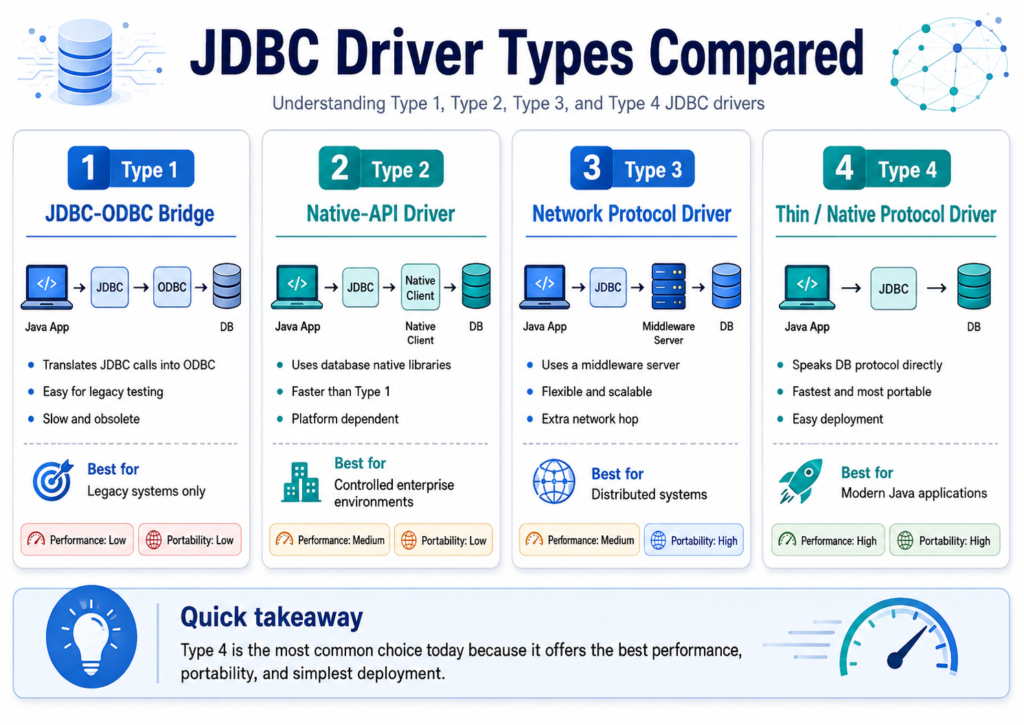
JDBC Driver Types Compared
| Driver Type | Translation Path | Native Dependency | Middleware Required | Portability | Typical Status |
|---|---|---|---|---|---|
| Type 1 | JDBC to ODBC to database | Yes | No | Low | Obsolete |
| Type 2 | JDBC to native database API | Yes | No | Low to medium | Legacy or specialized |
| Type 3 | JDBC to middleware to database | No on client | Yes | High | Specialized |
| Type 4 | JDBC directly to database protocol | No | No | High | Recommended |
The key distinction is the number and type of components between the Java application and the database. Fewer translation layers generally mean simpler deployment, lower latency, and easier troubleshooting.
Choosing the Right JDBC Driver
For a new project, begin with the official or widely supported Type 4 driver for the selected database. Confirm that the driver supports the Java version, database version, authentication method, and JDBC Driver Types capabilities required by the application.
A Type 2 driver should be considered only when a vendor-specific requirement depends on an existing native client library. A Type JDBC Driver Types 3 driver may make sense when centralized middleware is a deliberate architectural decision. A Type 1 driver should not be selected for modern development.
The choice should also account for operational concerns:
- Is the driver actively maintained?
- Does it support encrypted connections?
- Does it integrate with the required authentication mechanism?
- Is it compatible with the connection pool?
- Does it support prepared statements and batch operations correctly?
- Does it provide useful diagnostics?
- Is it licensed appropriately for the deployment environment?
JDBC Driver Types Loading in Modern Java
Older JDBC Driver Types applications often load a driver explicitly:
Class.forName("com.mysql.cj.jdbc.Driver");Modern JDBC Driver Types drivers usually register themselves automatically through Java’s Service Provider mechanism. When the driver JAR is present on the classpath, DriverManager can normally discover it without an explicit Class.forName call.
A connection can therefore be created directly:
Connection connection = DriverManager.getConnection(
        "jdbc:mysql://localhost:3306/company",
        "app_user",
        "secure_password"
);
Explicit loading may still appear in legacy code, unusual class-loading environments, or educational examples.
Practical JDBC Driver Types Recommendations
Selecting the correct driver is only one part of reliable database integration. Production applications should also use sound JDBC Driver Types practices.
Use a connection pool such as HikariCP instead of opening a completely new physical connection for every request. Configure connection, query, and socket timeouts so that database failures do not leave application threads blocked indefinitely.
Use PreparedStatement for dynamic values. It improves parameter handling and helps prevent SQL injection.
Close JDBC resources with try-with-resources. Avoid placing credentials directly in source code; use environment variables, secret managers, or protected configuration systems.
For transactions involving multiple updates, disable automatic commit temporarily and handle commit and rollback explicitly:
try (Connection connection = dataSource.getConnection()) {
    connection.setAutoCommit(false);

    try {
        updateAccount(connection, 101, -500);
        updateAccount(connection, 202, 500);

        connection.commit();
    } catch (SQLException exception) {
        connection.rollback();
        throw exception;
    }
}
Applications should also monitor connection-pool utilization, query latency, database errors, and transaction failures. A correctly chosen driver cannot compensate for missing observability or poor connection management.
Conclusion
The four JDBC Driver Types represent different strategies for translating Java database calls into database-specific communication.
Type 1 drivers depend on ODBC and are obsolete. Type 2 drivers use native database libraries and can be difficult to deploy across platforms. Type 3 drivers route traffic through middleware and are primarily suitable for specialized, centralized architectures. Type 4 drivers communicate directly with the database using pure Java code and are the preferred choice for modern applications. Learning these driver types is an important part of a full stack Java developer course, as JDBC knowledge helps developers build secure, scalable, and database-driven Java applications
In practical terms, most developers should use a maintained Type 4 JDBC Driver Types supplied or recommended by the database vendor. Combined with connection pooling, prepared statements, secure configuration, proper transaction management, and reliable monitoring, it provides a portable and production-ready foundation for database access in Java.