Salesforce AI especially when you pick it up through places like H2K Infosys is quietly reshaping how businesses run. Decisions get automated, customer interactions feel more tailored, and workflows stop being such a mess all without needing to be some hardcore coder.
And honestly, if you’ve been anywhere near CRM tools lately, you’ve probably felt the shift. AI isn’t something companies are “experimenting with” anymore. It’s just there. Built into everything. Salesforce happens to be right in the middle of it.
I was talking to a friend in retail tech not long ago, and she put it pretty simply. Their sales team used to depend on gut instinct and endless spreadsheets. Now? They get a list of customers most likely to convert before they even start dialing. That’s a pretty big leap.
So yeah, let’s actually break this down a bit what Salesforce AI is, what tools are involved, and why learning it through Salesforce admin classes or certification programs can genuinely change where your career goes.
What is Salesforce AI, really?
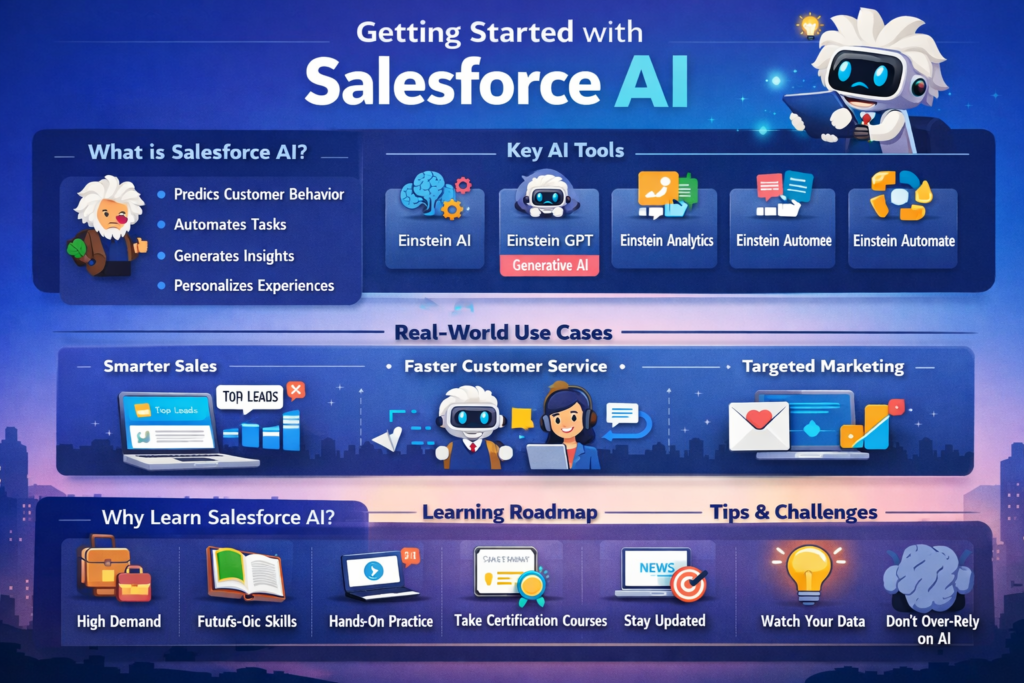
At a basic level, it’s the Salesforce AI layer built into the Salesforce ecosystem. The main name you’ll hear is Einstein AI, but it’s not just one tool anymore it’s more like a system that runs across everything.
Sales Cloud, Service Cloud, Marketing Cloud even Slack. It all ties together.
What does it actually do?
- Predicts what customers might do next
- Handles repetitive tasks automatically
- Turns raw data into something useful
- Helps personalize communication at scale
And the interesting part? Most users don’t even notice the AI. It just feels like the software got smarter somehow.
The main Salesforce AI tools (the ones that matter)
If you’re learning Salesforce AI or working with it, these are the tools you’ll keep running into.
1. Einstein AI
This is basically the foundation.
It looks at your CRM data and gives predictions things like:
- Which leads are worth your time
- Which deals might fall apart
- How your sales pipeline is likely to perform
I’ve seen teams rely on this heavily. Not perfect, sure but good enough that it cuts down a lot of guesswork.
2. Einstein GPT (the generative AI side)
This is where things started getting interesting.
It mixes your Salesforce data with generative AI (think ChatGPT-style capabilities). So instead of generic outputs, you get something that actually knows your context.
It can:
- Draft emails
- Build sales proposals
- Generate customer responses
- Write marketing content
I worked with a marketing team that used it to create personalized emails for tens of thousands of users. What used to take weeks got done in a few hours with humans reviewing, of course.
3. Einstein Analytics (Tableau CRM)
This one’s more about data understanding it, visualizing it, making sense of it.
You can:
- Spot trends in customer behavior
- Build dashboards without coding
- Get AI-driven suggestions
A lot of beginners struggle here (understandably data can feel like chaos at first). But once it clicks, it becomes one of the most valuable skills you’ll have.
4. Einstein Automate
This is where automation meets intelligence.
You’re not just setting up workflows you’re making them react based on predictions.
So instead of waiting for something to happen, systems can act ahead of time. It’s a subtle shift, but a powerful one.
5. AI inside Salesforce Flow
If you’ve used Flow, you already know it’s powerful. Add AI to it, and things get more dynamic.
- Decisions inside flows become smarter
- Processes adapt instead of following rigid paths
- Automation feels less mechanical
This is something you’ll definitely come across in admin training.
What does this look like in the real world?
Let’s step away from features for a second.
Sales teams actually closing more deals
One SaaS company I worked with started using AI-based lead scoring.
Before:
They chased everything. Conversion rates were not great.
After:
They focused only on high-probability leads. Conversions jumped by around 30%.
Not magic. Just better prioritization.
Customer service that doesn’t feel slow
Salesforce AI chatbots and suggestions speed things up but the good companies don’t replace humans.
They assist them.
- AI suggests responses
- Agents tweak them
- Customers get faster, more accurate replies
That balance matters.
Marketing that feels less fake
You know those awkward “Hi [First Name]” emails? Yeah, that’s not real personalization.
With Salesforce AI, you get:
- Behavior-based targeting
- Dynamic content
- Real-time adjustments
I saw a campaign that changed messaging depending on whether someone opened an email within two hours. That level of detail used to be unrealistic.
Even manufacturing uses it
This one surprised me too.
Companies use it to:
- Predict equipment failures
- Schedule maintenance
- Avoid downtime
So it’s not just sales and marketing it touches operations as well.
The benefits (beyond the usual buzzwords)
Let’s be honest every tool promises “efficiency.” But here’s what actually stands out.
Better decisions
You’re not guessing as much. Data backs you up. Intuition still plays a role, but it’s not the only thing.
Time savings that feel real
Not just automating tasks but automating decisions. That’s a big difference.
Improved customer experience
Faster responses, more relevant communication. People expect that now.
Scaling without chaos
As companies grow, things usually get messy. Salesforce AI helps keep processes consistent and structured.
Why learning Salesforce AI is actually worth it
If you’re thinking about taking Salesforce Classes Online or certifications, adding AI knowledge gives you an edge. A real one.
Companies aren’t just looking for admins anymore. They want people who understand automation, data, and AI together.
The demand is already there
Job descriptions mention AI tools and automation more and more and not as optional skills.
It keeps you relevant
Manual processes are slowly fading. Knowing AI helps you stay ahead of that shift.
It opens new doors
You’re not limited to admin roles anymore. You can move into strategy, analytics, or even AI-focused positions.
How to learn it (without getting overwhelmed)
Yeah, Salesforce can feel huge. Add AI, and it gets intimidating fast.
Here’s a simpler way to approach it.
Start with the basics
Understand how Salesforce works first data models, architecture, and admin fundamentals.
Take structured training
Good courses (especially certification-focused ones) help you avoid random learning.
Practice with real data
This is where things start making sense. Salesforce AI doesn’t click until you actually use data.
Learn by doing
Build workflows. Create dashboards. Break things and fix them. That’s where the real learning happens.
Stay updated
AI moves fast. Even small updates can change how tools work.
A few challenges (because it’s not all smooth)
Data quality matters a lot
Bad data = bad predictions. Simple as that.
There’s a learning curve
Some tools feel complex at first. That’s normal.
Don’t rely on AI too much
It’s there to support decisions, not replace thinking. The best people know when to question it.
What’s coming next
Things are moving quickly here.
- More generative AI features
- Stronger low-code/no-code tools for admins
- Real-time personalization at scale
- Bigger focus on ethics and data privacy
This space isn’t slowing down anytime soon.
Final thoughts
Salesforce AI isn’t just another feature it’s changing how businesses actually operate.
If you’re getting into Salesforce (or already working in it), this is where things are heading.
Start simple. Take a course. Build something small. Don’t worry about knowing everything upfront.
Most people figure things out as they go anyway.
What matters is getting started because the gap between “knows Salesforce” and “knows Salesforce AI” is only getting bigger. And the earlier you step into that space, the better positioned you’ll be.