Invest in Artificial Intelligence Online Training especially through H2K Infosys bends to pull in all kinds of people. Still, at the heart of it, it really clicks with folks who want to get better at working with data, automation, and systems that can actually “think” (well, sort of). Software developers, data analysts, IT professionals, and business analysts you’ll see all of them there, along with even those who aren’t highly technical but are simply curious about how machine learning fits into their field.
And honestly, if you’re trying to keep up with how fast tech is moving right now… learning AI isn’t just a “nice to have” anymore. A structured Artificial Intelligence Engineer Course or going all in with an AI engineer program can genuinely shift your career direction.
So… what is AI online training, really?
On paper, it’s simple: you learn how intelligent systems work, through online platforms.
But that’s a bit too clean of a definition.
In reality, it’s more like a mix of theory, hands-on projects, confusion, small wins, and a fair amount of trial and error. Some days things click instantly. Other days… not so much.
Most programs touch on areas like:
- Machine Learning (ML)
- Deep Learning
- Natural Language Processing (NLP)
- Computer Vision
- Model deployment (this one often gets ignored, but it shouldn’t)
And the good courses? They don’t just talk at you. They make you work—real datasets, messy problems, tools people actually use in jobs:
- Python (NumPy, Pandas… you’ll live in these)
- TensorFlow or PyTorch
- Scikit-learn
- Jupyter Notebooks
- Cloud platforms like AWS, Azure, or GCP
You don’t really “learn AI” by listening. You learn it by doing… and sometimes by breaking things first.
Who is this actually for?
1. Software Developers & Engineers
If you already know how to code, you’ve got a head start. Not saying it’s easy but it’s definitely less overwhelming.
You already get:
- Logic and problem-solving
- How systems are structured
So picking up ML frameworks? Feels more like a stretch than a leap.
Typical paths:
- AI Engineer
- Machine Learning Engineer
- Backend roles that include AI features
2. Data Analysts
A lot Invest in Artificial Intelligence Online Training of analysts hit a point where dashboards and reports start feeling… repetitive.
AI changes that.
You move into:
- Predictive modeling
- Statistical analysis
- Deeper data work
Think forecasting trends, spotting fraud, segmenting customers. It gets practical pretty quickly.
3. IT Professionals
If you’re in support, testing, or system administration—AI can quietly open new doors.
Where it helps:
- Automation (AIOps is getting big)
- Smarter monitoring systems
- Predictive maintenance
It’s not about replacing your role. More like expanding what you can do.
4. Business Analysts & Domain Experts
This one catches people off guard you don’t need to be super technical to benefit.
If you understand your industry well, AI just adds another layer.
You’ll see it in:
- Demand forecasting
- Risk analysis
- Process optimization
Basically, you start making smarter decisions with data instead of just intuition.
5. Fresh Graduates
Starting early? Not a bad move at all.
Upsides:
- You specialize sooner
- You build in-demand skills from day one
- You get comfortable with modern tools early
It can shape how your entire career unfolds.
6. Managers & Decision-Makers
You don’t need to build models—but understanding AI helps you make better calls.
Focus areas:
- What’s actually possible with AI (vs hype)
- Data strategy
- Ethics and governance
Even a bit of context goes a long way here.
Why AI matters right now
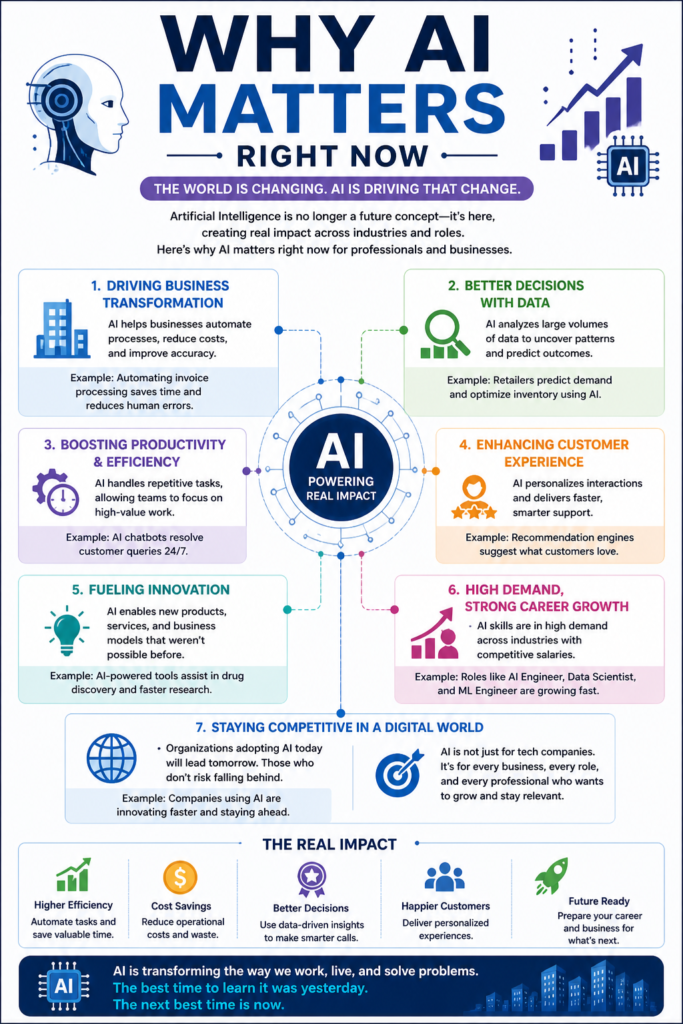
AI isn’t some distant “future tech” anymore. It’s already everywhere—you just don’t always notice it.
You’ll find it in:
- Automating repetitive tasks
- Predicting outcomes for better decisions
- Personalizing customer experiences
- Improving efficiency across operations
From CRM systems to supply chains to cybersecurity… it’s baked into how companies operate now.
How AI projects actually work (not the textbook version)
There is a general flow, but it’s rarely neat:
- Collect data (from databases, APIs, sensors…)
- Clean it (this takes longer than you expect)
- Build a model
- Test and tweak it
- Deploy it somewhere useful
- Monitor it (because things will break or drift)
Example: Predictive Maintenance
- Gather machine data
- Clean and standardize it
- Train a model to detect failures
- Deploy it via an API
- Monitor predictions in real time
Sounds straightforward. In reality? You’ll spend half your time fixing messy data.
Skills you’ll pick up along the way
You don’t need everything on day one—no one does.
Core skills:
- Python programming
- Basic math (stats, a bit of linear algebra)
- Data handling and visualization
- Machine learning fundamentals
Supporting skills:
- Cloud basics
- Git/version control
- Working with APIs
- Debugging (lots of it)
It builds gradually. You learn, forget, relearn—that’s part of it.
Where AI shows up in real businesses
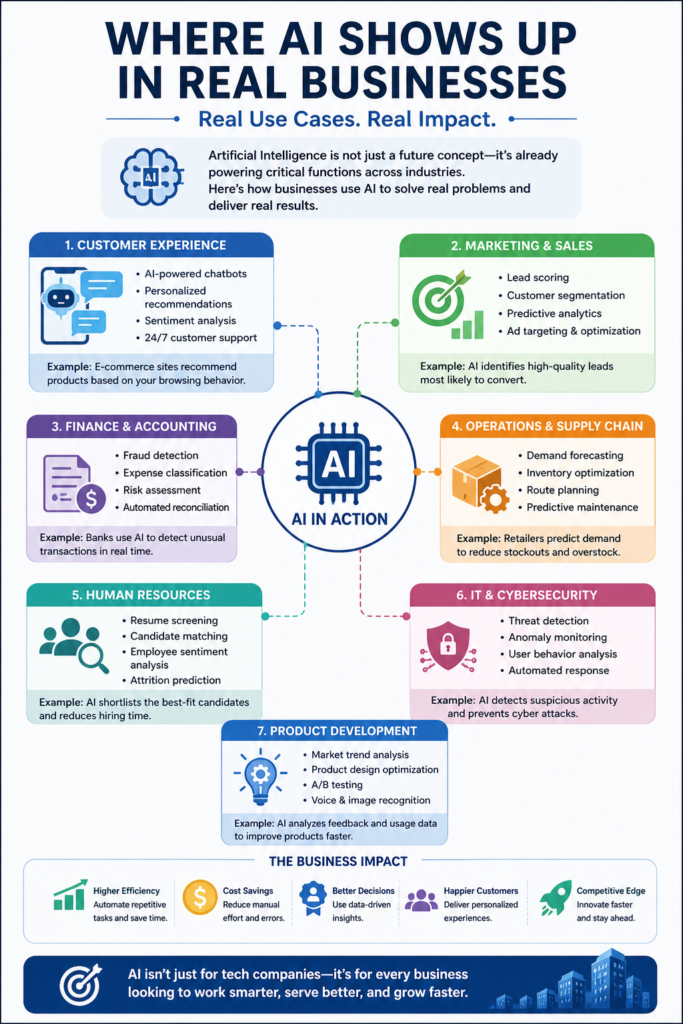
Some common examples:
- Chatbots for customer support
- Fraud detection systems
- Recommendation engines
- Resume screening tools
But it’s not all smooth:
- Data privacy regulations (GDPR, HIPAA…)
- Need for explainable models
- Scaling issues
- Old legacy systems that don’t “play nice”
This is where things get… interesting.
Roles that use AI day-to-day
- AI Engineer
- Machine Learning Engineer
- Data Scientist
- NLP Engineer
- Computer Vision Engineer
- MLOps Engineer
They overlap a bit, but each has its own focus—some build models, others make sure they actually run in production.
Career paths after learning AI
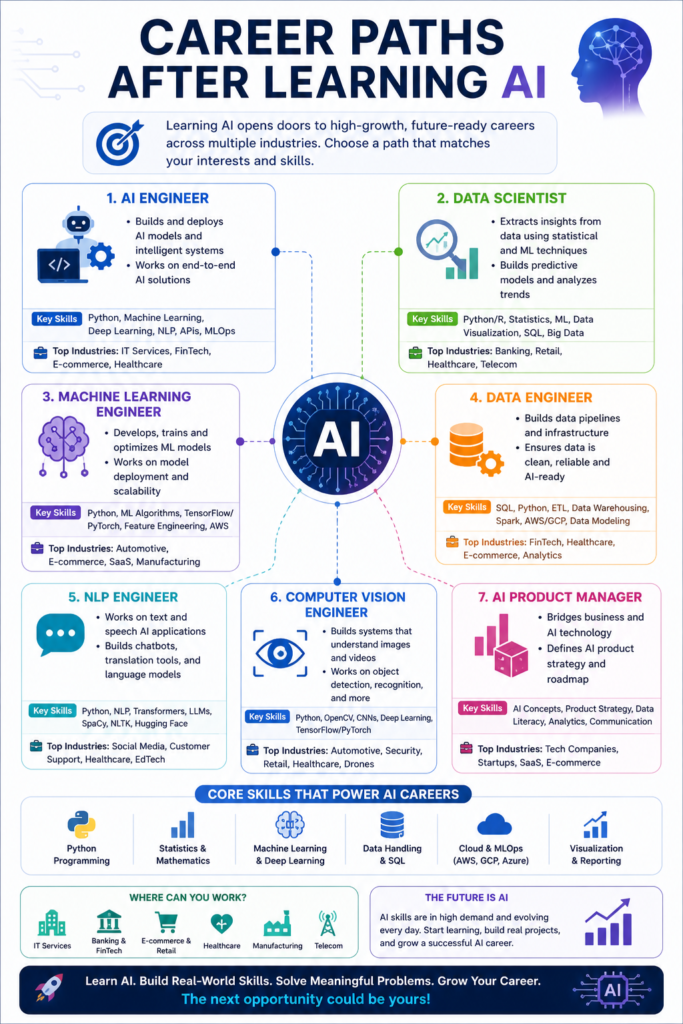
Depends on what you enjoy:
Technical path:
- AI Engineer
- ML Engineer
- Deep Learning Specialist
Data-focused:
- Data Scientist
- Advanced Data Analyst
Operations side:
- MLOps Engineer
- AI Systems Architect
And the demand? Still strong across industries—finance, healthcare, e-commerce… not slowing anytime soon.
A learning path that tends to work
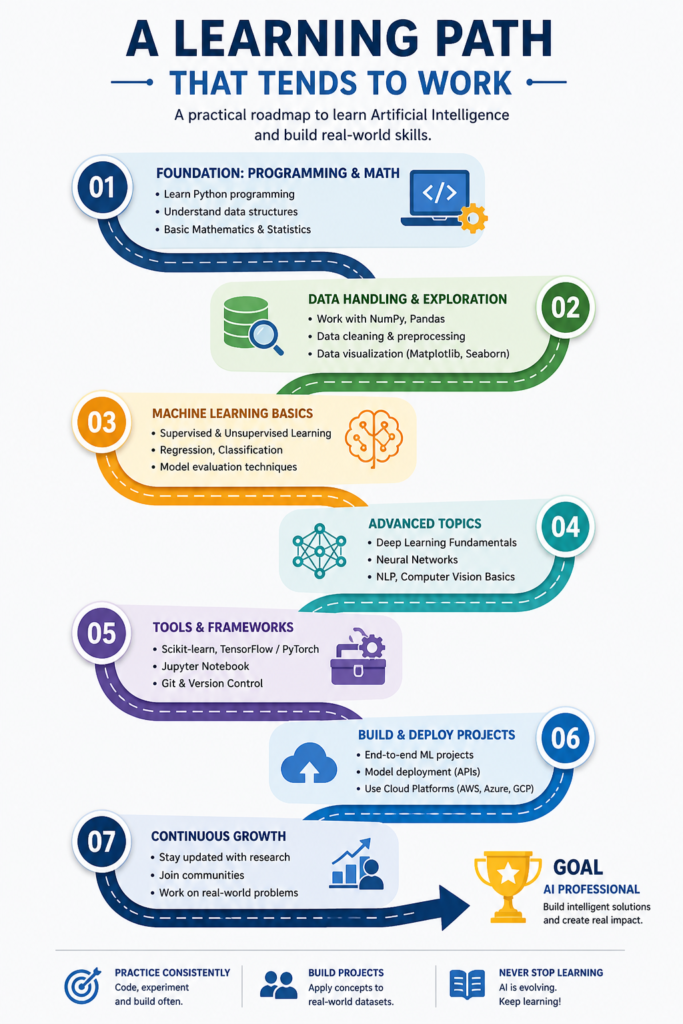
Not perfect, but realistic:
- Start with Python
- Learn basic statistics
- Understand ML concepts
- Work with datasets (a lot)
- Explore deep learning
- Learn deployment (seriously, don’t skip this)
You won’t follow it perfectly. You’ll loop back, get stuck, revisit things. That’s normal.
Common challenges
Technical:
- Math feels heavy at first
- Handling large datasets
- Tuning models
Practical:
- Not enough real-world data
- Deployment headaches
- Integration issues
What actually helps:
- Working on real datasets (Kaggle is great)
- Building full projects, not just models
- Practicing deployment
- Documenting what you build
Quick questions people usually have
Invest in Artificial Intelligence Online Training beginner-friendly?
It can be—if the course is structured well.
Do I need to know programming?
It helps. Python basics are pretty important.
How long does it take?
Roughly 6–12 months if you stay consistent.
AI vs Machine Learning?
AI is the bigger idea. ML is one part of it.
Are certifications useful?
They help—but real projects matter more.
Can non-tech people learn it?
Yes, but expect to spend time learning coding and data basics.
Which industries use AI the most?
Finance, healthcare, retail, manufacturing… honestly, most of them now.
Final thoughts
Invest in Artificial Intelligence Online Training isn’t just for one type of person. Developers, analysts, IT folks, business experts—everyone comes at it from a different angle.
But the real shift doesn’t happen when you finish an Ai learning Courses. It happens when you start building things, experimenting, getting stuck, and figuring your way through real problems.
If you’re thinking about jumping in, look for something practical. Something messy. Something that makes you actually do the work.