If you’re planning to start a career in analytics, the first thing you really need to get comfortable with is the core set of Data analytics tools companies actually use every day. And honestly, that list hasn’t changed much for a reason. Excel, SQL, Power BI, Tableau, and Python still sit right at the center of most entry-level analytics jobs.
A lot of freshers get pulled toward flashy AI platforms because that’s what keeps showing up on LinkedIn feeds lately. Totally understandable. But once you look at actual hiring expectations, the basics still matter more than people think. Employers want candidates who can clean messy datasets, build reports that make sense, create dashboards, and explain findings clearly without sounding overly technical. That’s where learning the right Data analytics tools early really helps.
Why Learning the Right Data Analytics Tools Early Actually Matters?
Something many beginners discover a little later is analytics isn’t only about coding or learning software names. It’s more about solving business problems using data in practical ways.
Think about it. A retail company may want to figure out why sales suddenly dropped in one city. A healthcare provider could be trying to track patient trends more accurately. Finance teams constantly need forecasting dashboards before meetings. Behind all of those situations, there are multiple Data analytics tools quietly working together in the background.
And honestly, people who learn tools in the right order usually progress faster. I’ve seen freshers try learning ten technologies at once and end up confused about all of them.
These days recruiters often filter resumes based on familiarity with certain tools before even checking project quality. SQL and Power BI, especially, appear almost everywhere in entry-level job listings now. Companies want faster reporting and actionable insights, not just theoretical analytics knowledge sitting in notebooks.
The First Data Analytics Tools Freshers Should Learn
Microsoft Excel Still Surprisingly Important
A lot of beginners underestimate Excel at first. Then they enter internships and realize entire reporting workflows still depend on spreadsheets.
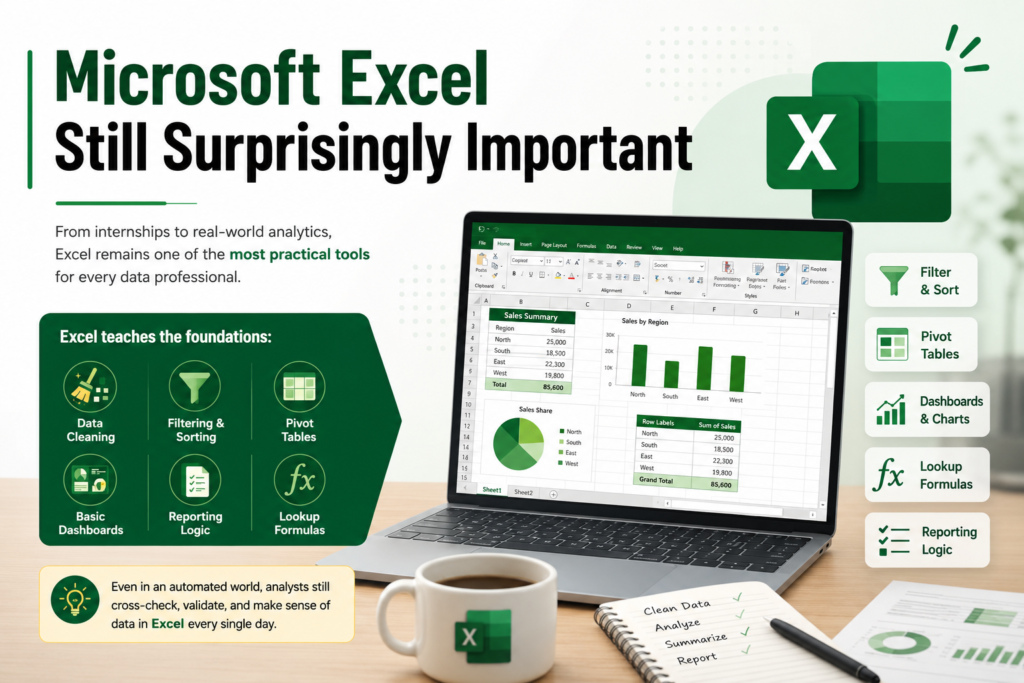
Even now, Excel remains one of the most practical Data analytics tools because it teaches foundational skills like:
- Data cleaning
- Filtering and sorting
- Pivot tables
- Basic dashboards
- Reporting logic
- Lookup formulas
What surprises many freshers is how often analysts still cross-check automated reports manually inside Excel sheets. AI hasn’t replaced that reality yet.
If you can confidently work with formulas, charts, conditional formatting, and pivot tables, you’re already ahead of many entry-level candidates.
SQL Is Basically the Core Language of Analytics
SQL Probably the Most Important Beginner Skill
If recruiters consistently test one thing during analytics interviews, it’s SQL.
Most business data sits inside databases, and SQL helps analysts pull exactly what they need without depending on engineering teams for every request. Out of all modern Data analytics tools, SQL probably reflects real daily analyst work the most.
Freshers should spend time learning:
- SELECT queries
- JOINS
- GROUP BY
- Subqueries
- Window functions
- Aggregations
One thing becoming very obvious lately is that even junior analysts are expected to write moderately complex SQL queries independently. Some companies now dedicate full interview rounds just to SQL problem-solving.
That’s partly why students pursuing a Data Analytics certification often spend extra time practicing with live datasets instead of memorizing syntax definitions.
Why Visualization Skills Matter More Than Ever?
Raw data alone doesn’t help much if decision-makers can’t understand it quickly.
Managers usually don’t want giant spreadsheets dropped into meetings. They want dashboards. They want visuals that explain trends fast.
That’s where visualization-focused Data analytics tools like Power BI and Tableau become incredibly valuable.
Power BI One of the Most In-Demand Data Analytics Tools Right Now
Power BI has become huge recently, especially because so many businesses already operate within Microsoft ecosystems.
Freshers learning Power BI should focus on:
- Dashboard building
- DAX basics
- Data modeling
- KPI reporting
- Interactive visuals
A few years back, Tableau seemed to dominate almost every analytics discussion online. Now Power BI appears constantly in job descriptions across healthcare, banking, retail, logistics pretty much everywhere.
And recruiters don’t just ask whether you “know Power BI.” They often ask candidates to explain dashboards they personally built and the business logic behind them.
That practical side matters a lot.
Tableau Still Holds Strong Value
Tableau Great for Data Storytelling
Tableau continues to be one of the most respected Data analytics tools when it comes to visual storytelling and polished reporting.
It works especially well for:
- Interactive dashboards
- Trend visualization
- Executive presentations
- Business reporting
Some organizations still prefer Tableau because the visuals feel presentation-ready almost immediately.
Freshers sometimes overthink whether to start with Tableau or Power BI first. Honestly, either one is fine initially. Once you understand dashboard thinking, switching between tools becomes easier anyway.
Python Is Becoming Harder to Ignore
Python Where Analytics Meets Automation
A few years ago, beginner analysts could sometimes avoid Python completely. That’s becoming less common now.
Modern analytics workflows increasingly involve automation, AI integration, and handling larger datasets. Python helps analysts speed up repetitive tasks and work more efficiently with data at scale.
Important Python topics for analytics include:
- Pandas
- NumPy
- Data cleaning
- Visualization libraries
- Automation scripts
What’s interesting lately is how companies combine traditional Data analytics tools with AI-assisted workflows. Analysts now use Python alongside generative AI platforms to speed up reporting, automate summaries, and process data faster.
Still, beginners don’t need to panic and learn advanced AI immediately. Strong fundamentals honestly matter more than chasing every trend.
How H2K Infosys Helps Freshers Learn Data Analytics Tools Properly?
One issue with self-learning is that it often becomes scattered. People jump between YouTube tutorials, random blog posts, and short videos without building structured skills.
That’s where training providers like H2K Infosys become useful for many freshers entering analytics careers.
What stands out about their approach is the focus on practical exposure instead of only theoretical lessons. And honestly, that mirrors how real analytics jobs work.
H2K Infosys Training Covers Real-World Data Analytics Tools
Students enrolled in H2K Infosys Data Analytics Training usually work on:
- SQL projects
- Power BI dashboards
- Excel-based reporting
- Real business datasets
- Python analytics workflows
That kind of hands-on experience matters because recruiters increasingly ask candidates to explain business reasoning behind projects, not just technical implementation.
Practical training environments also help freshers feel more comfortable during interviews and client discussions, which honestly becomes just as important as technical skills sometimes.
Freshers Shouldn’t Try Learning Everything at Once
This happens all the time.
Someone watches videos about AI analytics, Snowflake, Spark, cloud pipelines, machine learning, and automation all in the same week. Then suddenly everything feels overwhelming.
A much smarter approach is focusing on core Data analytics tools step by step:
- Excel
- SQL
- Power BI or Tableau
- Python
- Basic statistics
That sequence usually builds stronger long-term understanding.
I’ve personally noticed that candidates with deep practical knowledge of fewer tools often perform better than people who list fifteen technologies on resumes but struggle during interviews.
Data Analytics Trends Freshers Should Know in 2026
Analytics hiring changed a lot recently.
Companies now care heavily about:
- Dashboard communication
- Business storytelling
- Automation skills
- AI-assisted reporting
- Data-driven decisions
Even smaller startups now depend heavily on dashboards for daily operations.
One interesting trend is the rise of AI copilots directly inside Data analytics tools. Power BI, Tableau, and spreadsheet platforms now include AI-generated summaries and predictive insights built into workflows.
Still though, businesses need analysts who can verify outputs, spot mistakes, and explain business impact logically. Human interpretation still matters more than people realize.
Should Beginners Learn Cloud Platforms Too?
Eventually, yes.
Cloud analytics platforms like AWS, Azure, and Google Cloud are definitely valuable. But freshers usually benefit more from mastering foundational Data analytics tools first before diving into cloud ecosystems.
Once the basics feel natural, cloud concepts become much easier to understand.
The Best Learning Approach for Freshers
From what I’ve seen, beginners improve fastest when they:
- Learn one tool properly before jumping ahead
- Practice with messy, real-world datasets
- Build portfolio projects
- Create dashboards regularly
- Explain insights in simple language
- Practice interview scenarios
That combination develops both technical confidence and communication ability.
A good Data analytics course should include hands-on projects because employers care far more about practical problem-solving than theoretical certificates alone.
At the same time, earning a respected Data Analytics certification can absolutely help freshers stand out, especially when paired with strong project work.
Final Thoughts
The best Data analytics tools for freshers in 2026 are still the practical essentials: Excel, SQL, Power BI, Tableau, and Python. These tools continue showing up across real business environments because they solve actual operational problems companies deal with every day.
The analytics field keeps evolving quickly, especially with AI entering reporting workflows faster than expected. But businesses still depend heavily on analysts who can understand data clearly, communicate insights properly, and make sense of messy information.
That’s why learning core Data analytics tools through consistent practice, real projects, and structured Data analytics course from providers like H2K Infosys remains a smart career move for freshers trying to enter the analytics industry today.