Cloud-based tools like Google BigQuery, AWS Redshift, Azure Synapse, Snowflake, and platforms like Databricks are the backbone of modern Data analytics workflows they handle everything from data storage and processing to visualization and machine learning, all without needing heavy local infrastructure.
If you’ve worked with data even briefly in the last couple of years, you’ve probably noticed something: everything is moving to the cloud. Not slowly. Not optionally. Just… happening.
I remember when analysts still relied heavily on local Excel files and on-prem databases. Now? Even small startups are spinning up cloud pipelines that look surprisingly similar to what big tech companies use.
So let’s break this down in a way that actually makes sense no buzzword overload, just real tools people are using in Data analytics today and how they fit together in everyday workflows.
The Real Structure of a Modern Data Analytics Workflow
Before jumping into tools, it helps to understand the flow. Most Data analytics pipelines today follow a pattern like this:
- Data collection (from apps, APIs, logs)
- Storage (data lakes or warehouses)
- Processing and transformation
- Analysis and querying
- Visualization and reporting
Cloud tools plug into each of these steps. Some tools do multiple jobs, which is why things can feel confusing at first.
1. Cloud Storage: Where All Data Begins
Every Data analytics workflow starts with storing data somewhere reliable and scalable.
Common tools:
- Google Cloud Storage
- Amazon S3
- Azure Data Lake Storage
These are basically giant, flexible storage systems where raw data lands first. Think of them as dumping grounds but in a good way.
For example, if you’re analyzing user behavior from a mobile app, logs might stream directly into Amazon S3. From there, you decide what to clean, transform, or ignore.
A lot of learners in a Google Data Analytics course are surprised by this step it’s less glamorous, but honestly, it’s where everything begins.
2. Data Warehousing: The Brain of Analytics
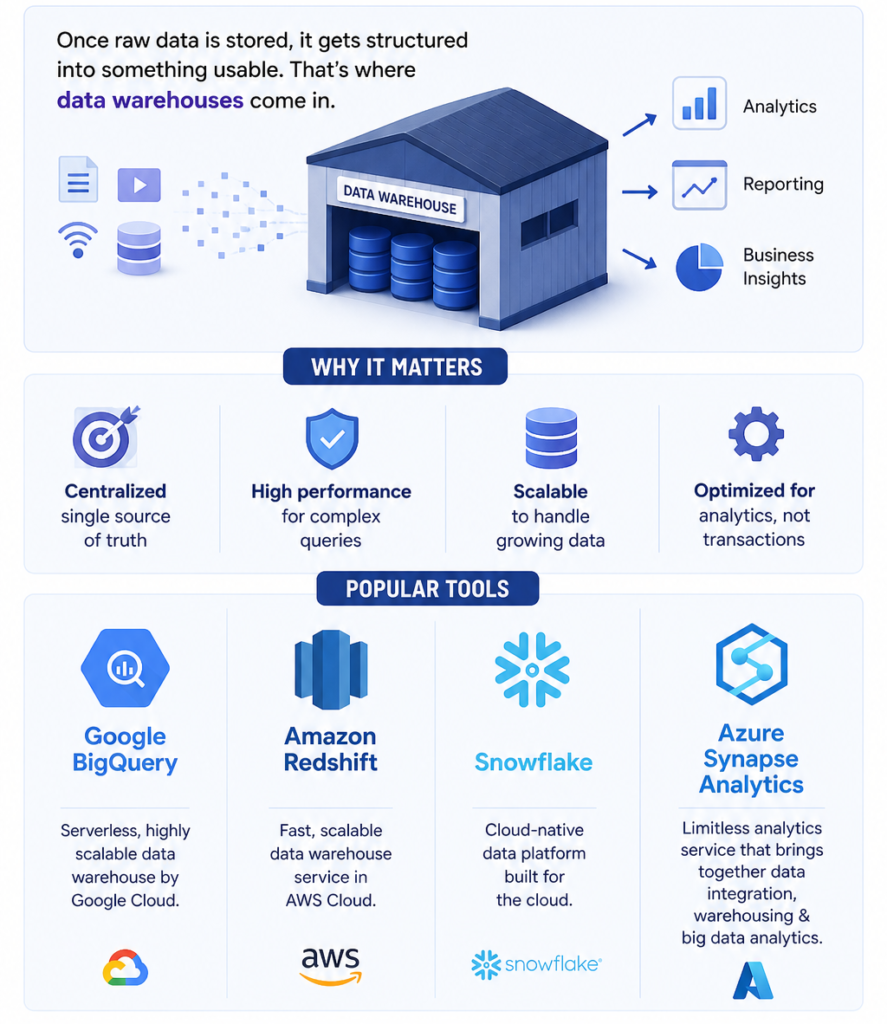
Once raw data is stored, it gets structured into something usable. That’s where data warehouses come in.
Popular tools:
- Google BigQuery
- Amazon Redshift
- Snowflake
- Azure Synapse Analytics
If I had to pick one trend in Data analytics over the past few years, it’s the explosion of tools like Snowflake and BigQuery.
Why? Because they make querying massive datasets feel… normal. You don’t need to worry about infrastructure much. You just write SQL and go.
I’ve personally seen teams move from traditional databases to BigQuery and cut query times from minutes to seconds. It’s kind of addictive once you get used to it.
3. Data Processing & Transformation Tools
Raw data is messy. Always. That’s not changing anytime soon.
Before analysis, you clean, filter, join, and reshape it.
Key tools:
- Apache Spark (via Databricks)
- dbt (Data Build Tool)
- AWS Glue
- Google Dataflow
This is where things get interesting.
Take Databricks, for example it’s widely used for large-scale Data analytics and machine learning. Built on Apache Spark, it’s powerful but also surprisingly collaborative.
Then there’s dbt, which has quietly become a favorite among analysts. Instead of writing messy transformation scripts, you manage transformations using SQL in a more organized way.
Honestly, dbt feels like version control for your data logic and once teams adopt it, they rarely go back.
4. Data Integration Tools (Moving Data Around)
You can’t analyze what you can’t access. So data needs to move from apps, CRMs, marketing platforms, and more into your warehouse.
Common tools:
- Fivetran
- Airbyte
- Talend
- Apache NiFi
Here’s a real-world scenario: imagine pulling customer data from Salesforce, marketing data from Google Ads, and product data from an internal database.
Tools like Fivetran automate that entire pipeline.
A lot of Data analytics training programs now include these tools because companies expect analysts to understand how data flows not just how to analyze it.
5. Orchestration: Keeping Everything Running Smoothly
Once pipelines get complex, you need something to manage them.
Tools used:
- Apache Airflow
- Prefect
- Dagster
These tools schedule and monitor workflows.
For example, Airflow can trigger a pipeline every night:
- Pull new data
- Transform it
- Update dashboards
If something breaks, you’ll know immediately.
This is one area where beginners in Data analytics often feel overwhelmed but once you see it working, it clicks.
6. Data Visualization & BI Tools
This is the part most people associate with Data analytics turning numbers into insights.
Popular platforms:
- Tableau
- Power BI
- Looker (Google Cloud)
- Google Data Studio (Looker Studio)
Let’s be honest this is the fun part.
You finally get to build dashboards, tell stories, and actually show impact.
I’ve seen companies make major decisions based on a single well-built dashboard. That’s the power of visualization done right.
And yes, tools like Tableau and Power BI are still dominating, but Looker is gaining ground, especially for teams already using Google Cloud.
7. Machine Learning Integration (Optional but Growing Fast)
Not every workflow needs machine learning but more teams are experimenting with it.
Tools:
- Google Vertex AI
- AWS SageMaker
- Azure Machine Learning
- Databricks ML
What’s interesting is how seamlessly ML is blending into Data analytics workflows.
It’s no longer a separate “data science” world. Analysts are starting to use simple models for forecasting, anomaly detection, and predictions.
Even basic exposure to this in a google data analytics course can give you a serious edge.
Real-Life Example: A Simple Cloud Workflow
Let’s make this practical.
Imagine an e-commerce company analyzing sales performance:
- Data collected from website → stored in Amazon S3
- Data moved into Snowflake
- Transformed using dbt
- Scheduled via Airflow
- Visualized in Tableau
That’s a full Data analytics pipeline cloud-based, scalable, and actually pretty common in 2026.
Current Trends Shaping Data Analytics Tools
A few things I’ve noticed recently (and you probably will too if you follow industry updates):
- Everything is becoming serverless
Less infrastructure management, more focus on analysis. - Real-time analytics is growing
Tools like Kafka and streaming pipelines are gaining traction. - AI integration is everywhere
Even dashboards now suggest insights automatically. - Data governance is becoming critical
With privacy laws tightening, tools are adding compliance features.
These trends are already being included in advanced Data analytics training, which tells you where the industry is heading.
So… Which Tools Should You Actually Learn?
This is where people usually overthink.
You don’t need to learn everything.
A solid starting stack for Data analytics would be:
- SQL (non-negotiable)
- One cloud platform (Google Cloud or AWS)
- A warehouse (BigQuery or Snowflake)
- A visualization tool (Tableau or Power BI)
That’s more than enough to get started.
From there, you expand based on your role or company needs.
Final Thoughts (Real Talk)
Cloud tools have completely reshaped how Data analytics works. What used to require big teams and expensive infrastructure is now accessible to almost anyone with the right training.
But here’s the thing most people don’t say enough:
Tools matter but understanding the workflow matters more.
You can learn BigQuery or Snowflake in weeks. But knowing when and why to use them? That takes real experience.
If you’re considering a google data analytics course or structured Data analytics training, focus on programs that simulate real workflows not just theory.
Because in the real world, data is messy, pipelines break, dashboards fail and that’s exactly where you learn the most.