
Introduction
Every data driven decision in a modern company starts with one key role. That role is the Business Analyst. A Business Analyst connects business goals with technical solutions. Companies now rely on data, automation, and fast delivery cycles. This shift has increased the need for professionals who can use the right tools to drive results.
The demand for skilled analysts continues to grow across industries such as finance, healthcare, retail, and technology. A strong business analyst course or business analyst training and placement program now focuses heavily on tools. Employers expect candidates to know how to gather data, analyze it, and present insights clearly.
This blog explains the in-demand business analyst tools that shape the current market. You will learn how each tool works, why it matters, and how it applies in real work scenarios. This guide also helps you understand how these tools connect with Business analyst certification goals and career growth.
Why Tools Matter in Business Analysis
Business Analysts handle many tasks. They collect data, define requirements, create reports, and support decision making. Tools help them complete these tasks faster and with accuracy.
Here is why tools are essential:
- Tools improve data accuracy
- Tools support collaboration between teams
- Tools reduce manual work
- Tools help create clear reports and dashboards
- Tools support agile and fast delivery
A modern business analyst course includes practical training on tools. Companies prefer candidates who can work with real systems instead of just theory.
Categories of In-Demand Business Analyst Tools
The in-demand business analyst tools fall into different categories based on their purpose:
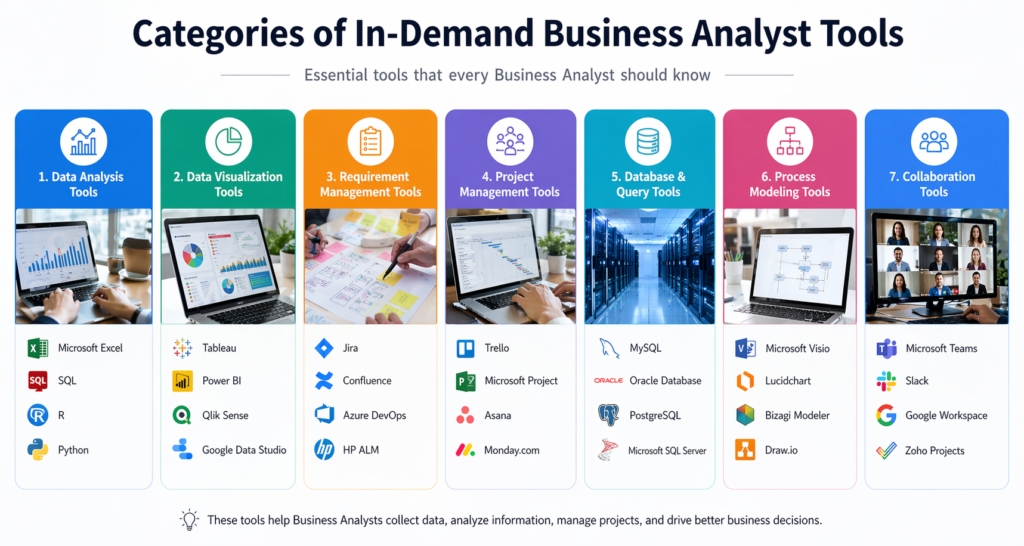
- Data Analysis Tools
- Visualization Tools
- Requirement Management Tools
- Project Management Tools
- Database and Query Tools
- Process Modeling Tools
- Collaboration Tools
Let us explore each category in detail.
Data Analysis Tools
Microsoft Excel
Microsoft Excel remains one of the most in-demand business analyst tools. It is simple and powerful. Analysts use Excel for data cleaning, sorting, and analysis.
Key Features:
- Pivot tables
- Data filtering
- Formulas and functions
- Charts and graphs
Example Use Case:
A retail company tracks sales data in Excel. The analyst uses pivot tables to identify top selling products.
Sample Formula:
=SUM(A1:A10)
This formula adds values from cell A1 to A10.
Excel is a core part of any business analyst training and placement program.
SQL
SQL stands for Structured Query Language. It helps analysts work with databases. SQL is one of the most essential in-demand business analyst tools.
Key Functions:
- Retrieve data
- Filter records
- Join tables
- Aggregate data
Example Query:
SELECT name, sales
FROM customers
WHERE sales > 1000;
This query retrieves customers with sales above 1000.
SQL skills are often required for Business analyst certification exams.
Data Visualization Tools
Tableau
Tableau is a leading visualization tool. It helps analysts create interactive dashboards. Tableau is among the top in-demand business analyst tools.
Features:
- Drag and drop interface
- Real time data updates
- Interactive dashboards
Example:
A company uses Tableau to track monthly revenue trends. The dashboard helps managers make quick decisions.
Power BI
Power BI is another strong tool for visualization. Many companies use it because it integrates well with Microsoft products.
Key Benefits:
- Easy report creation
- Data connectivity
- Real time insights
Power BI is widely included in business analyst training and placement programs. It is also one of the fastest growing in-demand business analyst tools.
Requirement Management Tools
JIRA
JIRA helps teams track tasks and manage projects. Analysts use JIRA to write user stories and track progress.
Key Uses:
- Create user stories
- Track bugs
- Manage workflows
Example:
A Business Analyst creates a user story in JIRA:
“As a user, I want to log in so that I can access my account.”
JIRA remains one of the most used in-demand business analyst tools in agile environments.
Confluence
Confluence works with JIRA. It helps teams document requirements.
Features:
- Documentation storage
- Team collaboration
- Version control
This tool supports knowledge sharing in projects. It is often taught in a business analyst course.
Project Management Tools
Trello
Trello uses boards and cards to manage tasks. It is simple and visual.
Benefits:
- Easy task tracking
- Clear workflow
- Team collaboration
Trello is one of the beginner friendly in-demand business analyst tools.
Microsoft Project
Microsoft Project helps manage complex projects.
Features:
- Resource planning
- Timeline tracking
- Task scheduling
Large organizations often use this tool. It supports structured project management.
Database and Query Tools
MySQL
MySQL is a popular database system. Analysts use it to store and retrieve data.
Example Query:
SELECT * FROM orders;
This query retrieves all records from the orders table.
MySQL knowledge strengthens your profile for Business analyst certification.
Oracle Database
Oracle is widely used in large enterprises. It handles large datasets.
This makes it one of the enterprise level in-demand business analyst tools.
Process Modeling Tools
Microsoft Visio
Visio helps create diagrams. Analysts use it to map processes.
Diagram Types:
- Flowcharts
- Data flow diagrams
- Process maps
Example:
A Business Analyst creates a flowchart to show customer order steps.
Visio is part of many business analyst training and placement programs.
Lucidchart
Lucidchart is an online diagram tool.
Benefits:
- Cloud based
- Easy sharing
- Real time collaboration
Lucidchart is growing fast among in-demand business analyst tools.
Collaboration Tools
Slack
Slack helps teams communicate.
Features:
- Messaging channels
- File sharing
- Integration with tools
Slack improves communication in remote teams.
Microsoft Teams
Microsoft Teams combines chat, meetings, and file sharing.
It is one of the most used in-demand business analyst tools in corporate settings.
How These Tools Apply in Real Projects
A Business Analyst uses multiple tools in one project.
Example Workflow:
- Use Excel to clean data
- Use SQL to retrieve database records
- Use Tableau to create dashboards
- Use JIRA to track tasks
- Use Confluence to document requirements
- Use Visio to map processes
This combination shows how in-demand business analyst tools work together.
Hands On Learning Approach
A strong business analyst course focuses on practice.
Step by Step Learning Path:
- Start with Excel basics
- Learn SQL queries
- Practice data visualization
- Understand project tools like JIRA
- Work on real case studies
Sample Practice Task:
- Download a dataset
- Clean data in Excel
- Query data using SQL
- Build a dashboard in Power BI
This approach builds real skills needed for business analyst training and placement.
Industry Demand and Job Trends
The demand for Business Analysts continues to grow.
Key Insights:
- Companies rely on data driven decisions
- Digital transformation increases demand
- Agile projects require skilled analysts
Reports show that roles requiring in-demand business analyst tools skills grow faster than average jobs.
Skills That Complement These Tools
Tools alone are not enough. Analysts also need:
- Communication skills
- Problem solving ability
- Domain knowledge
- Analytical thinking
A good Business analyst certification combines tools and soft skills.
Common Challenges and Solutions
Challenge 1: Too Many Tools
Solution: Focus on core in-demand business analyst tools first.
Challenge 2: Lack of Practice
Solution: Work on real datasets.
Challenge 3: Understanding Business Needs
Solution: Learn domain knowledge and communication.
Future Trends in Business Analyst Tools
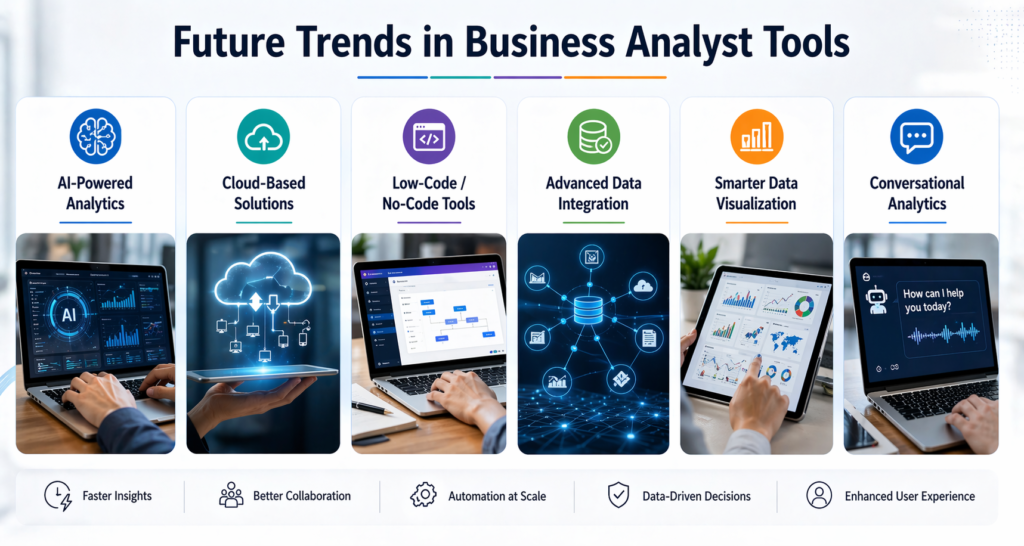
The future will bring new tools and updates.
Trends to Watch:
- AI based analytics
- Automation tools
- Cloud based platforms
These trends will shape the next generation of in-demand business analyst tools.
Key Takeaways
- Tools play a central role in business analysis
- Excel and SQL remain essential
- Visualization tools help present insights
- Project tools improve workflow
- Practice is key to mastering tools
- Real world application builds confidence
The right mix of tools defines success in a business analyst course.
Conclusion
Mastering the in-demand business analyst tools gives you a strong career advantage. Start learning, practice daily, and build real project experience.
Take action today and move forward with confidence in your business analyst journey.