Since JDK 1.0 Java language provides built-in support for multithreaded programming.
Multithreading is an essential feature in the Java platform. Every application has at least one thread. It is called the main thread. This thread can create more threads.
In Java language, each thread is associated with an instance of the class Thread.
You can use class Thread or interface Runnable for thread creation.
Thread class
The class Thread is a basic API to create a Java thread. The Java Virtual Machine allows an application to have multiple threads running concurrently. Threads have priorities, a higher priority means that thread has preferences to be executed. There is also a possibility to mark a thread as a daemon. Daemon thread is a background and low priority thread. It is dedicated to run tasks such as garbage collection. They provide services to support running of user thread. When an application starts there is usually a single non-daemon thread that typically calls method main.
Let’s create thread extending the class Thread:
public class MyThread extends Thread {
public void run() {
System.out.println(“My first thread is running!”);
}
}
We don’t need any imports in our class, because class Thread is located in package java.lang. This Java package is importing automatically. This code is not enough to run thread. You have to call it for execution. There are two ways to do this:
simply use the method start() for your thread;
use executors.
Here we are using the first method to start our thread:
public class ThreadExample {
public static void main(String[] args) {
System.out.println(“The main thread id is “+ Thread.currentThread().getId());
MyThread mythread = new MyThread();
mythread.start();
}
}
Method start() calls the MyThread method run(). As a result, we will get two threads running concurrently (main thread and thread that we have just created).
Why do we use the method start ()? Why don’t we call the method run () directly? The method start, besides running thread, creates a separate call stack for the thread. Let’s try an example that will help us to understand how it works. We are going to create our thread 3 times and to print its id:
public class ThreadExample {
public static void main(String[] args) {
for(int i = 0; i < 3; i++) {
MyThread mythread = new MyThread();
mythread.start();
}
}
}
class MyThread extends Thread {
public void run() {
System.out.println(“My thread with id “+ Thread.currentThread().getId() +
” is running!”);
}
}
The output of the current application will be:
The main thread id is 1
My thread with id 12 is running!
My thread with id 13 is running!
My thread with id 14 is running!
In case we will run the thread by calling the method run() we will get:
The main thread id is 1
My thread with id 1 is running!
My thread with id 1 is running!
My thread with id 1 is running!
As you can understand, in case of method calling the method run(), no new thread is really created.
Thread Lifecycle
There are 6 states of a thread. You can find them in the image:
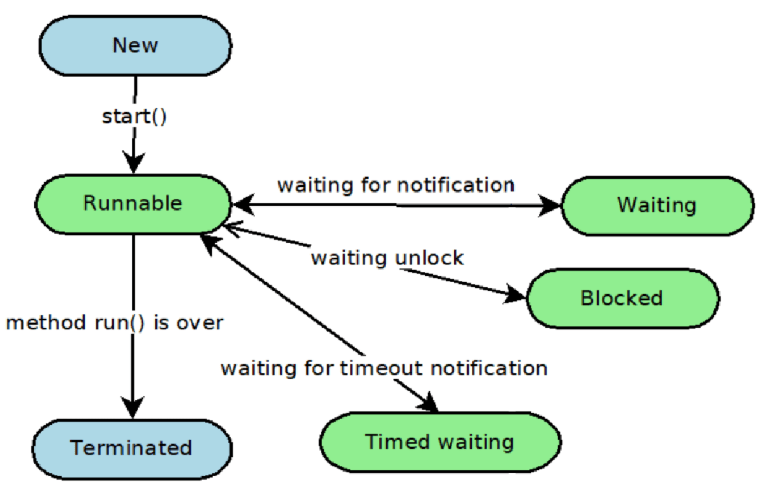
A thread is in the New state when it is just created. It has not started yet. After calling the method run(), the thread is moving to the state Runnable. The Waiting or Blocked states mean that the thread is temporarily inactive and it doesn’t consume any CPU. It’s waiting for notification from another thread or waiting for accessing a protected section of code that is currently locked by some another thread. The Timed waiting state is about sleep or a conditional wait of the thread.
The Terminated state can be reached in two cases: the thread finished his work and exited normally or an unhandled error occurred.
There is the method Thread.getState() that returns the stated of its thread as one of the Enum values(NEW, RUNNABLE, BLOCKED, WAITING, TIMED_WAITING, TERMINATED).
Here is an example of shaking the state of thread in different places:
public class ThreadExample {
public static void main(String[] args) throws InterruptedException {
MyThread mythread = new MyThread();
System.out.println(“After new thread instance creation: “ + mythread.getState());
mythread.start();
System.out.println(“After calling the method start(): “ + mythread.getState());
Thread.sleep(1000);
System.out.println(“We sent our thread to sleep: “+mythread.getState());
Thread.sleep(1000);
System.out.println(“My Thread is finished: “+mythread.getState());
}
}
class MyThread extends Thread {
public void run() {
System.out.println(“In the thread the state is “+ Thread.currentThread().getState());
try {
Thread.sleep(1500);
} catch (InterruptedException e) {
e.printStackTrace();
}
}
}
The output will be:
After new thread instance creation: NEW
After calling the method start(): RUNNABLE
In the thread the state is RUNNABLE
We sent our thread to sleep: TIMED_WAITING
My Thread is finished: TERMINATED
In this example, we sent our thread to sleep. Also, we used method sleep in the main thread, because to reach all states of our thread we need to wait.
The class Thread contains a method to interrupt a thread. If a thread is in the Waiting or the Blocked state, Interrupted Exception will be thrown. After, a thread interrupt status will be set back to the false state. You can check the interrupt status with the method isInterrupted().
public class ThreadExample {
public static void main(String[] args) throws InterruptedException {
MyThread mythread = new MyThread();
mythread.start();
mythread.interrupt();
System.out.println(“Interrupted state after calling interrupt(): “+ mythread.isInterrupted());
Thread.sleep(1000);
System.out.println(“Interrupted state in 1 second: “ + mythread.isInterrupted());
}
}
class MyThread extends Thread {
public void run() {
try {
Thread.sleep(3000);
} catch (InterruptedException e) {
System.out.println(“Thread was interrupted”);
}
}
}
The output will be:
Interrupted state after calling interrupt(): true
Thread was interrupted
Interrupted state in 1 second: false
If a thread is in the runnable state, the method interrupt() will just set interrupted status to true.
Runnable interface
One more way to create a thread is to implement the interface Runnable. The Thread class also implements this interface. Let’s look at the thread created by the implementation of the Runnable:
public class RunnableExample {
public static void main(String[] args) throws InterruptedException {
MyThread mythread = new MyThread();
Thread thread = new Thread(mythread);
thread.start();
}
}
class MyThread implements Runnable {
public void run() {
System.out.println(“The thread created by implementaion of the Runnable interface”);
}
}
As you see, you need to use class Thread. We pass our class that implements the Runnable interface into its constructor. After we can call the method start() on it.
The Thread class has the method getName(). Let’s try to apply it in our example:
public class ThreadExample {
public static void main(String[] args) throws InterruptedException {
System.out.println(“The Main thread name is “ + Thread.currentThread().getName());
MyThread mythread = new MyThread();
Thread thread = new Thread(mythread);
thread.start();
}
}
class MyThread implements Runnable {
public void run() {
System.out.println(“We created the thread with name “ + Thread.currentThread().getName());
}
}
The output will be:
The Main thread name is main
We created the thread with name Thread-0
This means that we have created our thread successfully.
There is also a possibility to set a name to your thread. For this, you can use the method setName().
The threads have priorities. You can get the priority of your thread by calling method getPriority(). Here is a simple example:
public class ThreadExample {
public static void main(String[] args) throws InterruptedException {
System.out.println(“The current thread priority is “ + Thread.currentThread().getPriority());
}
}
The output will be:
The current thread priority is 5
This is because, by default, all threads have priority 5. You can change this value by using the method setPriority().
The class Thread has the method join(). It allows one thread to wait until another thread completes its execution.
Let’s declare thread that prints its name every half second.
class MyThread implements Runnable {
public void run() {
for (int i = 0; i < 2; i++) {
try {
Thread.sleep(500);
} catch (InterruptedException e) {
e.printStackTrace();
}
System.out.println(“The thread “ + Thread.currentThread().getName()+ ” is running”);
}
}
}
Now we will create two instances of this thread and run them. Here is the example without the join() method:
public class ThreadsExample {
public static void main(String[] args) throws InterruptedException {
Thread thread1 = new Thread(new MyThread());
Thread thread2 = new Thread(new MyThread());
thread1.start();
thread2.start();
}
}
The output:
The thread Thread-1 is running
The thread Thread-0 is running
The thread Thread-1 is running
The thread Thread-0 is running
As you see, two threads run concurrently. Let’s ask one of the threads to wait while another one will finish his work:
public class ThreadsExample {
public static void main(String[] args) throws InterruptedException {
Thread thread1 = new Thread(new MyThread());
Thread thread2 = new Thread(new MyThread());
thread1.start();
thread1.join();
thread2.start();
}
}
The output:
The thread Thread-0 is running
The thread Thread-0 is running
The thread Thread-1 is running
The thread Thread-1 is running
Now, the Thread-1 started to run just after Thread-0 was completed. The method join() has overridden versions. They allow waiting for the completion of another thread just a limited period of time.
The class Thread has also method is Alive() that returns true if a thread is just created or already running.